Posted on May 25, 2026 08:44
The Best 7 Scrivener Alternatives in 2026 (Free & Paid)
Scrivener has long been the go-to writing app for many authors — and for good reason. When first launched, its Binder, Corkboard, and Compile system gave novelists something no other tool offered: a single workspace to plan, draft, and organize a book-length project.
But the things that frustrated writers about Scrivener a decade ago (the learning curve, the lack of real-time collaboration, the absence of built-in formatting for self-publishing) are exactly the things other modern writing apps now solve out of the box.
I’ve spent months testing the most-recommended Scrivener alternatives, free and paid, and in this guide I'll break down what each one genuinely does well — and where they still fall short.
Here’s a quick overview:
|
Tool |
Price |
Platforms |
Offline |
Formatting |
Collaboration |
Best for |
|
Reedsy Studio |
Free; add-ons up to $10.99/mo |
Web |
❌ |
✅ EPUB + print PDF |
✅ Real-time, tracked changes |
Free all-in-one for self-publishers |
|
Ulysses |
$5.99/mo or $39.99/yr |
macOS, iOS |
✅ |
⚠️ Basic export |
❌ |
Synced, cross-device writing on Apple |
|
Plottr |
$60/yr or $150 lifetime |
Web, Mac, Win |
✅ |
❌ Planning only |
⚠️ Paid tier only |
Visual story mapping |
|
Atticus |
$147 one-time |
Web + PWA (all OS) |
⚠️ Limited |
✅ Best-in-class, 17+ themes |
⚠️ Requires Atticus account |
Custom book formatting |
|
Dabble |
$9–29/mo or $699 lifetime |
Web, Mac, Win, Linux, iOS, Android |
✅ Desktop app |
❌ .docx only |
⚠️ Paid tier only |
Basic writing and planning tool |
|
Obsidian |
Free; Sync $5/mo |
Win, Mac, Linux, iOS, Android |
✅ |
❌ Requires external tools |
❌ |
Rich, visual worldbuilding features |
|
Novlr |
Free; Plus $6/mo; Pro $14/mo |
Web |
❌ |
⚠️ Basic EPUB, no print PDF |
❌ |
Goal-driven minimalist drafting |
Let's look at each app in detail.
1. Reedsy Studio
-
📥 Access: Get Reedsy Studio
-
💻 OS: Web-based
-
💸 Cost: Free core. Studio Craft add-on $4.99/mo. Studio Outlining add-on $7.99/mo. Bundle $10.99/mo. 30-day free trial of premium, no card required.
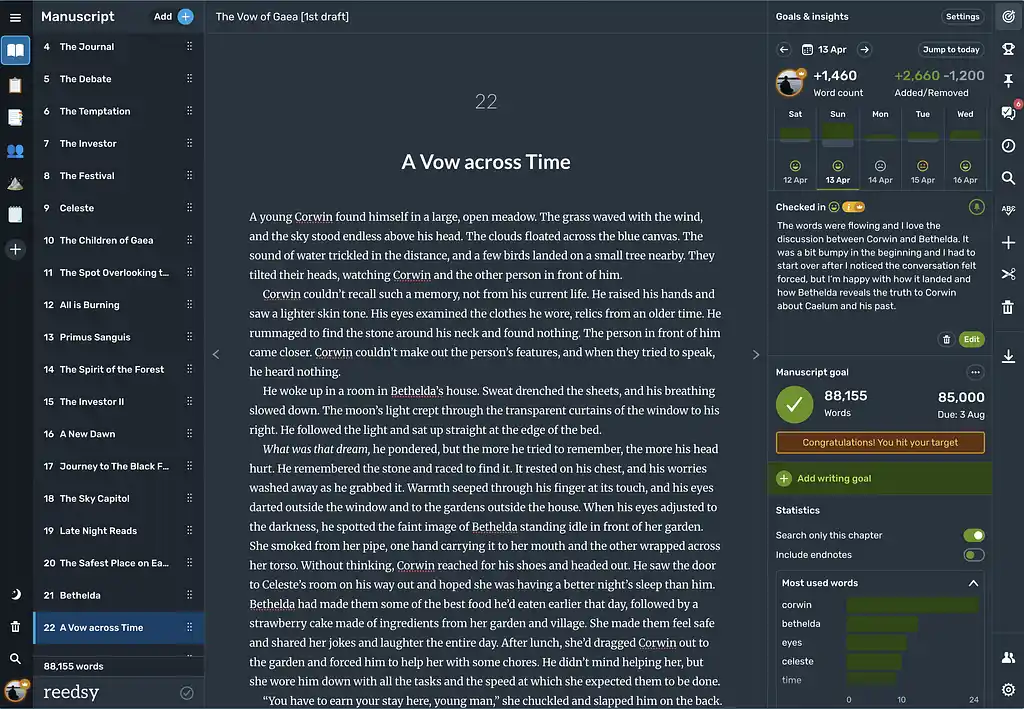
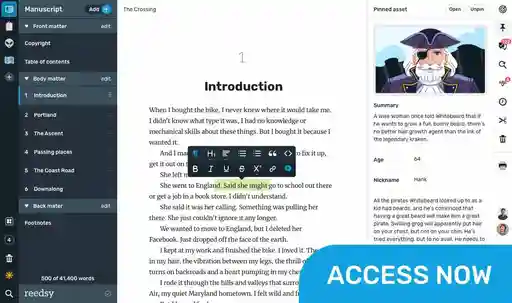
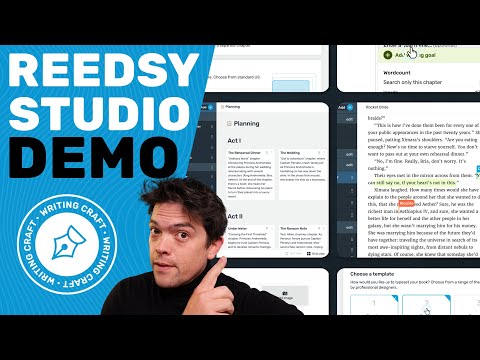
Reedsy Studio is the clearest antidote to some of the most frustrating things about Scrivener 一 namely, the steep learning curve, the Dropbox juggling just to share drafts with an editor, and the exporting headaches.
It’s incredibly easy to import your manuscript into Reedsy Studio, automatically divide it into chapters, and start writing right away (no hash-mark workarounds required!). The editor is simple and elegant, with auto-indentation, footnotes, block quotes, spellcheck, and a floating formatting bar that stays out of your way until you need it.
Studio's Boards offer a solid visual planning system with drag-and-drop cards, dozens of writing templates, and more. It’s genuinely useful for outlining, but it doesn't match Scrivener's depth if you're the kind of writer who lives in their sidebar.
Reedsy Studio also makes collaborating easy: you can invite an editor or co-author by email, work together with tracked changes and inline comments, and share a read-only preview link with beta readers 一 all without any file-syncing gymnastics! Scrivener still has no real-time collaboration at all; the standard workaround is a shared Dropbox folder and hoping nobody overwrites the wrong file.
Finally, Reedsy Studio shines with its (free) formatting and export features. Front and back matter (copyright page, table of contents, dedication) can be toggled on with a click. When you're ready, you export a typeset EPUB and a print-ready PDF in your chosen trim size, which you can upload directly to KDP or IngramSpark. Scrivener's Compile feature can technically produce similar outputs, but it demands far more setup and tinkering.
Verdict: Studio is the best all-round Scrivener alternative for self-publishing novelists who want a free, frictionless path from blank page to bookshelf-ready files. It trades Scrivener's organizational depth for a dramatically lower learning curve, real collaboration, and professional export that actually works right off the bat.
➡️ Read our full Reedsy Studio guide
👍 Reedsy Studio Pros:
-
Free core tier with professional EPUB + PDF export
-
Real-time collaboration with tracked changes — Scrivener's biggest gap, solved
-
Near-zero learning curve; import a .docx and start writing immediately
-
40+ planning templates and visual Boards for outlining
👎 Reedsy Studio Cons:
-
No offline mode (on the roadmap, but currently not available)
-
Web-only — no native desktop or mobile app
-
Less deep organizational tools than Scrivener's Binder/Corkboard system
-
No one-time purchase option: premium features require a subscription.
2. Ulysses
-
📥 Access: Get Ulysses
-
💻 OS: macOS, iOS
-
💸 Cost: $5.99/month or $39.99/year. 7-day free trial.
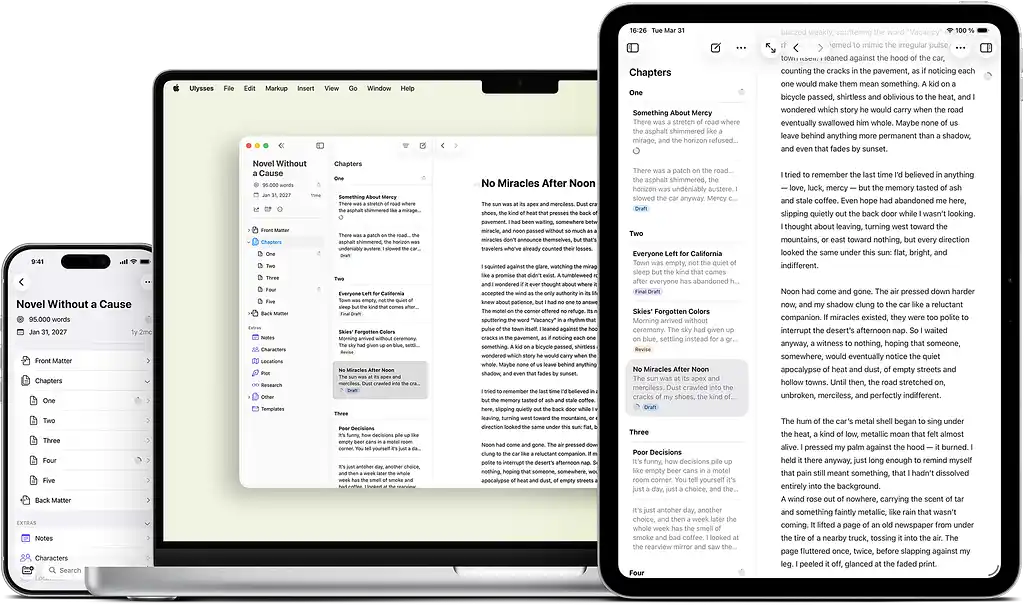
If Scrivener is a heavy-duty workshop, Ulysses is a sleek, minimalist studio. It’s built for writers who love the Apple ecosystem and want a beautiful, distraction-free writing environment without losing powerful manuscript organization.
Instead of a traditional rich-text editor, Ulysses uses Markdown. You format text with simple shortcuts or symbols — like adding # before a heading or ** around bold text — so your hands never have to leave the keyboard. That said, the adjustment can be annoying if you’re used to formatting with a mouse.
Ulysses uses a three-pane layout similar to Scrivener’s Binder, letting you split your book into “sheets” — scenes or chapters — organize them into folders, and filter them with keywords.
Where Ulysses really leaves Scrivener behind is mobile writing and syncing. Scrivener’s iOS app is more of a stripped-down companion and still relies on finicky Dropbox syncing, while Ulysses offers a much more consistent experience across Mac, iPad, and iPhone, with everything synced through iCloud.
For authors who also blog, Ulysses includes direct publishing integrations with WordPress, Ghost, and Medium. And when it’s time to export a book, its built-in styling engine can generate clean PDFs and EPUB files in just a few clicks — though it doesn’t offer the granular formatting controls needed for print-ready layouts.
Verdict: Ulysses is a strong alternative for Mac and iOS users who want Scrivener’s nested organizational structure but wrapped in a modern interface and a seamless cross-device experience.
➡️ Read our full Ulysses review
👍 Ulysses Pros:
-
Flawless, instant iCloud sync across Mac, iPad, and iPhone
-
"Projects" feature that isolates your manuscript, research, and deadlines from other notes
-
One of the best mobile writing experience on the market
👎 Ulysses Cons:
-
Strict Apple ecosystem lock-in — no Windows, Android, or web-based version
-
Subscription-only pricing model (no one-time purchase option like Scrivener)
-
Markdown-based environment can require an adjustment period
3. Plottr
-
📥 Access: Get Plottr
-
💻 OS: Web-based, Mac, Windows
-
💸 Cost: $60/year or $150 lifetime. 30-day free trial.
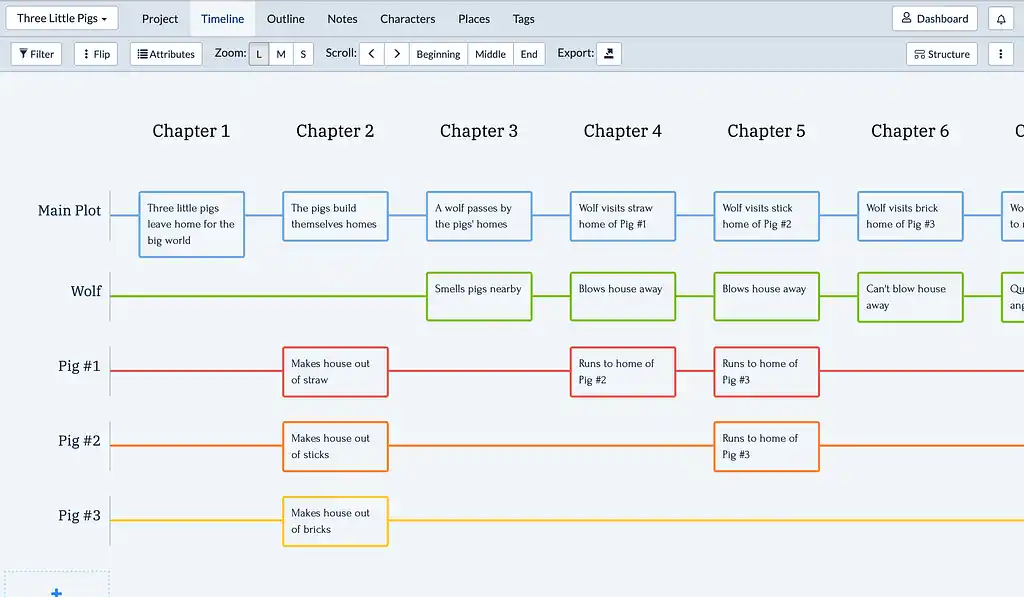
Plottr is a good alternative — or complement — to Scrivener’s outlining tools, but it can’t fully replace the app itself. It offers strong plotting capabilities in a more visual, drag-and-drop-friendly interface: its Timeline View lets you plot chapters, scenes, and subplots on a color-coded grid, stack multiple arcs side by side, and filter by POV or conflict. Because Plottr includes a native export to Scrivener, many authors use both. Build your visual timeline in Plottr, then convert it into organized folders and index cards inside Scrivener to begin drafting.
The catch is that Plottr is only a planning tool. There's no writing pane, no manuscript editor, no export-to-EPUB. You build your structure here, then move elsewhere to draft.
Verdict: Plottr is a great outlining tool for visual thinkers who find Scrivener's organizational features powerful but clunky. Just know you'll need a separate app for the actual writing.
➡️ Read our full Plottr review
👍 Plottr Pros:
-
Powerful drag-and-drop visual timelines with color-coded arcs
-
Native export to Scrivener and Word — fits into existing workflows
-
40+ starter templates (Hero's Journey, Save the Cat, 3-Act Structure, etc.)
👎 Plottr Cons:
-
No writing or drafting space (and hence no export options) — planning only
-
Expensive subscription model vs. Scrivener's one-time fee
-
Collaboration features locked behind a higher tier
4. Atticus
-
📥 Access: Get Atticus
-
💻 OS: Web-based + desktop PWA (Mac, Windows, Linux, Chromebook)
-
💸 Cost: $147 one-time, lifetime updates. 30-day money-back guarantee.
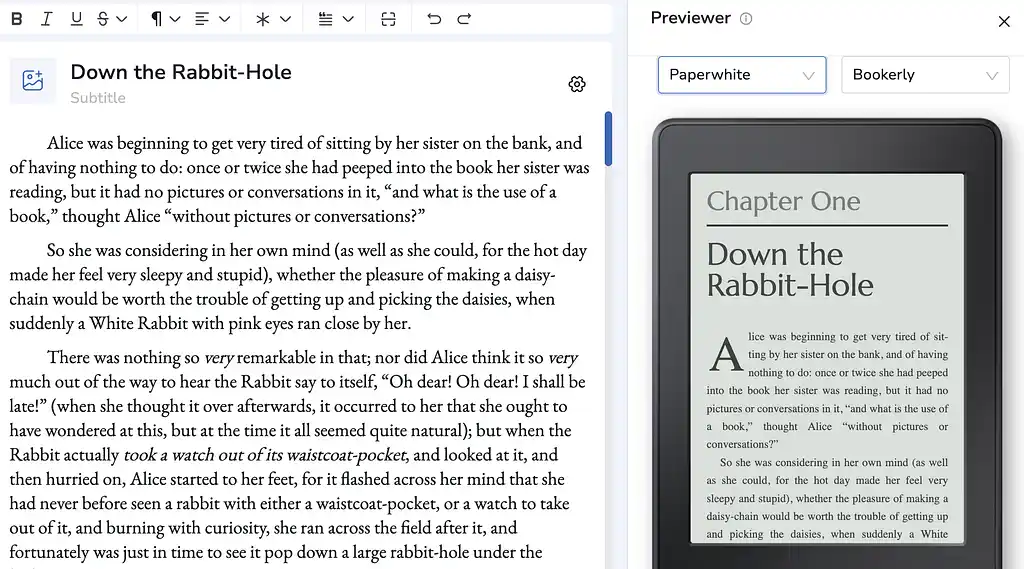
Atticus was built to solve one of Scrivener's most notorious pain points: exporting retail-ready book files. Where Scrivener's Compile feature demands trial-and-error to produce a decent-looking PDF, Atticus does it in clicks with built-in templates and a live device previewer that shows you exactly how your book looks on any device. Front and back matter, drop caps, ornamental breaks, trim sizes optimized for KDP and IngramSpark — it's all there, and it all works immediately.
The trade-off is that Atticus is a formatter first and a writing tool second: there's no spellchecker, no focus mode, no plotting or outlining tools whatsoever, and the editor can feel laggy on very long manuscripts. If you live in your outlines, Scrivener or Reedsy Studio are still the better options.
Verdict: Atticus is solid for self-publishing authors who prioritize professional book formatting and cross-platform access over deep organizational tools — especially if you draft elsewhere and want a single app to make your book look stunning — but falls short as a writing and planning tool.
➡️ Read our full Atticus review
👍 Atticus Pros:
-
Best-in-class formatting with 17+ themes, custom templates, and live device preview
-
One-time $147 fee with lifetime updates
-
True cross-platform: runs on Mac, Windows, Linux, Chromebook, and any browser
👎 Atticus Cons:
-
Bare-bones editor with no spellcheck or focus mode
-
Zero plotting or organizational tools
-
Collaborators need their own Atticus account ($147 each) to edit
5. Dabble
-
📥 Access: Get Dabble
-
💻 OS: Web-based, Mac, Windows
-
💸 Cost: $9/mo (Basic), $19/mo (Standard), $29/mo (Premium), $699 lifetime. 14-day free trial.
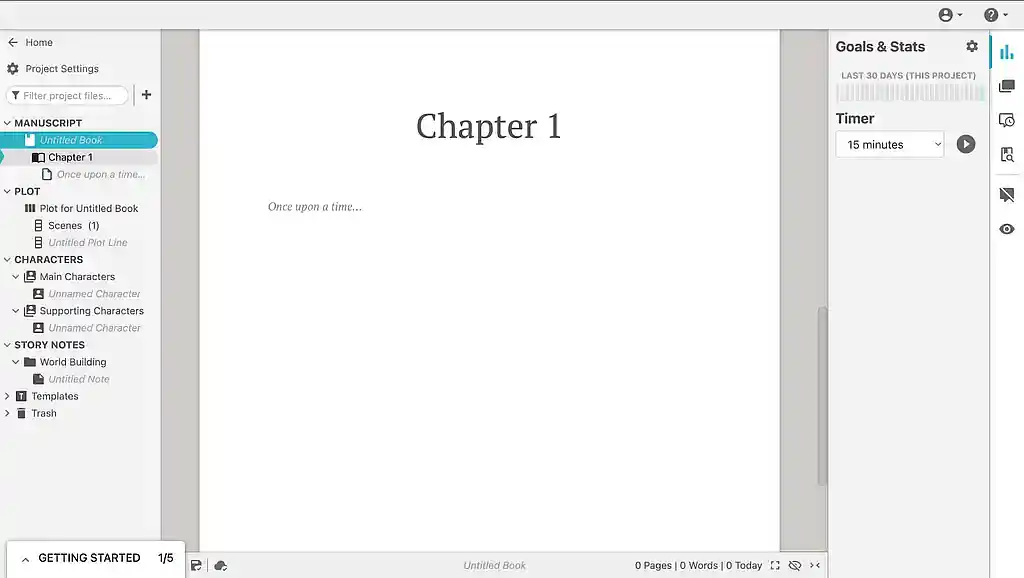
Dabble sits in the space between Google Docs and Scrivener. It’s more novelist-friendly than the former and far less intimidating than the latter. Your manuscript and notes live in a clean sidebar, and a focus mode kicks in automatically as you write. It also syncs across devices via the cloud (with offline mode on the desktop app) so you can write on your laptop and pick up on your phone.
The plotting grid is solid: you can map storylines, POVs, and story beats on color-coded cards, and it syncs directly with your manuscript chapters. It's less powerful than Scrivener's Binder and Corkboard, but also less cluttered. The trade-off is what happens after the draft. Dabble can't export to EPUB or PDF — only .docx and plain text — so you'll need a separate tool to get publish-ready files. And at $19–29/month for the features most novelists want, it's significantly more expensive than Scrivener's one-time $60 fee over any reasonable timeframe.
Verdict: Dabble is a decent Scrivener alternative for writers who want a clean, cloud-synced drafting environment without the learning curve — but its lack of formatting and export features means you'll eventually need another tool to finish the job.
➡️ Read our full Dabble review and our in-depth Dabble vs. Scrivener comparison
👍 Dabble Pros:
-
Clean, distraction-free interface with automatic focus mode
-
Cloud sync with offline support across all major platforms
-
Decent plotting grid with color-coded story cards
👎 Dabble Cons:
-
No EPUB or PDF export — .docx only
-
Expensive subscription ($19–29/mo) vs. Scrivener's one-time $60
-
No pre-built planning templates for story structures or character types
6. Obsidian
-
📥 Access: Get Obsidian
-
💻 OS: Windows, macOS, Linux, iOS, Android
-
💸 Cost: Free. Optional Sync add-on $5/mo. Publish add-on $10/mo.
Obsidian isn't a writing app — it's a blank canvas you turn into one. Where Scrivener gives you a pre-built studio with every tool bolted in place, Obsidian gives you an empty room and a massive catalogue of free community plugins. Want Scrivener's Binder? Install the Longform plugin. Want a Corkboard? Install Kanban. Want word count targets? Install Writing Goals. You can replicate most of Scrivener's feature set, but you have to build it yourself — and that's either the appeal or the dealbreaker, depending on your tolerance for tinkering.
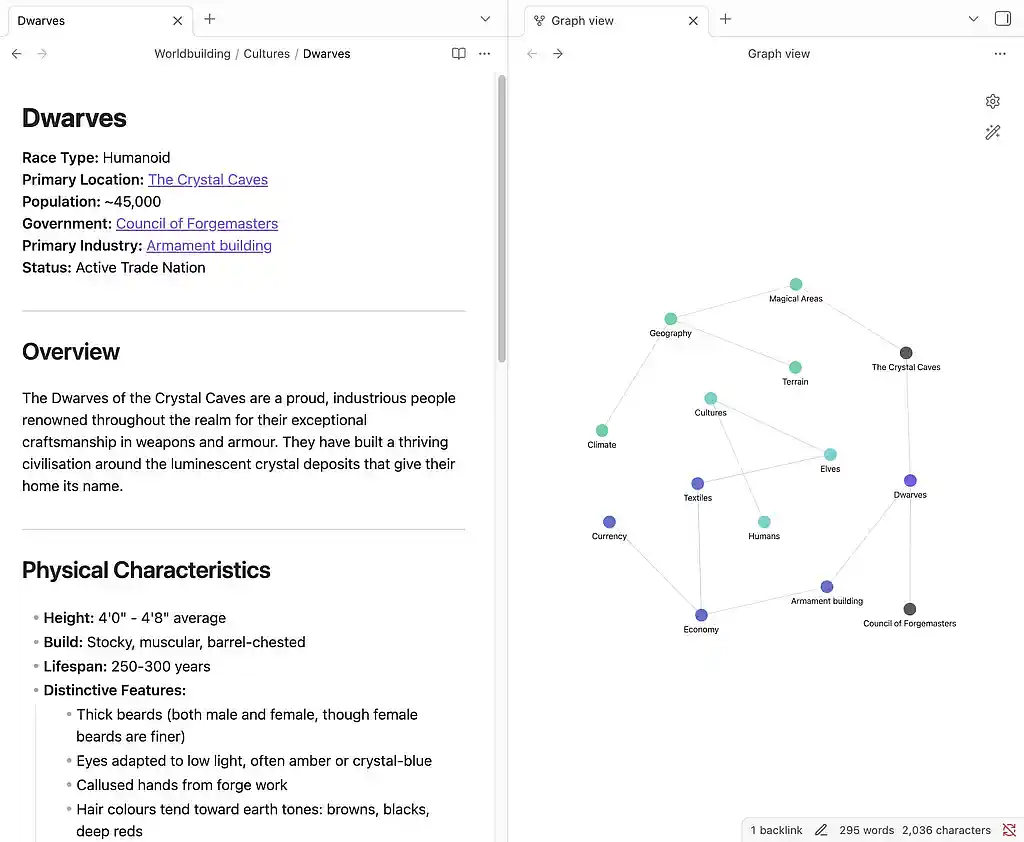
Where Obsidian genuinely outshines Scrivener is worldbuilding. Its linked-note system lets you connect characters, locations, factions, and plot points with simple [[double brackets]], and the Graph View renders those connections as an interactive visual web. For writers building sprawling fantasy or sci-fi universes, it's a level of structural visibility Scrivener's rigid folder hierarchy can't match. Your files are also future-proof: everything saves as plain-text Markdown on your local drive, so even if Obsidian disappears tomorrow, your work opens in any text editor on earth.
Verdict: Obsidian is the best Scrivener alternative for tech-minded writers who want total control over their workspace and deep worldbuilding tools — but it has no manuscript formatting, no Compile, and no collaboration without paid add-ons. Most authors use it alongside a dedicated writing app rather than as a standalone replacement.
➡️ Read our full Obsidian review
👍 Obsidian Pros:
-
100% free with a massive ecosystem of community plugins
-
Graph View for visualizing how characters, locations, and plot points connect
-
Plain-text Markdown files — fully portable, no vendor lock-in
👎 Obsidian Cons:
-
Requires significant setup and plugin installation before you can write
-
No built-in manuscript formatting or book export
-
No real-time collaboration (Sync add-on required, and still no live co-editing)
7. Novlr
-
📥 Access: Get Novlr
-
💻 OS: Web-based
-
💸 Cost: Free (up to 5 projects). Plus $6/mo. Pro $14/mo. Lifetime Pro $499.
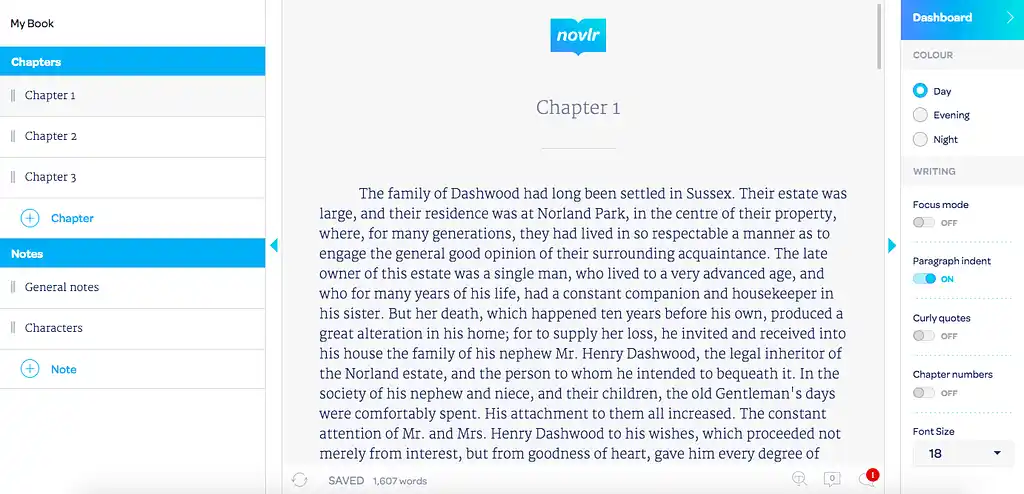
Novlr is essentially a streamlined, cloud-based version of Scrivener's core drafting mechanics. It matches Scrivener's ability to break a novel into a nested tree of rearrangeable chapters and scenes, but strips away the dense menus in favor of a clean, modern interface you can open from any browser and start writing in immediately.
Its standout feature is productivity tracking. Novlr offers some of the best writing analytics in the category: daily word counts, streak rewards, and visualized progress charts designed to keep you motivated over the long haul of a manuscript. The flip side: Novlr is purely a drafting tool. There's no visual plotting, no corkboard, no split-screen research view, and export is limited to basic formats — you'll need a separate app to get your manuscript publish-ready.
Verdict: Novlr is a great Scrivener alternative for pantsers and minimalists who want the chapter-and-scene structure without the learning curve — plus genuinely good writing analytics to stay on track.
👍 Novlr Pros:
-
Minimalist, distraction-free interface
-
Strong goal tracking and writing analytics in one dashboard
-
Active Discord community for writing sprints and peer feedback
👎 Novlr Cons:
-
No collaborative editing — you're the only person who can edit your work
-
Basic planning tools with no templates or visual outlining
-
Limited formatting and no print-PDF export
Scrivener has earned its reputation for a reason, but it's no longer the only serious option for novelists. Whether you need free formatting, visual plotting, or distraction-free drafting, there's now a tool built specifically for that. Just pick one, give it a real test drive, and if you like it, spend the time you'd lose tinkering on Scrivener on what actually matters: finishing your book.
All writing app listicles, reviews, and comparisons on Reedsy:
-
Book writing software (Listicle)
-
Writing tools (Listicle)
-
Collaborative writing tools (Listicle)
-
Grammarly alternatives (Listicle)
- Plagiarism checkers (Listicle)
-
Atticus (Review)
-
Campfire (Review)
-
Dabble (Review)
-
Grammarly (Review)
-
Hemingway (Review)
-
Novlr (Review)
-
Obsidian (Review)
-
Plottr (Review)
-
ProWritingAid (Review)
-
Scrivener (Review)
-
Squibler (Review)
-
Sudowrite (Review)
-
Vellum (Review)
- Ulysses (Review)
-
Dabble vs. Scrivener (Comparison)
-
Reedsy Studio vs. Atticus vs. Scrivener (Comparison)
-
Scrivener vs. Word (Comparison)