
Posted on September 19, 2025 13:31
The 5 Best Plagiarism Checkers Online (2026)
No matter how original your ideas are, it’s surprisingly easy to echo someone else’s words — especially if you’ve been referencing other people’s work and revising drafts over time. That’s why, even for seasoned writers or students, a plagiarism checker can be a useful tool to keep your work clean and properly attributed.
But finding a good tool is not that straightforward. So we tested five popular plagiarism checkers with the same set of passages — including direct quotes, paraphrased text, and content from various sources. We evaluated each tool on detection accuracy, database coverage, and overall usability to arrive at a score out of 10. (You'll find our complete testing methodology at the end of this article.)
The clear winner? QuillBot — it strikes the perfect balance between detection accuracy, user-friendly reporting, and fair pricing, making it our top choice for most writers.
Here's how all five tools stacked up:
|
Tool |
⭐️ Score (/10) |
✅ Pros |
❌ Cons |
🏆 Best for |
|
QuillBot |
8.5 |
Citation formatting in multiple styles; Easy-to-read reports; Recent web content detection |
Can be slow to load; Sometimes buggy interface |
Writers needing reliable checks with proper citation support |
|
Copyleaks |
8.2 |
Highest detection rate (81.8%); Support in 100+ languages; In-interface source preview |
No easy citation copying; Sometimes buggy interface |
Writers requiring comprehensive multilingual detection |
|
Quetext |
7.3 |
500 words for free; High word count limit; Citation generator included |
Limited accuracy |
Budget-conscious writers checking longer documents |
|
Grammarly |
6.5 |
Clean interface; Easy citation copying; ProQuest academic database access |
Weakest detection (54.5%); No downloadable reports |
Writers already using Grammarly for grammar who want basic plagiarism checks |
|
Scribbr |
6.3 |
Academic focus; Self-plagiarism checker |
Misleading "free" claim; Expensive single-document pricing |
Students needing one-time academic paper checks |
Let's examine each tool in detail to help you choose the right one for your needs.
1. QuillBot
Pricing: $19.95/month for Premium (25,000 words monthly)
Detection Rate: 72.7%
Database Coverage: Vast web database including recent publications
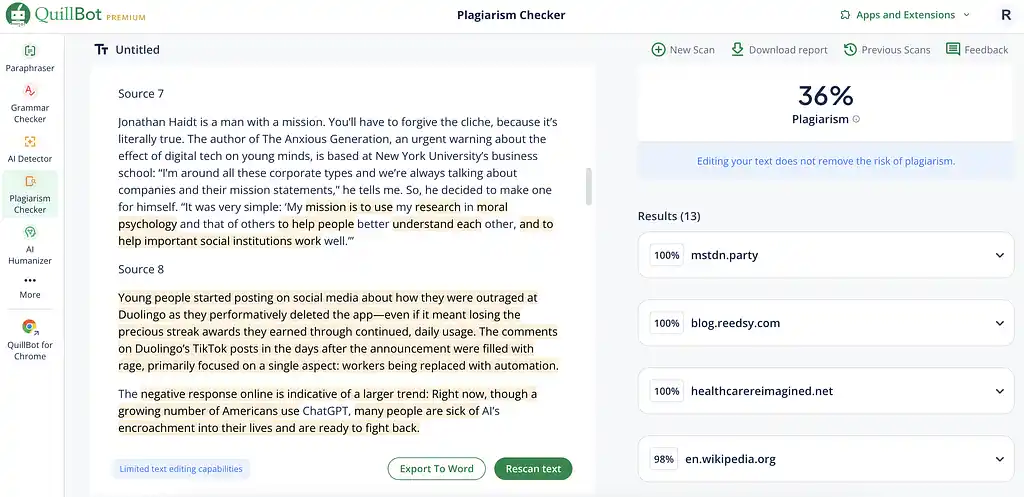
QuillBot takes our top spot by delivering consistent, reliable plagiarism detection wrapped in a user-friendly package. While it doesn't have the highest detection rate in our test, it excels where it matters most: practical usability and value for money.
The tool's standout feature is its comprehensive citation support — it can automatically format sources in various APA, MLA, and Chicago editions, saving you significant time on proper attribution. The report itself is clean and easy to navigate, clearly highlighting problematic passages and their sources.
The main drawbacks? The interface can be buggy, occasionally getting stuck while loading results, and processing times can drag when checking longer documents. Despite these minor frustrations, QuillBot remains our top choice for its balance of features, accuracy, and affordability.
Score: 8.5/10 — QuillBot delivers professional-grade plagiarism detection with excellent citation support, though occasional technical hiccups prevent a perfect score.
2. Copyleaks
Pricing: $16.99/month for 25,000 words
Detection Rate: 81.8% (highest in our test)
Database Coverage: Shared Data Hub plus standard web sources
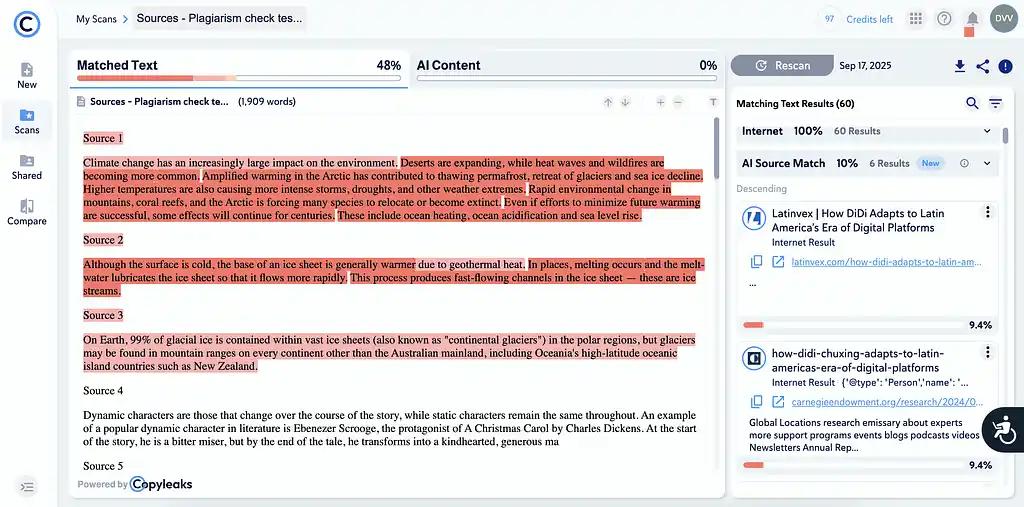
Copyleaks impressed us with the highest detection rate in our test, catching over 80% of plagiarized content. The tool also supports plagiarism detection in over 100 languages, making it invaluable for multilingual writers.
What sets Copyleaks apart is its exceptional report design — well-organized, visually clear, and easy to scan. The ability to preview plagiarized sources directly within the interface is particularly helpful, allowing you to quickly verify matches without opening multiple browser tabs.
Additional perks include access to the Shared Data Hub (a secure library of user-submitted documents for enhanced detection), plus Google Docs add-on and Chrome extension integration for seamless workflow incorporation.
However, the platform has some frustrating quirks. The login process is sometimes buggy, and finding the subscription cancellation button feels like a treasure hunt. There's also no straightforward way to copy formatted citations, which means extra manual work when adding references to your document.
Score: 8.2/10 — Copyleaks offers the most thorough detection with an excellent visual interface, though usability issues and citation limitations hold it back from the top spot.
3. Quetext
Pricing: Free for 500 words; $13.99/month for 100,000 words
Detection Rate: 63.6%
Database Coverage: Standard web sources with DeepSearch™ technology
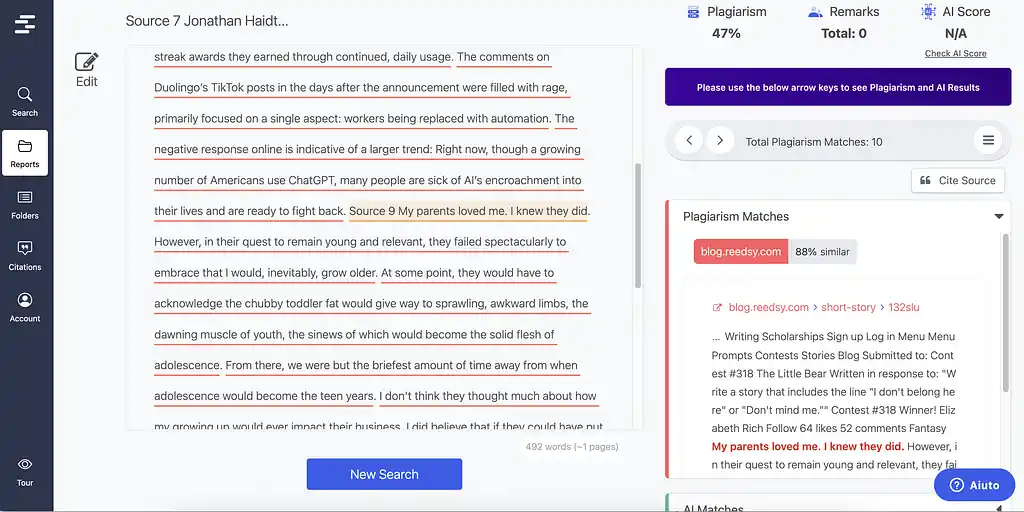
Quetext positions itself as the budget-friendly option, offering the most generous word count (100,000 words) at the lowest monthly price. Its core DeepSearch™ technology specifically targets subtle plagiarism like paraphrasing — though in our tests, it didn't significantly outperform other tools in this area.
The Citation Generator is a welcome addition, helping format references in APA, MLA, and Chicago styles. The color-coded reports are straightforward and easy to understand, making it simple to identify problem areas at a glance.
Score: 7.3/10 — Quetext delivers exceptional value for money for students or writers on tight budgets who need to check lengthy documents, though accuracy trade-offs may concern professional writers.
4. Grammarly
Pricing: $30/month for 150,000 words (with Pro plan)
Detection Rate: 54.5% (lowest in our test)
Database Coverage: 16 billion web pages plus ProQuest academic databases

If you're already using Grammarly for grammar checking, adding plagiarism detection might seem convenient. Unfortunately, our tests reveal it's the weakest performer of the bunch, catching just over half of the plagiarized content.
The plagiarism checker is bundled with Grammarly's Pro plan, which at $30/month is the most expensive option we tested. While you get a generous 150,000-word monthly limit and access to ProQuest's academic databases, the poor detection rate makes this hard to justify.
On the positive side, Grammarly's interface remains characteristically clean and intuitive. Citation formatting in APA, MLA, or Chicago styles is straightforward, and you can easily copy and paste formatted references. However, there's no option to download a formal plagiarism report — a significant limitation for academic submissions.
For writers already invested in Grammarly's ecosystem, the plagiarism checker serves as a basic safety net. But if plagiarism detection is your primary concern, you'll find better accuracy and value elsewhere.
Score: 6.5/10 — Grammarly's plagiarism checker disappoints with weak detection rates and high pricing, making it hard to recommend despite its polished interface.
5. Scribbr
Pricing: $19.95 per document up to 7,500 words
Detection Rate: 72.7%
Database Coverage: 99.3 billion web pages, 8 million publications
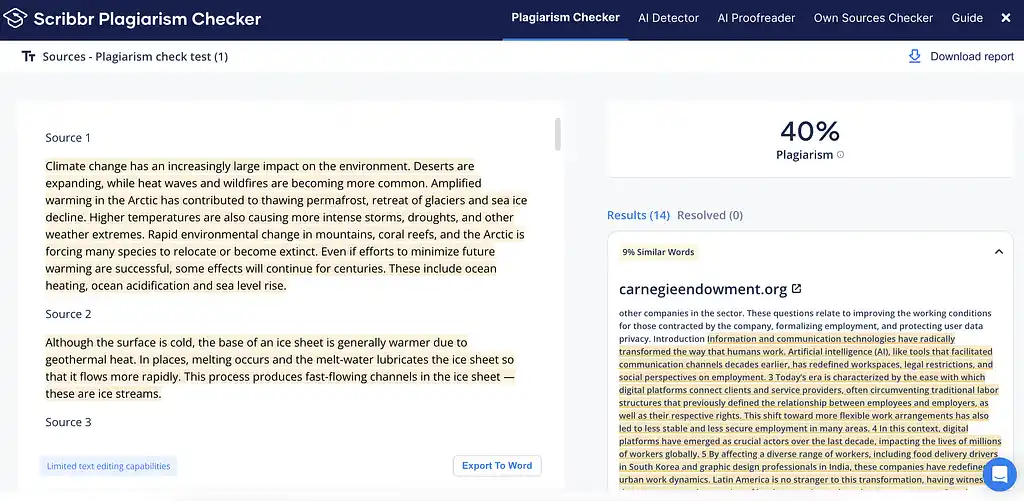
Scribbr, owned by the same company as QuillBot, is marketed squarely toward students looking for rigorous academic plagiarism checks. But unlike QuillBot — our top pick — it ends up at the bottom of our list for a few reasons.
First of all, Scribbr claims to offer a “free” checker, but all you actually get is a vague plagiarism risk score (High, Medium, Low) with the details blurred out. To see the real report, you’ll need to pay — and it’s not cheap. Their model is per-document pricing: $19.95 for up to 7,500 words, $29.95 for 7,500–50,000 words, and $39.95 for anything longer.
While our test wasn’t strictly academic, Scribbr performed on par with QuillBot, though (unlike QuillBot) it failed to catch plagiarism in recent publications. It does provide a polished downloadable report — nearly identical to QuillBot’s — but without the handy citation option.
One standout feature is the self-plagiarism checker, which lets you upload your own documents to build a personal database and check against your past work or assignments.
In the end, the steep per-document pricing makes it feel overpriced, especially for general writing needs.
Score: 6.3/10 — Despite performance on par with QuillBot, Scribbr's misleading "free" claim, steep per-document pricing, and lack of citation features make it overpriced for general writing needs.
How we tested each tool
We subjected each plagiarism checker to identical testing conditions, feeding them the same set of passages totaling over 2,000 words. Our test material included:
- Direct quotes from Wikipedia entries
- Paraphrased sections from news articles (The Guardian, WIRED, Forbes)
- Academic paper excerpts
- Private PDF content
- Published short stories from Reedsy
- Mixed original and plagiarized sentences
This approach tested each tool's ability to detect various types of duplication, from word-for-word copying to subtle paraphrasing.
We evaluated each checker based on:
- Detection Accuracy: Percentage of plagiarized content correctly identified
- Source Coverage: Database breadth (academic journals, websites, PDFs, recent publications)
- Report Quality: Clarity, readability, and actionable insights
- Pricing Structure: Cost per word/month and overall value
- Citation Support: Ease of properly attributing flagged content
- User Experience: Interface design and ease of use
Each tool received scores across these categories, which we averaged for a final score out of 10.
One crucial finding: none of the tools reliably detected paraphrased content, catching only occasional sentences here and there. This limitation affects all plagiarism checkers and remains an industry-wide challenge.
To wrap things up, while no plagiarism checker is perfect, Quillbot emerges as the most practical choice for most writers. It combines solid detection accuracy with user-friendly reporting and fair pricing — everything you need for routine plagiarism checks.
For those requiring the highest detection rates or multilingual support, Copyleaks justifies its minor interface frustrations. Budget-conscious writers checking lengthy documents should consider Quetext, despite its accuracy limitations.
Remember, these tools work best as a safety net, not a guarantee. They mostly do a good job at catching direct copying and near-identical phrasing but struggle with sophisticated paraphrasing. For high-stakes academic work or professional publishing, consider these checkers your first line of defense, not your only one.
Whether you're submitting a thesis or publishing a novel, choosing the right plagiarism checker can save you from embarrassment and protect your reputation. Pick the tool that matches your needs, budget, and workflow, and always give your work that extra human review before hitting submit.
Other writing app listicles, reviews, and comparisons on Reedsy:
-
Book writing software (Listicle)
-
Writing tools (Listicle)
-
Collaborative writing tools (Listicle)
-
Scrivener alternatives (Listicle)
-
Grammarly alternatives (Listicle)
-
Proofreading software (Listicle)
-
AI writing tools (Listicle)
-
Grammar checkers (Listicle)
-
Atticus (Review)
-
Campfire (Review)
-
Dabble (Review)
-
Grammarly (Review)
-
Hemingway (Review)
-
Novlr (Review)
-
Obsidian (Review)
-
Plottr (Review)
-
ProWritingAid (Review)
-
Scrivener (Review)
-
Squibler (Review)
-
Sudowrite (Review)
-
Ulysses (Review)
-
Vellum (Review)
-
Dabble vs. Scrivener (Comparison)
-
Grammarly vs. Hemingway (Comparison)
-
Reedsy Studio vs. Atticus vs. Scrivener (Comparison)
-
Scrivener vs. Word (Comparison)
-
Ulysses vs. Scrivener (Comparison)

