Guides • Perfecting your Craft
Last updated on Jul 27, 2026
The Best Book Writing Software (2026 Update)

Nick Bailey
Nick is a writer and editor at Reedsy, covering self-publishing, book marketing, and fiction craft for indie authors and aspiring writers. He has bylines on Litreactor, NowNovel, Fictionary, and more.
View profile →As a budding author, I’ve tried and tested many book-writing tools over the years in order to find the best one for writing my novel. But with so many options available, it’s hard to narrow down which software will suit my process best.
That's why I tested the most popular writing tools against each other to find out which one comes out on top. In this post, I’ll share the results of my rigorous testing so that you can skip the trial-and-error and get writing faster.
Here's a quick comparison table before I dig into each tool in detail.
|
⚙️ Tool |
📝 Summary | ⭐ Score (X/5) |
| Reedsy Studio | An all-in-one writing app that covers planning, writing, collaboration, and formatting for free. | 4.5 |
| Scrivener | Powerful planning and organization tools, slightly offset by a steep learning curve. | 4 |
| Dabble | Simple and easy to use, but offers little that other tools don't do better. | 2.5 |
| Ulysses | A capable distraction-free writing app limited to Apple devices. | 3 |
| Atticus | Strong formatting features, but expensive and limited outside of formatting. | 2.5 |
| Novlr | A competent free option for drafting, with limited planning and formatting. | 2.5 |
Now, onto the software.
Reedsy Studio
🏆 Best for: UI, Collaboration, Formatting, Price
Let’s get the obvious out the way: as a writer for Reedsy, I’m a little biased when it comes to our writing app, Reedsy Studio. But I’ll do my best to put my bias aside and give my honest thoughts on Studio — starting with the UI.
User interface — 4/5
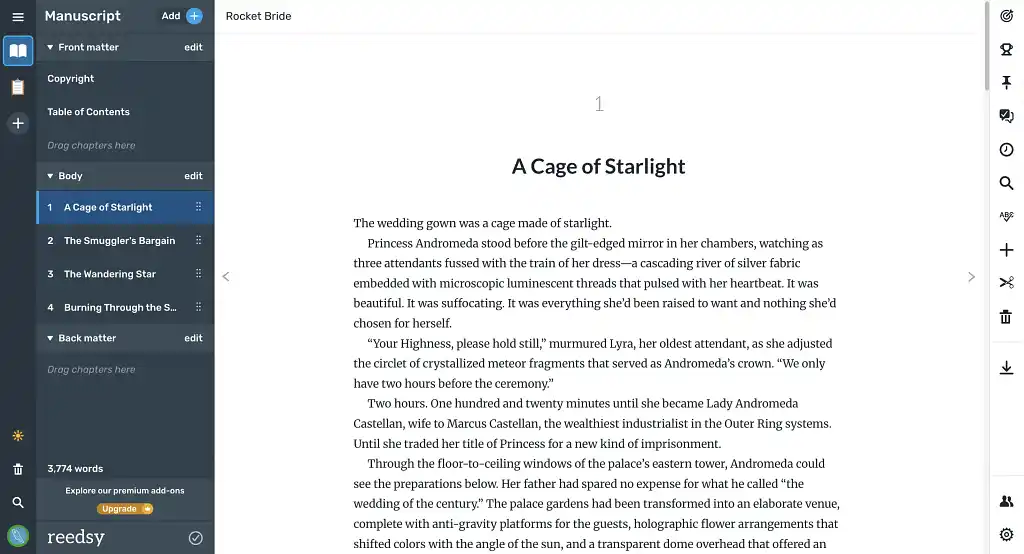
Reedsy Studio was designed with simplicity in mind. The interface is clean and intuitive, so you can start writing immediately after signing up, no lengthy tutorial required. Chapters can be dragged and dropped into a new order, so restructuring your book doesn't mean cutting, pasting, or risking any lost content. Studio doesn’t have an offline mode yet, so drafting on the go can be a challenge.
Planning & organization — 5/5
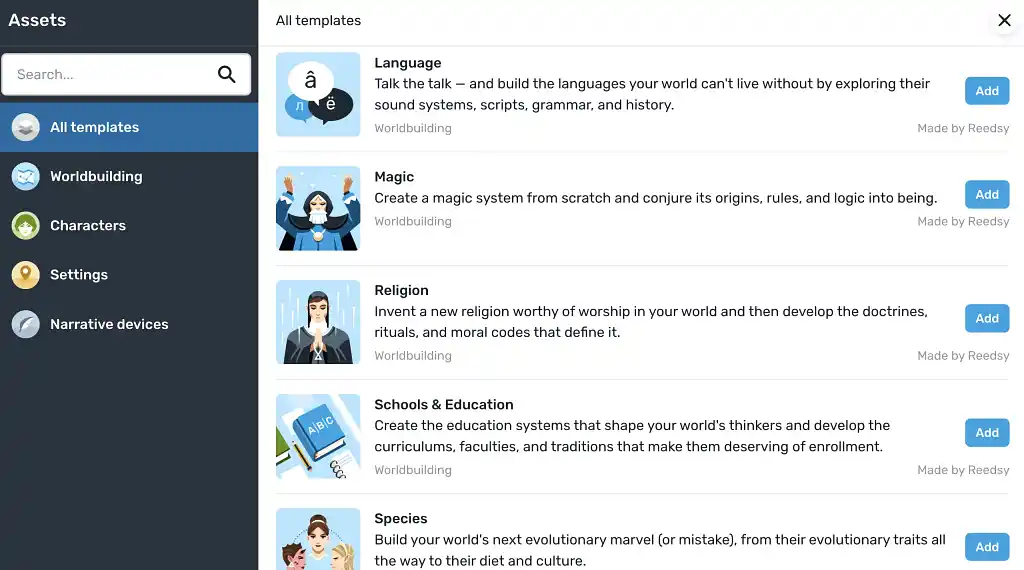
Boards are my personal favorite Studio feature. They’re made up of folders and cards, which you can use to create scene cards, chapter summaries, character profiles, and so on. Studio also offers dozens of in-depth templates you can use to flesh out your world, covering everything from protagonists to planets.
Collaboration — 5/5
As we’ll come to see throughout this post, robust co-writing features are surprisingly sparse in the world of writing software. Of the few that do offer collaborative writing, Reedsy Studio stands out as the most complete option. Just click to invite a collaborator, email them a link, and voilà! You can work together in real time, for free.
Formatting — 4/5
Studio also shines in the formatting department. Because formatting is applied as you write, there's no separate production stage to worry about — the manuscript on your screen is already laid out the way your reader will see it. When you're ready to share your work with the world, you can export it as an EPUB or a print-ready PDF. Your front and back matter, chapter headings, and trim size are all handled automatically. Studio's three typeset templates keep things simple, though they do leave less room to polish the finer details of your book's design.
Price — 5/5
The basic plan for Reedsy Studio is 100% free to use. It includes one free planning board, all three formatting options, and real-time collaboration. Two optional add-ons are also available: Craft ($4.99/month) for in-depth writing stats and custom goals, and Outline ($7.99/month) for unlimited Boards and premium planning templates — or $10.99/month for both.
Verdict
Bias acknowledged, I'll still put Studio at the top of this list: it lets you plan, draft, collaborate, and format your project for free. Some writers may find the formatting offerings a little limited, but for a tool that does this much at no cost, that's an easy compromise to make.
⭐ Rating: 4.5/5
➡️ Read our full Reedsy Studio guide
Scrivener
🏆 Best for: Planning
Scrivener is a favorite among experienced authors, in no small part because it was one of the first pieces of writing software created with authors in mind. But does it still stack up? Let’s find out.
User interface — 4/5
Scrivener boasts a clean, no-nonsense editor with all the standard text formatting options you’d expect from a word processor. Of all the tools I tested for this list, Scrivener’s interface was easily the most customizable — I could tweak every inch of my manuscript, from the width of my margins to the color of my index cards.
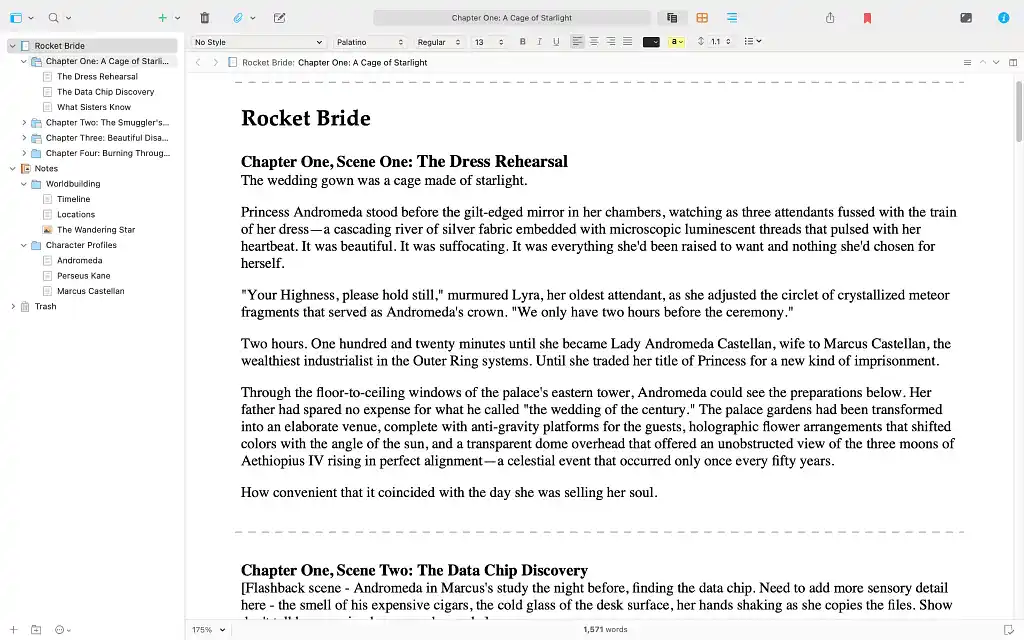
I bookmarked anything I found myself returning to often, like my protagonist’s character profile and timeline, so I could pull them up from anywhere in the editor. Linguistic Focus mode helps make sure I’m not repeating the same adjectives over and over again. A starry night can only be “breathtaking” so many times…
Scrivener’s interface may be customizable, but I also found it a little dense and difficult to navigate at times. I didn’t end up touching most of these options — a lot of them felt like tinkering for its own sake, and I'd rather be writing.
Planning & organization — 5/5
That same depth carries over into planning. Everything centers around the Binder, which is a sidebar that houses every file in your project, organized into folders with color labels and icons.
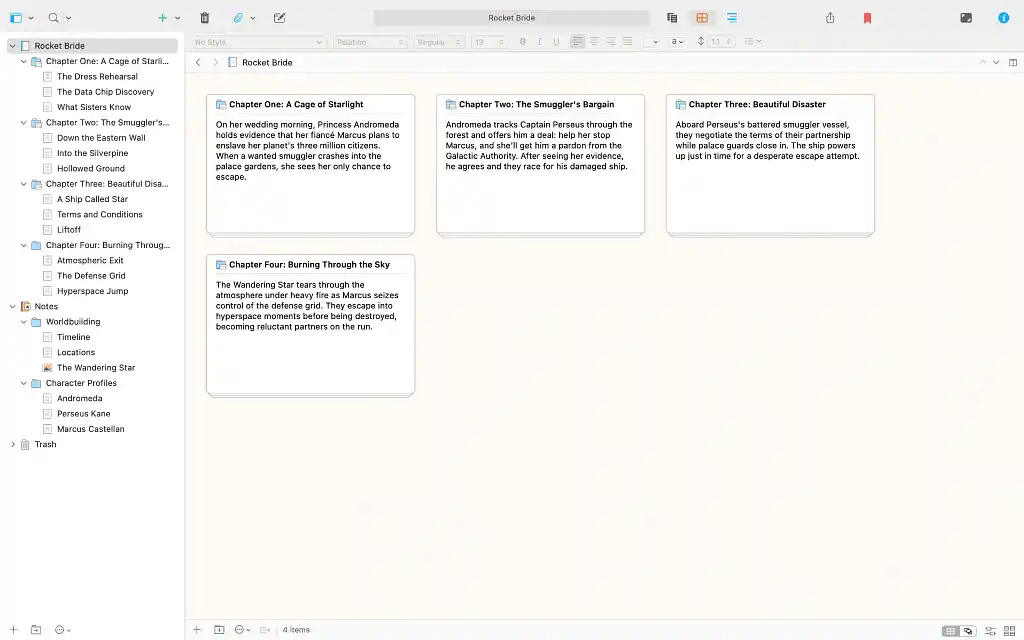
It took some getting used to, but once I got the hang of it, the digital index cards worked great to help me visualize, structure, and rearrange my notes. Once you find your ideal book writing setup, you can save it as a template to reuse in the future. I only tested one book for this review, but it’s nice to know that my preferences will be remembered if I ever return to Scrivener for a sequel.
Collaboration — 2/5
I was disappointed that Scrivener doesn’t offer real-time collaboration. If you’re working with a co-writer or editor, you’d better get used to bouncing pdfs back and forth. You can use the Import & Merge function to make the process a little more manageable, though.
Formatting — 3/5
Formatting with Scrivener can also feel a little finicky. Once your book is ready to print, you’ll need to manually set your margins, trim size, and front and back matter. This isn’t the end of the world, but compared to tools like Reedsy Studio that handle everything automatically, it feels like an unnecessary hassle.
Price — 4/5
At $59.99, Scrivener is one of the pricier options on this list. However, their one-time payment model is preferable to a monthly subscription for many, and Scrivener’s wealth of features means you’ll be getting some serious bang for your buck — especially compared to some of the other software I’ll cover later on.
Verdict
If you’re a serious planner who enjoys mapping out every inch of your story beforehand, Scrivener might be the software for you. But if you’re just after a no-nonsense word processor and don't need all the bells and whistles, there are cheaper alternatives out there that’ll get the job done just as well.
⭐ Rating: 4/5
➡️ Read our full Scrivener review
Dabble
Where Scrivener gives you every tool you could want, Dabble strips the writing experience back to its bare essentials. But is simpler always better?
User interface — 3/5
Dabble's interface is plain: a simple sidebar, a bare toolbar, and options that only appear once you hover over them. Next to Scrivener or Reedsy Studio, which manage to be distraction-free and modern-looking at once, it does feel a little dated.
Planning & organization — 3/5
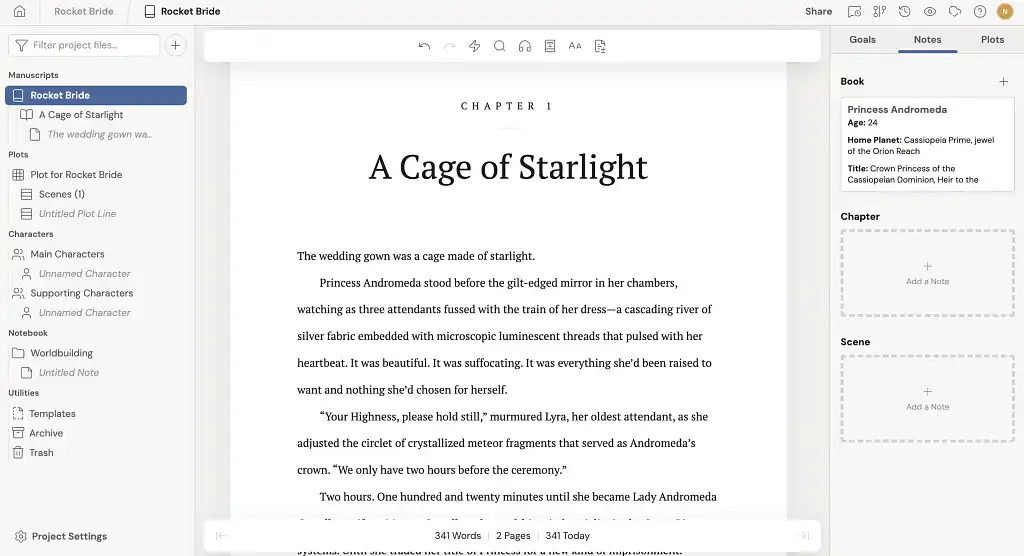
It’s a mixed bag on the planning side, too. Dabble’s Plot Grid lets you map storylines, timelines, and POVs visually — it feels similar to Scrivener’s Corkboard, but with less of a learning curve.
Templates are a more recent addition, and they still need some work. Dabble only offers four bare-bones genre templates at the moment, and nothing for specific story structures or character types. Other users share their templates on the Dabble forums, though you'll need to go digging. A dedicated community template library would go a long way here.
Collaboration — 3/5
Dabble does offer real-time collaboration, but there's no free tier here, so both you and your collaborator will need paid accounts before you can work together. Reedsy Studio, by comparison, lets you invite anyone in for free.
Formatting — 2/5
Like Scrivener, I found formatting with Dabble fairly clunky. There's little support for advanced elements like images, footnotes, tables, or custom styles. Exporting is also limited to .docx or text files, so you'll need another tool to produce a print-ready PDF or EPUB.
Price — 2/5
Dabble offers three tiers, starting at $19 a month for Writer, which covers the Plot Grid, story notes, cloud sync, and co-writing. Author doubles the price to $29 and adds the editing tools — track changes, comments, and advanced grammar checks — while Bestseller runs to $49, though what you're paying for there is access to Dabble's Academy workshops and courses rather than any additional software.
Verdict
Dabble's problem isn't what it does, but that others do it better. Scrivener costs more upfront, but it's a one-time payment for feature-rich software, while Reedsy Studio matches most of what Dabble offers, looks better doing it, and costs nothing at all.
⭐ Rating: 2.5/5
➡️ Read our full Dabble review
Ulysses
My writing software odyssey continued with Ulysses. This one is a Mac and iOS exclusive, so Windows and Android users: you’re out of luck, I’m afraid. But if you are an Apple user, Ulysses is worth a look.
User interface — 4/5
Booting up Ulysses for the first time, I was presented with three introductory documents laying out its core philosophy: writing comes first, while editing, formatting, and exporting are secondary. That philosophy is immediately evident in Ulysses' distraction-free interface, which I found very satisfying to write in.
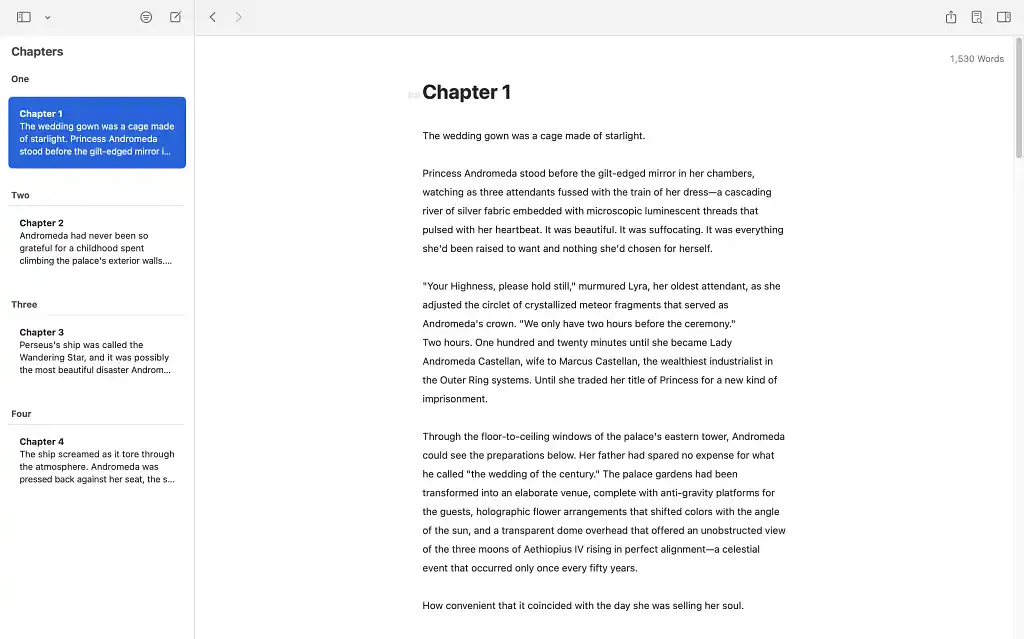
The one real hurdle is that Ulysses uses Markdown rather than a traditional rich text editor, so formatting means typing # before a heading, or wrapping text in ** to bold it. Once it clicks, it's a fast, menu-free way to write, but it definitely took some getting used to.
Ulysses is also endlessly customizable, with light and dark modes, mix-and-match color schemes, and a library of preset themes on its website. These are nice to have, but cosmetic tinkering isn’t a major priority for me when it comes to writing tools — I would inevitably wind up distracted from putting pen to (proverbial) paper.
Planning & organization — 3/5
The onboarding docs had me bracing for a complicated learning curve, but Ulysses’ planning system proved much more straightforward in practice. You can tag sheets with keywords and filter by them, pulling up every scene involving a given character or subplot in a couple of clicks.
Unlike Studio's Boards or Scrivener's Corkboard, Ulysses gives you no visual space to map out your story. That may not be a dealbreaker for writers who are comfortable outlining in plain text, but I prefer seeing my story laid out in front of me.
Collaboration — 1/5
Ulysses also doesn’t measure up to Reedsy Studio when it comes to co-writing. There's no real-time collaboration on offer, so if you're working with an editor or co-writer, you'll be exporting and sharing files the old-fashioned way.
Formatting — 3/5
Formatting with Ulysses is straightforward, but not seamless. You can export your book in a few different formats (including the all-important PDF and EPUB), and Ulysses provides a handy preview of how your book will look before you export.
But if you want to customize your margins or trim size, you’ll need to do so before you export. And like Scrivener, you’ll need to choose the exact dimensions, rather than selecting from a list of standard trade sizes. But that’s the price you pay… on top of the actual price you pay.
Price — 3/5
Ulysses is priced at $5.99/month or $39.99/year. That single subscription works across Mac, iPad, and iPhone, and comes with iCloud sync and Apple Family Sharing built in. Ulysses won’t break the bank, but there's little here you can't get for free elsewhere.
Verdict
If you’re an Apple user looking for a distraction-free writing space with endless customization options, Ulysses might be worth the yearly subscription. If you’re a Windows user… too bad!
⭐ Rating: 3/5
➡️ Read our full Ulysses review
Atticus
Atticus is a browser-based tool that was originally designed for book formatting, but in recent years it's evolved into full-on writing and editing software.
User interface — 3/5
To access Atticus’ word processor, you need to click on the greyed-out “Writing” button at the top of the page. The writing interface is clean enough, but a little basic compared to something like Reedsy Studio or Scrivener.
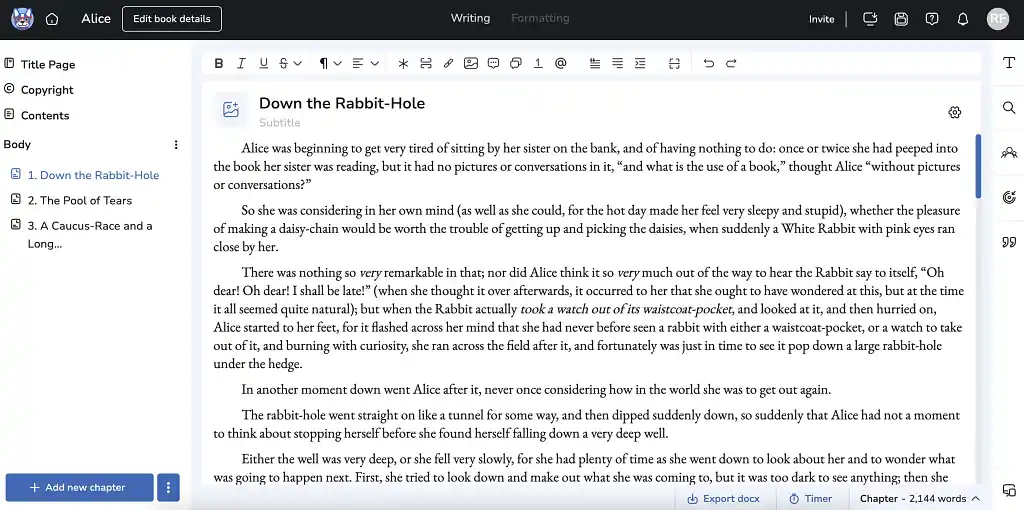
One of the major drawbacks of Atticus' editor is the lack of a built-in grammar checker. This is a frustrating omission, and one I couldn’t get around by running my work through a third-party checker — Atticus strongly discourages users from pasting outside text into the editor, citing everything from export problems to content corruption. You can integrate a ProWritingAid subscription instead, but that'll set you back an extra $30 a month.
Planning & organization — 1/5
Grammar checking isn’t the only thing you’ll need to rely on external software for. Atticus is decidedly not a planning tool — it has no plotting features comparable to Reedsy Studio’s Boards or Scrivener’s Binder.
Collaboration — 2/5
Atticus is only the third app on this list that offers real-time collaboration. Unfortunately, Atticus’ co-writing features are much closer to Dabble than Reedsy Studio. Both you and your collaborator will need a paid Atticus account to make use of it, which makes it much less convenient than it otherwise could be.
Formatting — 4/5
Atticus may still have a ways to go as a book writing tool, but I was impressed by the depth of its formatting options. It offers 17 unique templates, and you can fine-tune fonts, sizes, spacing, and alignment for every element of your book. You also get a breakdown of which trim sizes work best with major print-on-demand services, and the export process produces publish-ready PDFs.
Price — 2/5
Atticus's formatting tools are strong, but they come at a price — $147 to be exact. And remember: if you want a built-in grammar checker, that’ll be an extra $30, and any collaborators you’re working with will need to buy a copy too. Atticus is also the only tool on this list that doesn’t offer a free trial. You can try-before-you-buy with a 30-day money-back guarantee, but not every author has $147 lying around to test out a writing tool.
Verdict
Atticus formats books well, but $147 is a lot to pay for a tool that does little else, especially when Reedsy Studio delivers comparable results for free.
⭐ Rating: 2.5/5
➡️ Read our full Atticus review
Novlr
Next up is Novlr, a browser-based app built “by writers, for writers,” according to its tagline. It also happens to be one of only two tools here you can use for free.
User interface — 4/5
I found writing in Novlr a perfectly pleasant experience. The UI is sleek and clutter-free, which makes it easy to settle into a writing session.
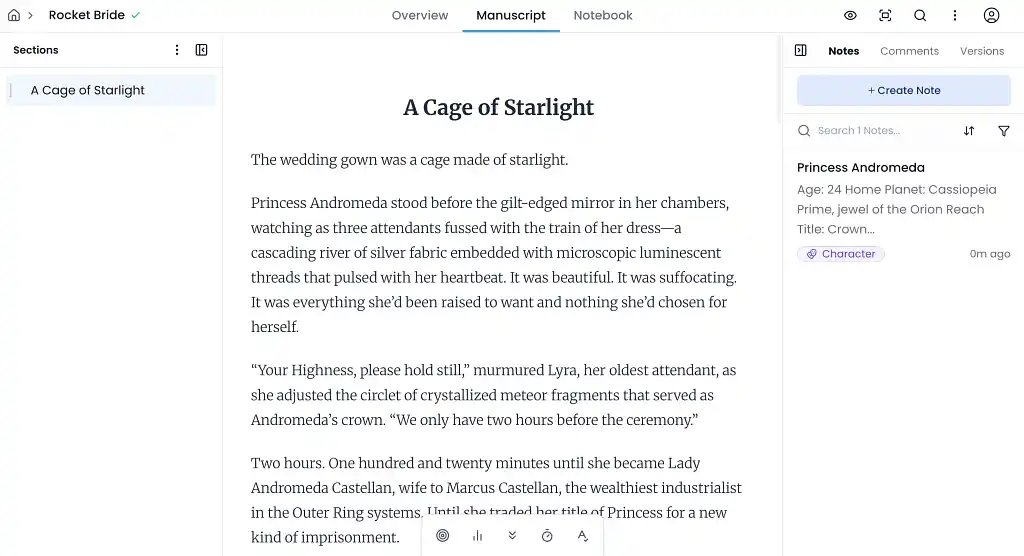
Your text sits between two sidebars — outlines on the left, formatting on the right — but I hid both when I wanted to focus on my writing. There are three color schemes available: Day (pictured above), Evening, and Night. The customization isn’t quite as extensive as Ulysses’, but I never felt short-changed.
Planning & organization — 2/5
Novlr also keeps things simple here… perhaps too simple. You can keep notes for things like worldbuilding or character profiles, but you’re limited to simple blocks of text — nothing like the ready-made templates in Studio's Boards.
Progress tracking fares better. You can set daily and monthly word count goals, with an Analytics tab covering your total words, time spent writing, and average pace. I particularly liked the streak counter, which tracks how many days in a row you've hit your target. But the lack of visual story planning was offputting for me.
Collaboration — 1/5
Comfortable as Novlr is to write in, it's built for an audience of one — it doesn’t offer any real-time collaboration features like Reedsy Studio, Dabble, or Atticus. If working with a co-writer or editor is a key part of your process, I wouldn’t recommend Novlr.
Formatting — 2/5
Novlr doesn’t offer print-friendly formatting just yet, but it can export your work for ebook publication. Temper your expectations though — there are no style templates to choose from and no specialized formatting for front and back matter.
Something else to watch out for: Novlr exports everything in your word processor, including notes and character outlines. To avoid any formatting-related headaches, you'll need to delete everything apart from your manuscript from your project.
Price — 4/5
Aside from Reedsy Studio, Novlr is the only software here with a free tier. You do lose access to a few features (writing streaks included), but I found the free tier perfectly serviceable. Paid plans run from $8 to $16 a month, adding unlimited projects and writing analytics at the lower tier, and ProWritingAid's advanced editing tools and ebook publishing at the higher one.
Verdict
Novlr is a competent free writing app, and it more than covers the basics if drafting is all you're after. But with no collaboration and minimal formatting options, it's hard to recommend it over Reedsy Studio, which is also free and does considerably more.
⭐ Rating: 2.5/5
At the end of the day, no app is going to be fully able to outline, write, or edit your book for you — but with these book writing software options in mind, you’ll be able to find something that makes the process easier, streamlined, and more enjoyable. Now get out there and start writing!
Other writing app listicles, reviews, and comparisons on Reedsy:
-
Writing tools (Listicle)
-
Collaborative writing tools (Listicle)
-
Scrivener alternatives (Listicle)
-
Grammarly alternatives (Listicle)
-
Plagiarism checkers (Listicle)
-
Proofreading software (Listicle)
-
AI writing tools (Listicle)
-
Grammar checkers (Listicle)
-
Atticus (Review)
-
Dabble (Review)
-
Grammarly (Review)
-
Obsidian (Review)
-
ProWritingAid (Review)
-
Squibler (Review)
-
Ulysses (Review)
-
Dabble vs. Scrivener (Comparison)
-
Grammarly vs. Hemingway (Comparison)
-
Reedsy Studio vs. Atticus vs. Scrivener (Comparison)
-
Scrivener vs. Word (Comparison)
-
Ulysses vs. Scrivener (Comparison)