Posted on August 21, 2026 12:57
The Best AI Writing Tools for Authors (2026)
There’s a lot AI can’t do when it comes to writing your book: finding your unique voice, deciding what your characters do (and why), or exploring the deeper questions at the heart of your story and why they matter to readers. Those elements — and many more — are, and should remain, entirely yours.
But if you’re open to bringing AI into your creative process, it can still help with certain tasks: brainstorming the next sentence of your novel, keeping track of your story bible, or flagging inconsistencies in your plot.
In this post, we’ll compare six of the best AI writing tools for authors, along with the general-purpose AI assistants worth keeping in your back pocket.
Here’s a quick overview:
|
Tool |
Type |
Pricing |
Platform |
Best for |
|
Sudowrite |
Custom fiction-specialist AI model |
From $10/mo |
Browser, iOS, Android |
Drafting fiction prose |
|
NovelCrafter |
All-in-one, you bring your own API keys of your preferred model |
From $8/mo |
Browser |
Long novels and series |
|
NovelAI |
Custom fiction-specialist (and uncensored) AI model |
From $10/mo |
Browser |
Genre and spicy/dark fiction |
|
Squibler |
All-in-one AI writing app |
Free; Plus from $15.83/mo |
Browser |
Beginners and visual plotters |
|
ProWritingAid |
AI-assisted editing |
Free; Premium from $10/mo |
Browser, Windows, Mac, Word, Docs, Scrivener |
Self-editing a finished draft |
|
Grammarly |
Everyday writing assistant |
Free; Pro from $12/mo |
Browser, Windows, Mac, Word, Docs, iOS, Android |
Grammar and clarity |
Let's look at each tool in more detail.
Creative and fiction writing
Below are tools that can help you draft, brainstorm what happens next, and hold in memory a long book's worth of characters and worldbuilding 一 but they also have the strongest impact on your writing process, so use them carefully.
1. Sudowrite
-
💰 Price: From $10/mo, or Pro from $22/mo for 1 million credits; free trial available
-
🤖 AI Model: Muse, its proprietary AI model made for fiction
-
🔒 Data privacy: You own your work; Sudowrite says it never trains its models on it.
-
💻 Access: Browser and mobile app
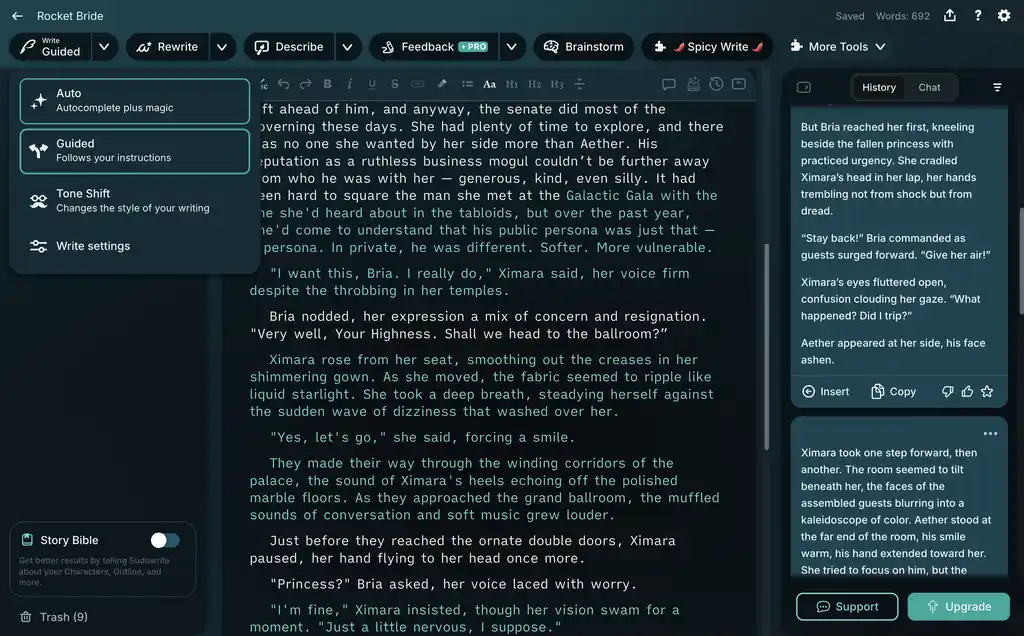
Sudowrite is built exclusively for fiction authors. Its proprietary model, Muse, is fine-tuned for storytelling, giving it a better grasp of narrative voice, pacing, and scene construction than a general-purpose chatbot like Claude or ChatGPT. Sudowrite also claims its AI is trained entirely on data that was given with writer’s consent.
Sudowrite also has a feature called the Story Bible, which holds long projects together. This is where you can store characters, settings, plot points, and worldbuilding details. Sudowrite then refers back to this information when generating text, helping you maintain continuity across a longer manuscript.
And, according to our testing, this feature does help Sudowrite’s prose stand out against the competition. Given a short scene and Story Bible, it followed the broad tone and direction while offering several ways forward.
Alongside this, features such as Brainstorm, Write, and Expand can suggest plot developments, continue a passage, or develop an underwritten moment. This makes Sudowrite particularly useful when you know roughly where a scene is going but need help finding the words.
Like most of these tools, Sudowrite uses a credit-based system: its features consume credits based on the AI model selected and the number of words it reads from or writes for you.
Verdict: The best AI writing tool for fiction authors who want help drafting prose that stays reasonably close to their voice.
👍 Pros:
-
Free trial available
-
Muse is designed specifically for fiction
-
Story Bible helps with continuity
-
Supports more than 30 languages
👎 Cons:
-
May ignore or contradict specific story details
-
Credit system and feature-heavy interface add complexity
Read our full Sudowrite review for a closer look
One thing worth noting before we go further: none of these is a dedicated writing tool. If you’re looking for a proper app to draft and organize your book, Reedsy Studio is free and built for exactly that.

2. NovelCrafter
-
💰 Price: Scribe $4/mo (no AI); Hobbyist $8/mo (adds AI); Artisan $14/mo (adds AI chat); Specialist $20/mo (adds collaboration)
-
🤖 AI Model: Optional — bring your own API keys from OpenAI, Anthropic, etc.
-
🔒 Data privacy: NovelCrafter says it never trains on your work or logs prompt text, but your chosen AI provider still processes each request.
-
💻 Access: Browser
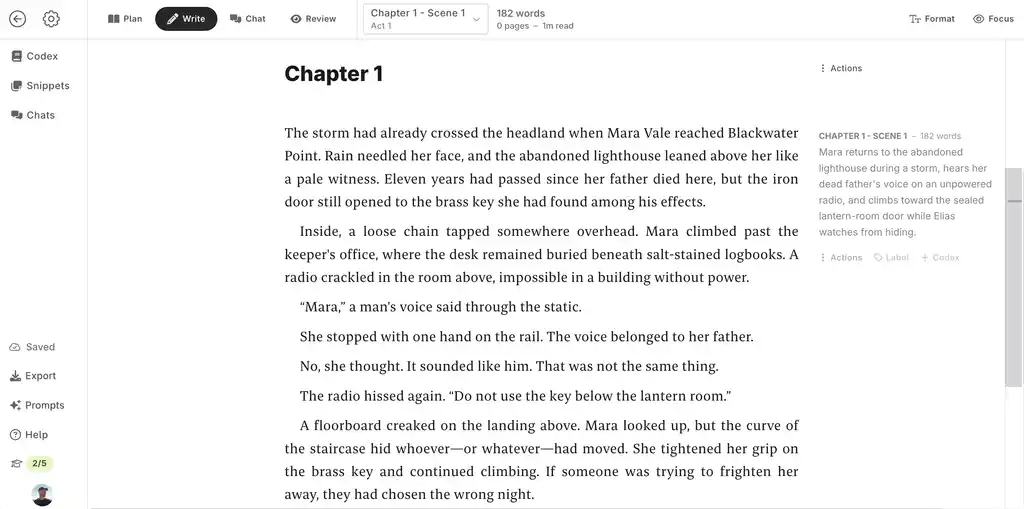
NovelCrafter is less an AI prose generator than a complete novel-writing workspace with optional AI features. Its standout feature is the Codex, a wiki-style story bible that tracks characters, locations, objects, and lore, then automatically links those entries to your manuscript.
If you sign up for the AI features, the Codex gives the AI long-term memory for characters, locations, organizations, and lore. In the AI Chat you can brainstorm new ideas using the outline, interview characters through their Codex profiles, or revise selected prose. You can also expand, shorten, rephrase, change tense, or improve readability with built-in or custom prompts.
One thing to note, though: instead of providing their own AI model, NovelCrafter lets you bring your own API key and connect whichever model you prefer, from OpenAI to Anthropic to open-source models. This gives you greater control over the general-purpose model you use, but it requires some setup and means you don’t automatically get a model made for fiction with your subscription. Also, to use Novelcrafter’s AI features you need to be on their $8/month Hobbyist plan (as well as buying credits from a general-purpose AI model), and depending on what model you use, token usage can add significantly to the overall cost.
Verdict: The most flexible option for authors managing a long, complex novel or series who want to control their own AI setup.
👍 Pros:
-
Codex provides an automatically connected story bible
-
Choose your own cloud or local AI model
-
Decent planning and writing environment
👎 Cons:
-
To use the AI features you need to subscribe to the $8/mo tier at least
-
More complicated than a plug-and-play writing assistant
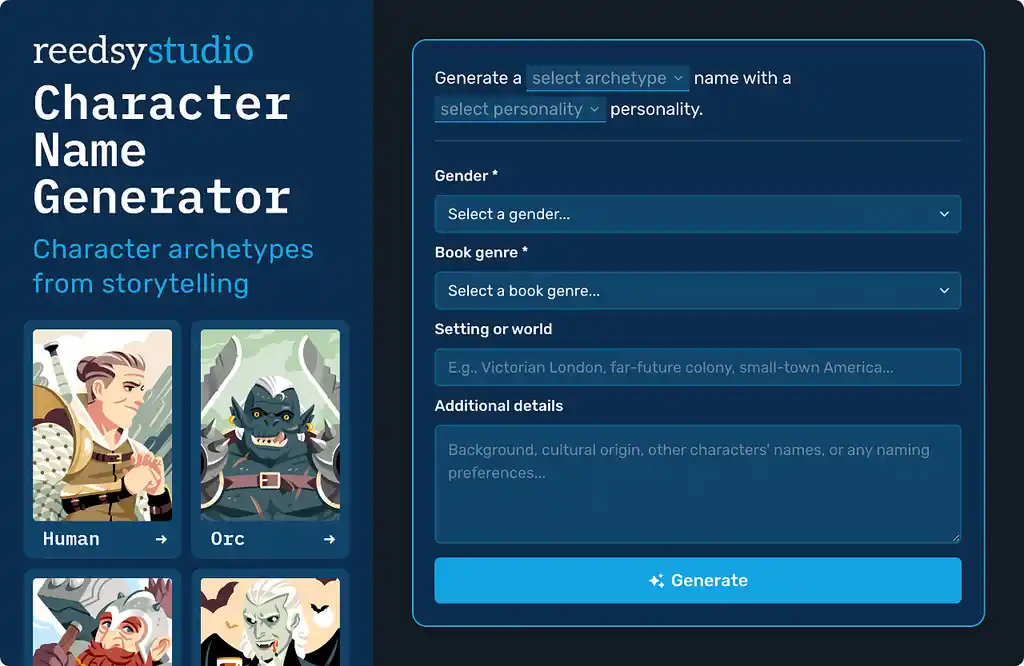
If this sounds too complex, try Reedsy Studio’s free writing generators for book titles, character names, plot ideas, and fictional places. They’re a low-stakes way to explore AI without handing over your prose.
3. NovelAI
-
💰 Price: Tablet $10/mo; Scroll $15/mo; Opus $25/mo
-
🤖 AI Model: Xialong, a large, in-house model built for storytelling
-
🔒 Data privacy: Saved stories are browser-encrypted, and NovelAI says generation requests are not logged.
-
💻 Access: Browser
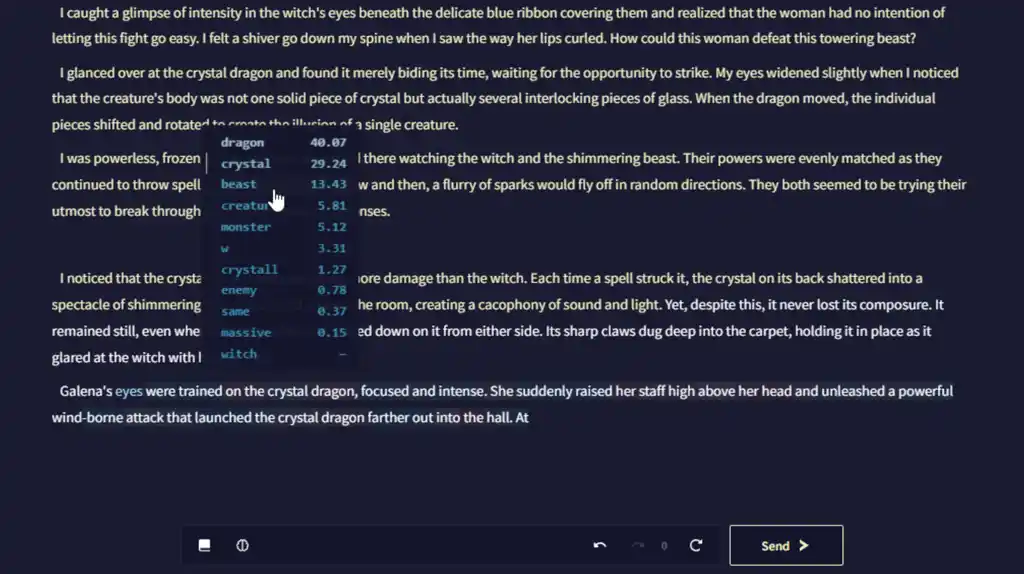
NovelAI is particularly appealing to writers of darker or spicier fiction, which many chatbots may refuse to process or sanitize. Its relatively permissive approach makes it well suited to horror, grimdark fantasy, explicit romance, and other adult genres.
All paid tiers include unlimited text generation and anime-style image generation, with larger image allowances on the more expensive plans.
As you write your novel, you can click “Send” and NovelAI will pick up where you or it left off almost instantly. It will then edit or retry the result before directing the next beat. This gives you more moment-by-moment control than requesting an entire chapter.
To keep your story on track, NovelAI gives you three different features. Put big-picture facts — such as the viewpoint, setting, or main plot goal — in Memory. Use Author’s Note for whatever matters in the next few paragraphs, since it has a stronger influence on the immediate output. Lastly, the Lorebook works more like a reference file: when a character, place, or concept appears, NovelAI pulls in the matching entry. Entries can also activate one another, so mentioning an elf can bring in both that character’s details and your wider elven lore.
Overall, we liked how quickly NovelAI came up with different ways to continue a scene. It sometimes missed the mark, but retrying took only a few seconds. That makes it useful when you’re stuck and want several possible directions to choose from. Just expect to pick the best ideas and rewrite them yourself, rather than getting polished prose on the first try.
Verdict: The best AI tool for genre and dark-fiction authors who hit content walls everywhere else.
👍 Pros:
-
Permissive/uncensored for adult and dark themes
-
Quick sentence generation, great for iteration
-
Memory, Author’s Note, and Lorebook provide strong continuity
👎 Cons:
-
Steep learning curve for setting up your book’s story bible
-
Struggles with macro-plotting full-book arcs
4. Squibler
-
💰 Price: Free; Plus $29.99/mo or $15.83/mo billed annually; Pro $89.99/mo or $49.17/mo billed annually
-
🤖 AI model: Not disclosed but names OpenAI and Anthropic as AI partners
-
🔒 Data privacy: You own your content, but prompts and documents are processed by OpenAI or Anthropic. Its policies do not explicitly rule out training.
-
💻 Access: Browser; mobile companion apps are forthcoming
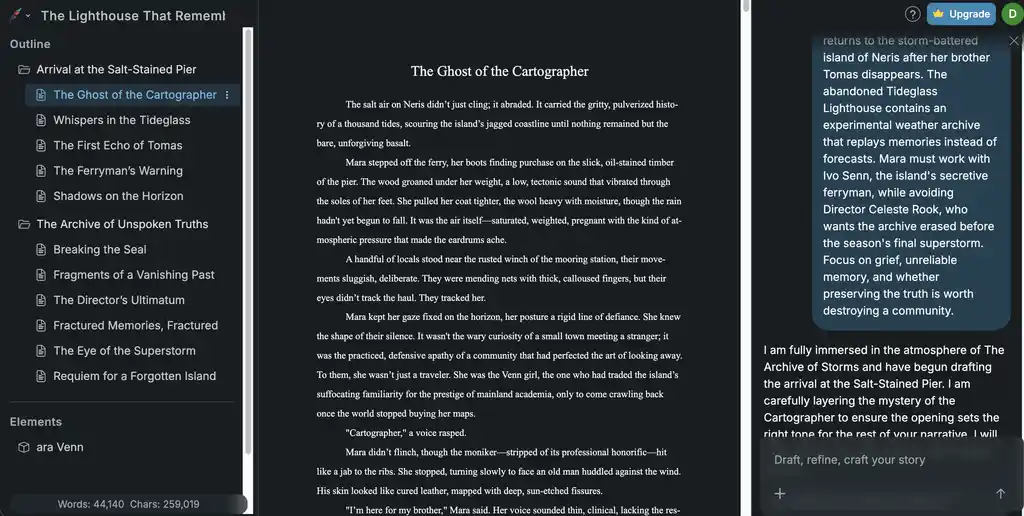
Squibler is an AI-first workspace for outlining, drafting, editing, and organizing a book. Its interface places the outline on the left, the manuscript in the center, and an AI chat on the right. A separate Elements section stores information about characters, locations, and other story details.
In our testing, we gave Squibler an original novel premise. It quickly turned it into a two-part outline with eleven named scenes and began drafting thousands of words almost immediately. The outline provided a plausible direction for the story, and some of the generated prose contained useful descriptions and ideas.
However, the draft repeatedly revisited the same actions and revelations, making the word count look more impressive than the usable material really was. Squibler also changed or ignored some details from the prompt, while the generated characters and settings were not automatically added to Elements. This means authors must still build the story bible themselves and carefully reorganize the resulting manuscript, sometimes to the point of rewriting it almost fully.
Verdict: A useful tool for beginners who want to turn a premise into an outline and a large zero draft quickly, but the generated material needs substantial rewriting.
👍 Pros:
-
Free plan includes a generous 1,000 AI credits per month
-
Generates a structured outline and substantial draft material quickly
-
Keeps outlining, drafting, story elements, and AI chat in one workspace
👎 Cons:
-
Generated scenes can become repetitive
-
Does not automatically populate Elements from the generated story
-
Full-manuscript generation and document export require a paid plan
Read our full Squibler review for a closer look.
Editing and polishing
Compared to the tools above, the tools below don’t generate prose; instead, they help you improve your own. They offer a lower-risk way to use AI on your manuscript, though they can still significantly shape it for better or worse.
5. ProWritingAid
-
💰 Price: Free with a 500-word report limit; Premium $30/month, $120/year, or $399 lifetime. Whole-manuscript tools require separate Story Credits
-
🤖 AI model: Not disclosed; story reports use AI for analysis, while Sparks and Rephrase can generate text
-
🔒 Data privacy: ProWritingAid says it never uses your writing to train its models
-
💻 Access: Browser, Windows, Mac, Word, Google Docs, and Scrivener
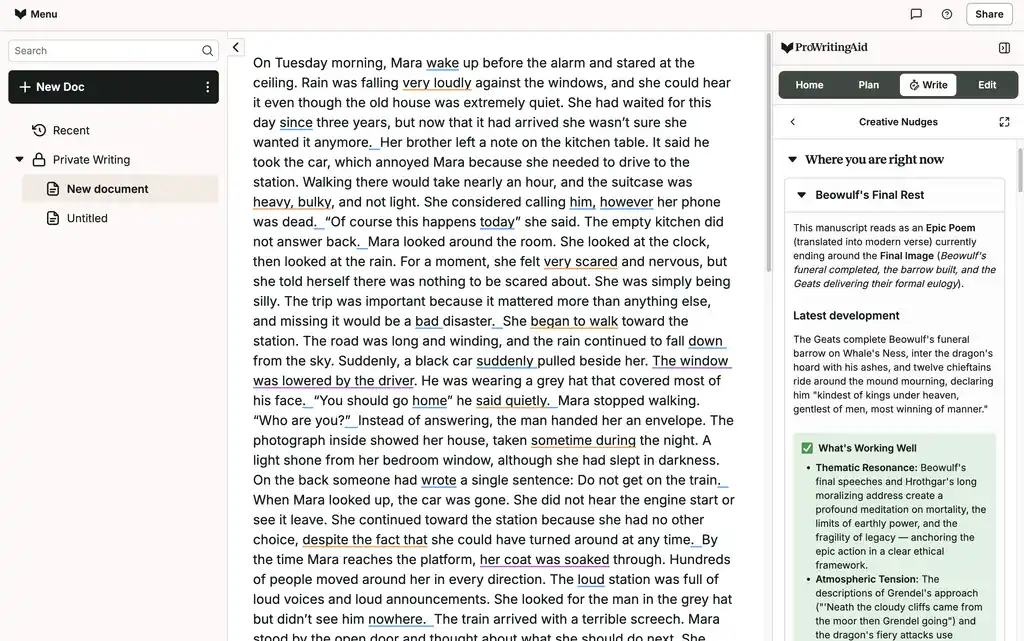
ProWritingAid is for the stage where you already have words on the page and want to make them better. It catches everyday grammar and spelling mistakes, but its main draw is a collection of more than 25 reports covering repetition, readability, sentence structure, pacing, dialogue, and sensory detail.
We tested it on a deliberately messy short story. It caught the obvious tense and punctuation errors, but also noticed repeated words, passive phrasing, redundant descriptions, and sentences weighed down by unnecessary “glue” words. For example “She continued toward the station because she had no other choice, despite the fact that she could have turned around” was improved to “She continued toward the station, though she could still have turned back.”
The Chapter Critique was more useful than we expected. It unpacked the scene, identified its point of view and role in the wider story, and explained where the tension rose and fell. It can also spot contradictions in the protagonist’s reasoning/motivation, or opportunities to show instead of tell 一 which makes it feel closer to an early beta read than a standard grammar check.
One downside of ProWritingAid is the sheer volume of feedback it provides, some of which can feel fussier than helpful. Its most in-depth tools — Manuscript Analysis, Plot Analysis, and the Virtual Beta Reader — also cost one Story Credit per run, on top of a regular subscription. Credits cost $50 on the free plan or $35 on Premium before bundle discounts, so repeatedly analyzing a full novel can become expensive.
Verdict: The best option for authors who want detailed feedback when self-editing a completed draft.
👍 Pros:
-
More than 25 reports uncover patterns that ordinary grammar checkers miss
-
Chapter Critique gives useful feedback on tension, pacing, motivation, and prose
-
Works inside Word, Google Docs, Scrivener, and other writing apps
👎 Cons:
-
The volume of feedback can feel overwhelming
-
Whole-manuscript analysis costs extra, even with a paid subscription
Read our full ProWritingAid review for a closer look.
6. Grammarly
-
💰 Price: Free; Pro $30/month or $144/year
-
🤖 AI model: Not disclosed; generative features use external providers including OpenAI
-
🔒 Data privacy: You can opt out of Grammarly using your content for model training and product improvement
-
💻 Access: Browser, Windows, Mac, Word, Google Docs, iOS, and Android
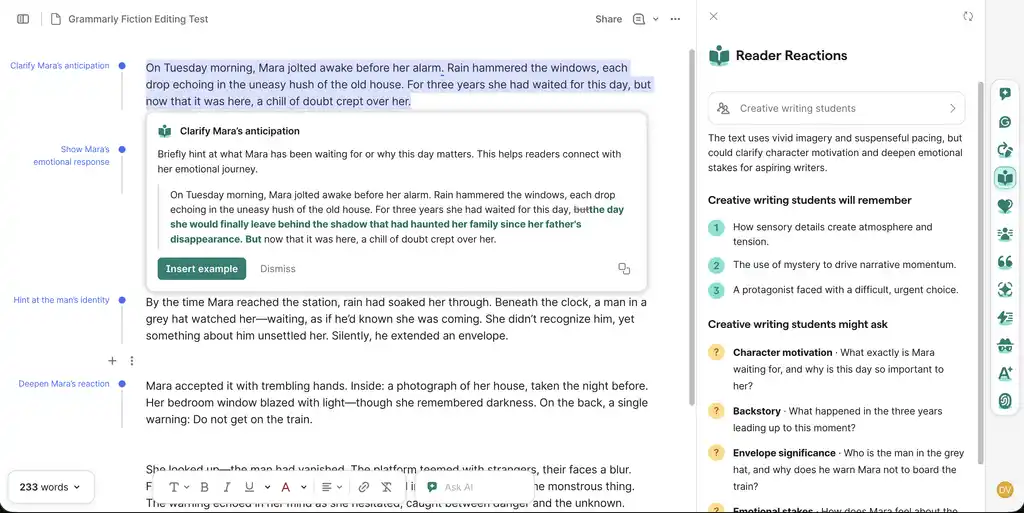
Grammarly is primarily an editing tool rather than a fiction generator. It checks grammar, punctuation, clarity, and tone wherever you write, while its Pro plan adds full-sentence rewrites, AI chat, and Reader Reactions.
We tested it on an intentionally flawed fiction passage. It reliably caught problems with verb tense, punctuation, repetition, and awkward sentences. Reader Reactions went beyond proofreading by summarizing what readers were likely to remember and raising questions about unclear character motivation, emotional depth, and what was at stake (providing examples of how you may do it). This resembled a lightweight beta read, though the feedback remained fairly broad.
Its AI rewrite made the passage cleaner and more concise, but also introduced generic, melodramatic language and subtly changed the character’s emotions 一 so we wouldn’t recommend using it.
The Pro plan also includes plagiarism checking and an AI detector that highlights passages likely to be identified as AI-generated, which can help you avoid surprises when submitting work (although AI-detection scores are only estimates).
Verdict: The best everyday editing assistant for authors who want reliable grammar and clarity suggestions across the apps they already use.
👍 Pros:
-
Strong grammar, punctuation, and clarity checks
-
Reader Reactions provides useful audience-level feedback
-
Includes plagiarism and AI-detection
👎 Cons:
-
AI rewrites can flatten your voice or change your meaning
-
Reader feedback is not deep enough to replace a developmental editor or beta reader
Read our full Grammarly review for a closer look.
General chatbots
Of course, you can also go straight to the major AI providers, such as ChatGPT, Claude, and Gemini, which power many of these tools anyway — especially if you already use them for work or other personal projects. The key is to work in folders and give them enough context, such as your outline, character sheets, and a few pages of prose as a style sample, so you don’t have to re-explain your book at the start of every conversation.
Chatgpt
-
💰 Price: Free; Plus $20/month; Pro $200/month
ChatGPT is often the first AI tool authors turn to. Its free Projects feature lets you upload reference files and set instructions that apply to every chat within a workspace. This means you can specify once that you write in close third person and past tense, and ask it to follow your worldbuilding and character sheet when generating prose. While its models improve with each iteration, they can still hallucinate — just like any other AI model.
Claude
-
💰 Price: Free; Pro $20/month or $200/year; Max from $100/month
Claude is often praised for the most natural prose and the strongest long-document editing. It also has Projects, with a knowledge base you can load with your story bible and finished chapters, plus instructions that apply across the project. Because it handles very long documents well, you can paste in a whole chapter, or a whole manuscript on the paid tiers, and ask for real structural feedback rather than line notes.
Gemini
-
💰 Price: Free; Google AI Plus $4.99/month; Google AI Pro $19.99/month; Ultra from $99.99/month
Gemini can be a convenient choice because it lives inside Google Docs and Drive, so if your manuscript already sits there, it can reference it without you uploading anything. It can also draft or rewrite in the document you're actually working in. Its context window is the largest of the three, which makes it the easiest option for a single whole-book pass looking for timeline errors or a sagging middle. It’s also worth knowing about Google's NotebookLM: this tool allows you to upload your own sources, such as research notes, a series bible, and past books, and then answers strictly from those, with citations back to the file. That's a useful way to interrogate your own worldbuilding without having to pay for a new tool.
Whichever tool you choose, remember: there’s no shortcut to great writing. AI may have a place in your process, but producing your best work still means putting in the effort — writing badly, feeling stuck, wrestling with a plotline for weeks, then solving it on a walk, in the shower, or talking to your friends. And seek help from professional editors: industry-conscious readers who can feel your writing in their bones, in a way that even the biggest and most advanced AI models can never do.
Other writing app listicles, reviews, and comparisons on Reedsy:
-
Book writing software (Listicle)
-
Writing tools (Listicle)
-
Collaborative writing tools (Listicle)
-
Scrivener alternatives (Listicle)
-
Grammarly alternatives (Listicle)
-
Plagiarism checkers (Listicle)
-
Proofreading software (Listicle)
-
Grammar checkers (Listicle)
-
Atticus (Review)
-
Campfire (Review)
-
Dabble (Review)
-
Grammarly (Review)
-
Hemingway (Review)
-
Novlr (Review)
-
Obsidian (Review)
-
Plottr (Review)
-
ProWritingAid (Review)
-
Scrivener (Review)
-
Squibler (Review)
-
Sudowrite (Review)
-
Ulysses (Review)
-
Vellum (Review)
-
Dabble vs. Scrivener (Comparison)
-
Grammarly vs. Hemingway (Comparison)
-
Reedsy Studio vs. Atticus vs. Scrivener (Comparison)
-
Scrivener vs. Word (Comparison)
-
Ulysses vs. Scrivener (Comparison)