Posted on June 04, 2026 15:43
Ulysses vs. Scrivener: Which Is Best For Writers?
Scrivener and Ulysses are two popular writing apps, and both can help you draft a book, but they’re built around very different ideas of what writers need.
Scrivener is designed for authors who want to plan, organize, and control every part of a complex manuscript. Ulysses is designed for writers who prefer a cleaner, more focused drafting experience, especially within the Apple ecosystem.
In a nutshell:
-
Scrivener is best for novelists who want a comprehensive writing suite with powerful planning tools,
-
Ulysses is best for Apple users who want a streamlined writing environment with elegant, lightweight organization.
|
Class |
Scrivener |
Ulysses |
|
Pricing |
$59.99 for Mac or Windows; $80 Mac + Windows bundle; iOS sold separately |
$39.99/year or $5.99/month in the U.S.; local pricing may differ |
|
Platform Availability |
Mac, Windows, and iPhone |
Mac, iPad, and iPhone |
|
User Interface & Learning Curve |
Powerful but dense; tutorial strongly recommended |
Clean and intuitive after a short onboarding |
|
Book Writing |
Feature-rich editor with split view, snapshots, and targets |
Excellent distraction-free editor with Markdown-based formatting |
|
Planning & Research |
Binder, Corkboard, Outliner, metadata, research folder |
Sheets, Groups, keywords, filters, and basic notes |
|
Editing & Collaboration |
No built-in collaboration; Dropbox workaround only |
No built-in collaboration; Dropbox workaround only |
|
Formatting & Export |
Powerful Compile system, but complex |
Easy exports, but not a full print-ready formatter |
|
Best for |
Complex novels and research-heavy books |
Writers who want focus, speed, and Apple sync |
Let’s break down how each tool performs for long-form authors.
User interface & learning curve
-
🏆 Ulysses (4/5): Clean, intuitive, and quick to start writing in, with lightweight organization in the background.
-
Scrivener (2/5): Much more powerful, but dense enough that most writers will need tutorials and setup time.
Ulysses (4/5)
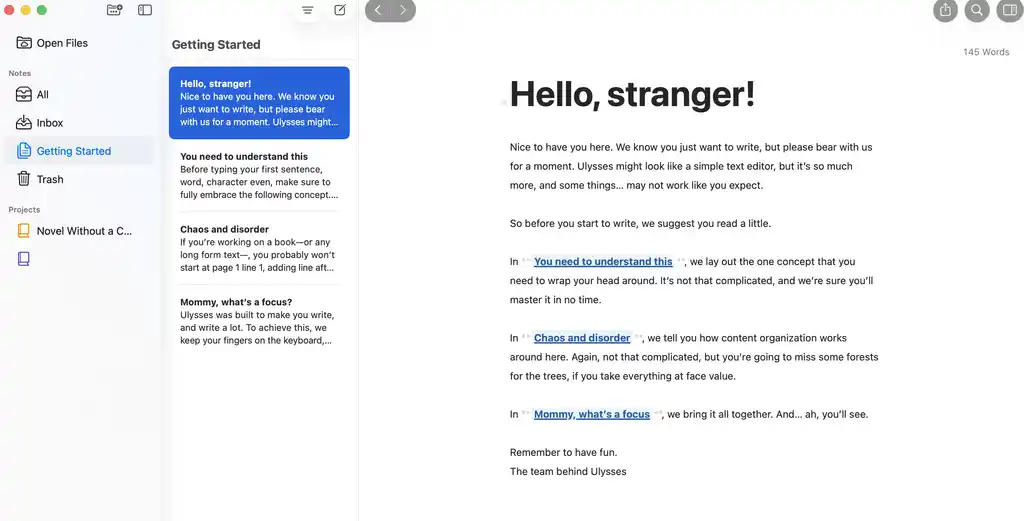
Ulysses makes a strong first impression because it tells you exactly what it is: a clean place to write, with organization kept quietly in the background.
Its system is simple. Sheets are individual pieces of text — chapters, scenes, notes, scraps of dialogue — while Groups act like flexible folders. Together, they give you enough structure for long-form projects without making the app feel heavy.
That makes Ulysses especially appealing if you want one searchable home for all your writing: articles, notes, drafts, and books. It also offers more customization than its minimalist design suggests, letting you adjust markup, themes, and visual details until the page feels right.
Scrivener (2/5)
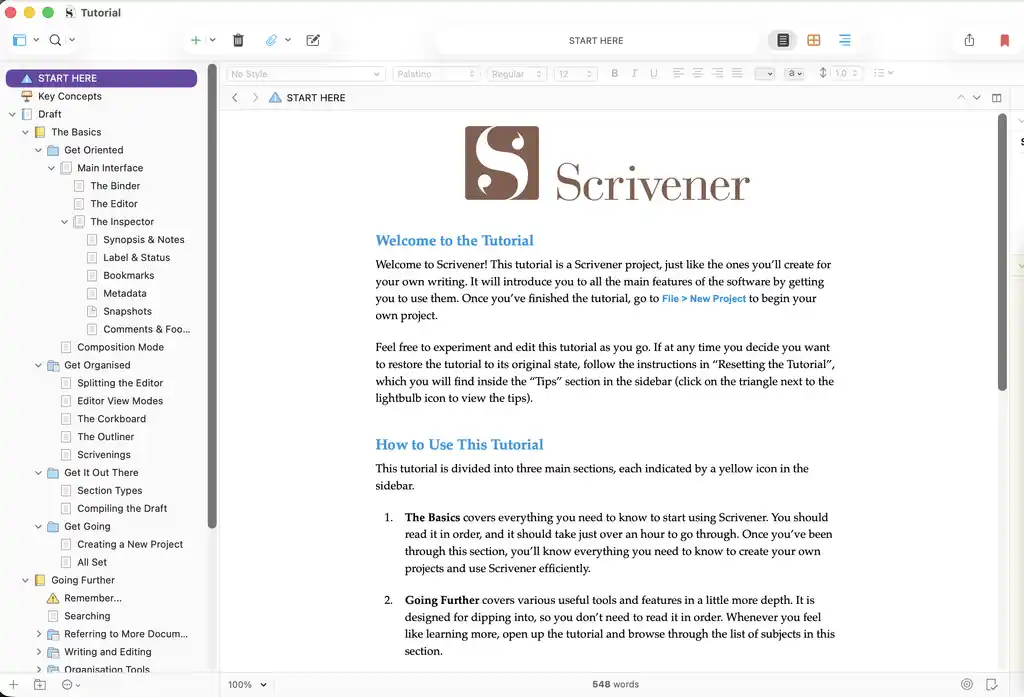
Scrivener is the opposite: powerful, but overwhelming at first. The learning curve is real, and the first few sessions can feel more like using production software than a writing app. But that complexity has a purpose. Scrivener is built for authors managing layered projects — and once its logic clicks, it starts to feel less like clutter and more like a command center.
One good thing about Scrivener is that it has a strong support ecosystem, with years of tutorials, forums, and templates, which makes a big difference for a tool this powerful.
Book writing
-
Ulysses (4/5): A strong, distraction-free editor with Markdown formatting, goal tracking, AI tools, and excellent iPad syncing.
-
🏆 Scrivener (5/5): A richer long-form editor with split view, snapshots, writing targets, Composition Mode, and traditional formatting control.
Ulysses (4/5)
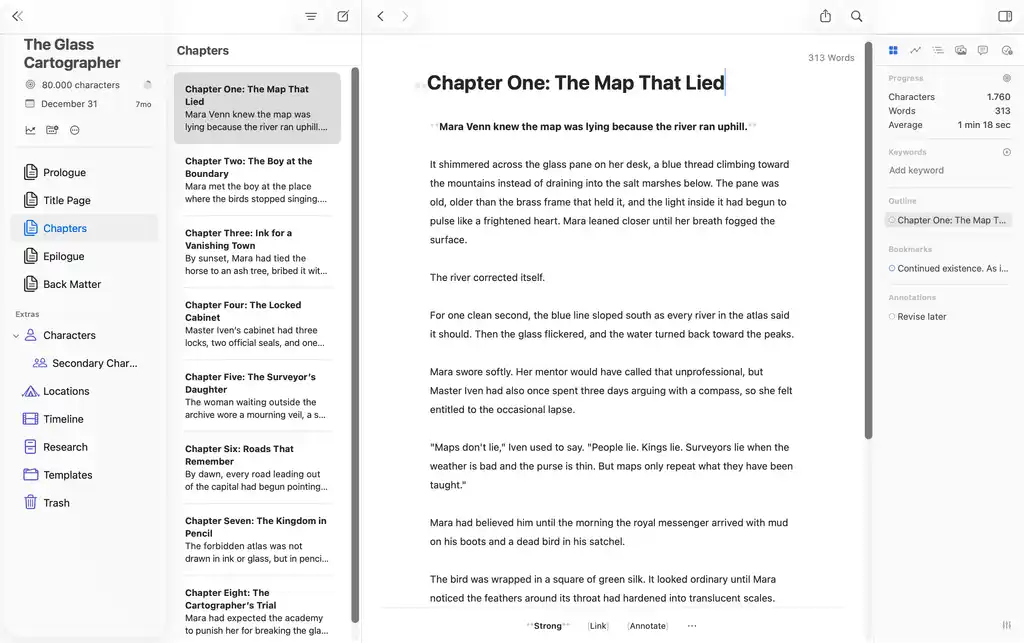
Ulysses’ editor is simple and clean, but it does require one adjustment: Markdown-style formatting. Instead of using a traditional rich-text editor, where you click a formatting bar to bold text or create a heading, you add simple markers directly into the text — like ** for bold or # for headings. It doesn’t take long to get used to it, but some might still prefer a traditional editor, like Scrivener’s.
Its goal-tracking tools are useful but simple. Spellcheck and grammar support are decent, with the Advanced Check offering a more Grammarly-like review. Ulysses also includes built-in AI tools for proofreading, rewriting, and summarizing selected text.
Scrivener (5/5)
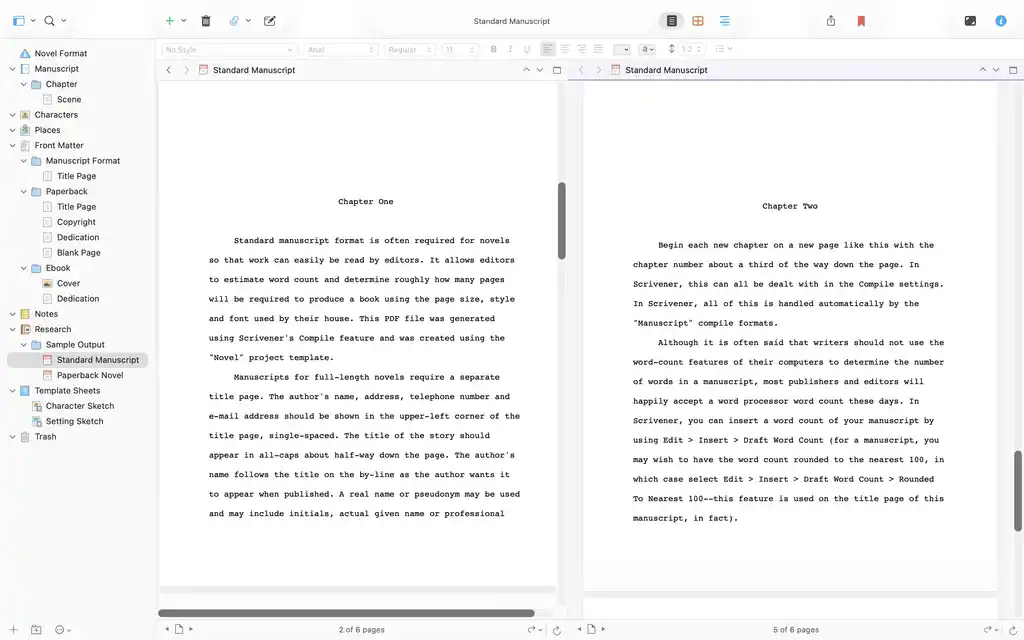
Scrivener’s editor is also built around the idea that long manuscripts are easier to write in pieces. You can break a book into chapters, scenes, or smaller fragments, then jump between them without scrolling through one giant document.
Split view lets you keep two sections open at once (as shown above), which is useful when revising a scene against an earlier chapter. Snapshots let you save a version of a section before rewriting it, then roll back if the new draft doesn’t work. Project targets and session targets help track daily progress.
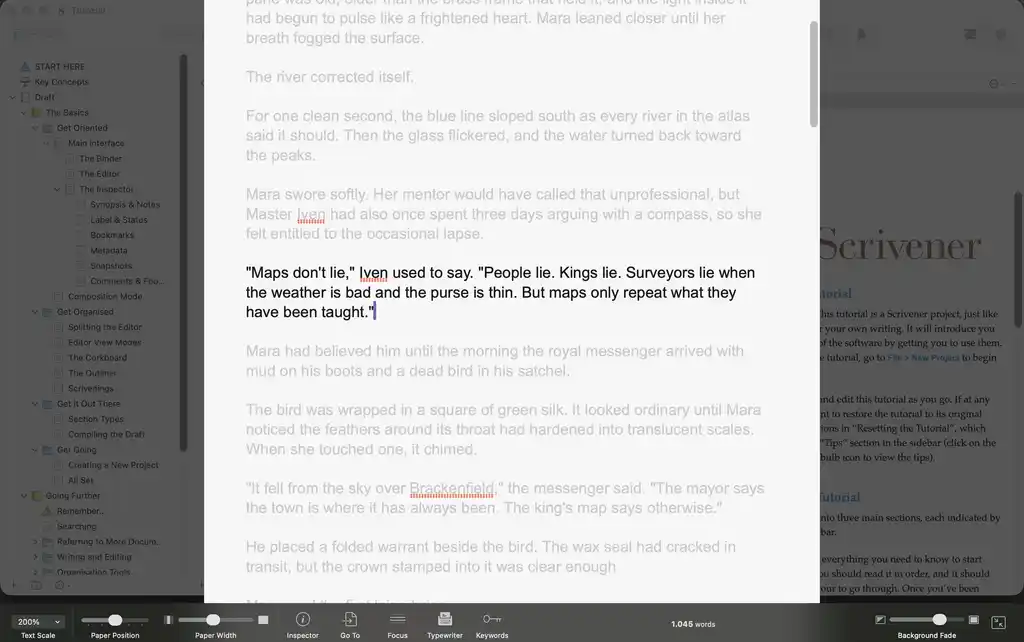
For deeper focus, Scrivener’s Composition Mode strips away the rest of the interface and leaves you with a clean page — almost like writing on a typewriter.
Scrivener also gives you more traditional formatting control while drafting. You can change fonts, work in a more familiar rich-text environment, and customize the page more deeply than in Ulysses. Overall, it’s a superior editor.
Planning and research
-
Ulysses (2/5): Fine for text-based outlines, notes, keywords, and filters, but limited for visual story planning.
-
🏆 Scrivener (5/5): Built for complex projects, with the Binder, Corkboard, Outliner, metadata, and a full research folder.
Ulysses (2/5)
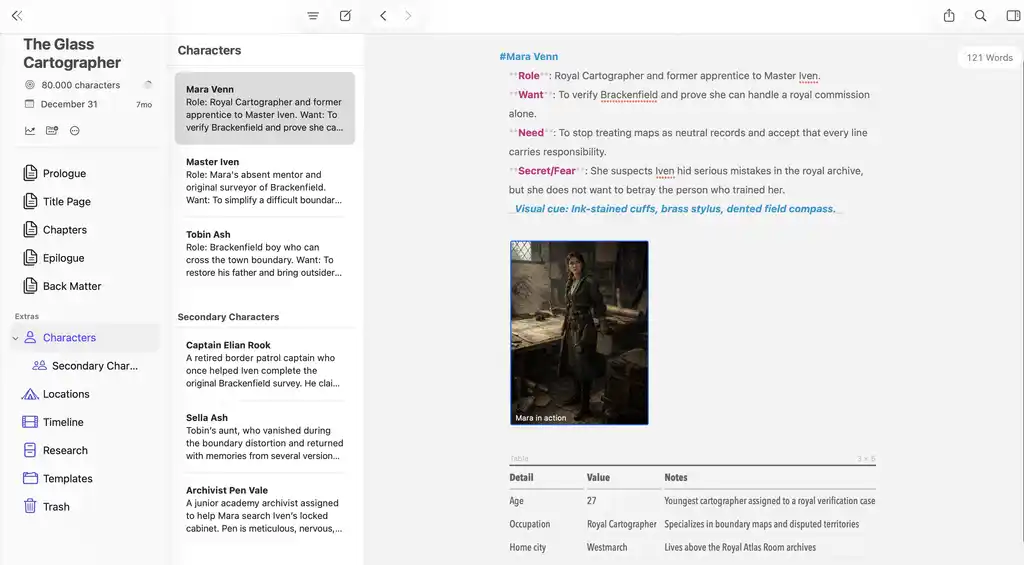
Ulysses can be used to store the background material behind a novel, but its approach is fairly simple. Character profiles, setting notes, plot sketches, worldbuilding details, and research fragments can all sit next to the manuscript as their own sheets or groups.
As with the drafting experience, though, everything is built around text-based Markdown files. You might create one main planning sheet with headings for acts, turning points, or major story beats, then use bullet points to track scenes, subplots, character arcs, and revision ideas. Keywords and filters give you a little more structure: scenes can be tagged by character, location, storyline, or progress stage, then filtered so related material is easier to find.
Even so, Ulysses does not offer the same depth as software designed specifically for novel planning. Story structure is often easier to manage visually, and without tools such as a corkboard, timeline, or index-card view, it can be harder to step back and see how the whole book fits together.
For straightforward planning, especially if you like working from text outlines, Ulysses can do the job. For more layered manuscripts with lots of moving parts, Scrivener gives writers far more control.
Scrivener (5/5)
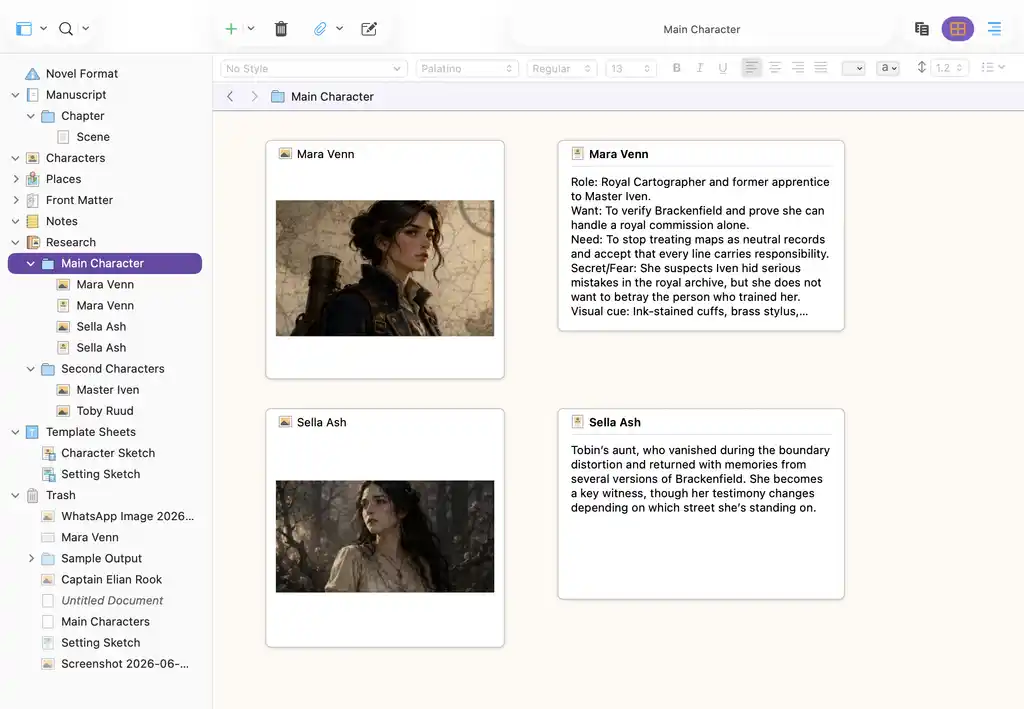
Planning is where Scrivener clearly pulls ahead. The Binder acts like a digital ring binder for the whole project, letting you break a manuscript into movable pieces. Chapters, scenes, research notes, character sketches, images, audio notes, PDFs, and web pages can all live inside one project.
The Corkboard is especially useful for visual thinkers. Each document can appear as an index card, so you can shuffle scenes, test different orders, and see the shape of the book without reading the full manuscript. The Outliner gives you another view of the same material, with status labels, word counts, synopses, and custom metadata.
This is the kind of structure that matters when a novel has multiple POVs, timelines, subplots, or research threads. Scrivener also tends to scale better when a project becomes large and messy (e.g., research-heavy nonfiction, academic work, or a long series).
Editing and collaboration
-
Ulysses (1/5): No shared workspace, comments, suggestions, or real-time editing, so collaboration has to happen elsewhere.
-
Scrivener (1/5): Also lacks real-time collaboration, with Dropbox or exported files as the main workarounds.
Ulysses (1/5)
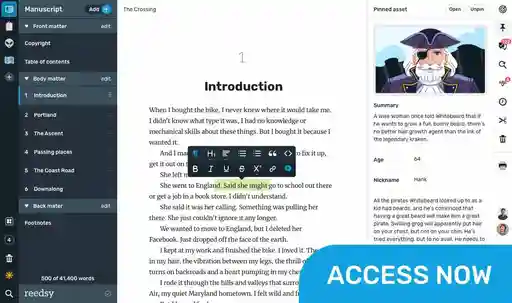
Ulysses is not built with collaboration in mind. Unlike tools such as Reedsy Studio, it does not let you bring an editor, co-author, proofreader, or beta reader directly into your manuscript. There is no shared workspace where others can comment, suggest changes, or edit alongside you in real time.
This comes down partly to how Ulysses handles syncing. Your library is synced through iCloud and linked to your own Apple Account, which makes the app feel very much like a private writing environment rather than a team-based one.
There are ways around this, but none of them feel especially smooth. For a premium writing app aimed at committed writers, that lack of proper collaboration tools is a noticeable limitation.
Scrivener (1/5)
Scrivener presents the same issue 一 it does not support real-time collaboration, and inviting an editor into your live project is not the way the app is designed to work.
The usual workaround is to share files through Dropbox or another cloud service, then coordinate so only one person opens the project at a time. For beta readers or editors, most authors will export a Word or PDF file, collect feedback elsewhere, then bring revisions back into Scrivener manually.
This is also where Scrivener’s sync reputation gets complicated. Many experienced users trust it, especially with automatic saving and backups set up properly, but the Dropbox-based workflow can feel less reassuring than Ulysses’ iCloud sync if you move between Mac and iPad all day.
Formatting and export
-
Ulysses (3/5): Smooth exports to PDF, DOCX, EPUB, HTML, and text, but not enough for professional print formatting.
-
🏆 Scrivener (4/5): Compile gives much deeper export control for manuscripts and ebooks, though it takes experimentation to master.
Ulysses (3/5)
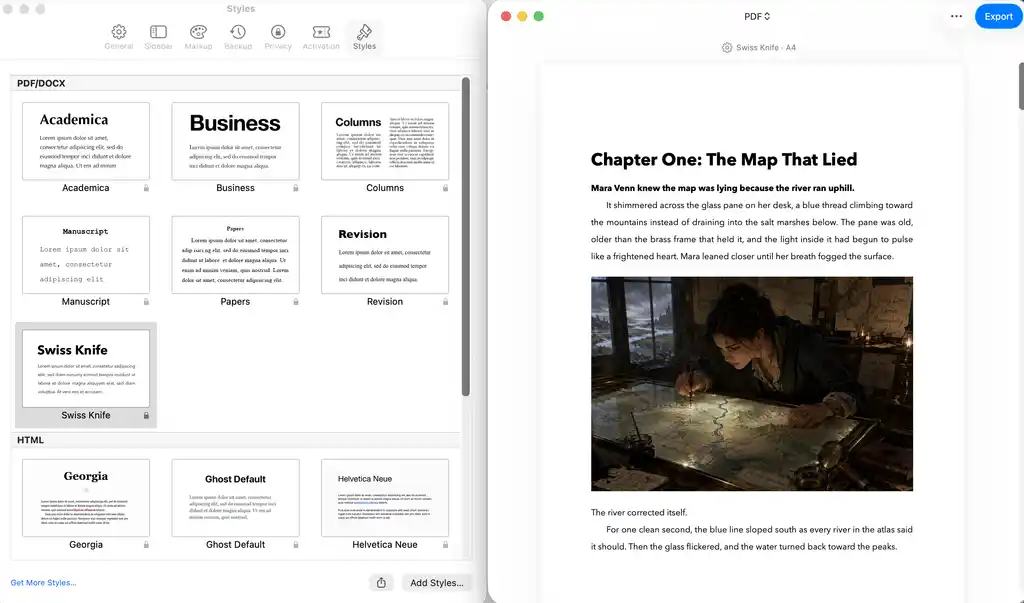
Exporting is one of Ulysses’ smoother features. You can export one sheet, a selection of sheets, or an entire group, then preview the result in formats such as PDF, DOCX, EPUB, HTML, and plain text. This feels especially convenient on iPad, where Ulysses makes it easy to share a clean draft quickly.
For ebooks, Ulysses is practical rather than advanced. EPUB export lets you add metadata like title, author name, cover image, formatting style, and table of contents levels, which is enough for a simple ebook draft or a clean basic EPUB.
There is also more formatting control than the minimalist interface suggests, especially on Mac, where export styles can be edited for things like margins, indents, fonts, spacing, headers, footers, and page breaks.
Print formatting is where Ulysses falls short. It can produce a tidy PDF, but it does not walk authors through trim sizes, bleed, margins, front and back matter, or print checks like dedicated book-formatting tools do. In short, it is strong for simple exports and basic ebooks, but not for professional print production.
Scrivener (4/5)
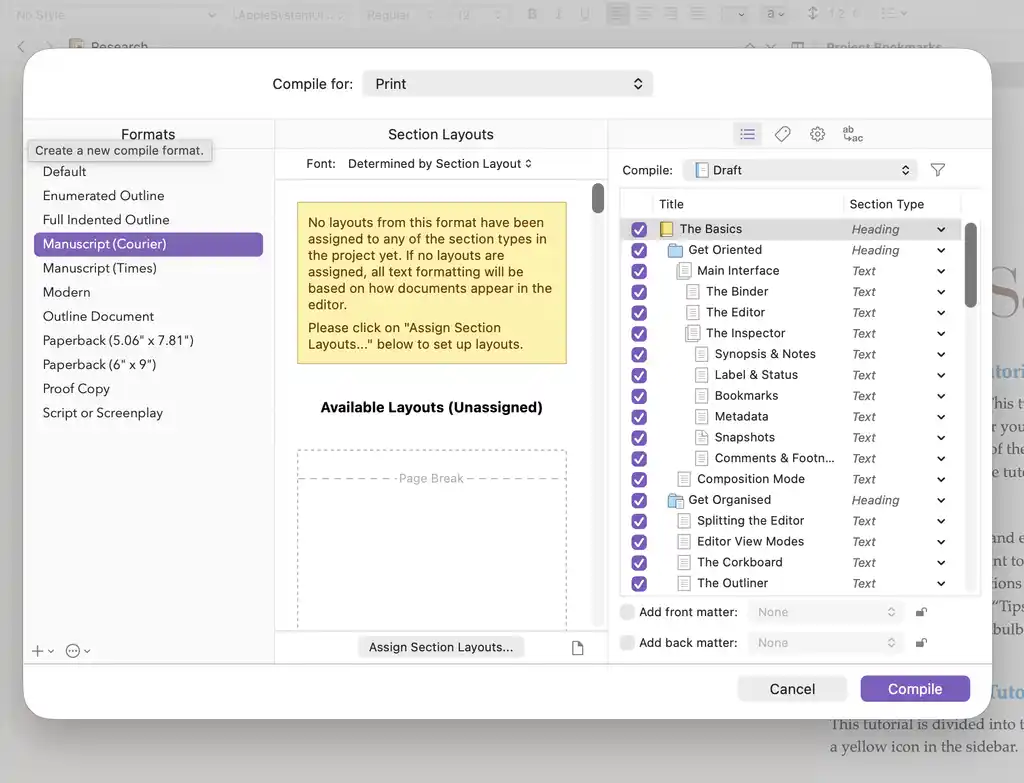
Scrivener’s export system is handled through Compile, which is both its strength and its weakness. You can export to formats like DOCX, PDF, EPUB, and other manuscript-ready files, with control over section breaks, titles, fonts, metadata, and table of contents behavior.
For authors who like granular control, Compile is powerful. You can decide how different document types should appear, create different outputs for different purposes, and reuse settings once they are configured.
That control is useful if you need different outputs from the same manuscript — a draft for an editor, a submission file, and an ebook export — but it also means Scrivener asks you to understand the machinery before it feels smooth.
But Compile is not intuitive. It often takes experimentation before the exported file looks the way you expect. Scrivener is excellent for producing functional exports and draft manuscripts, but it is not as streamlined as a dedicated formatter.
Pricing and platform availability
-
Ulysses (3/5): A polished Apple-only subscription at $39.99/year or $5.99/month.
-
🏆 Scrivener (4/5): A better long-term deal for many authors, with one-time Mac/Windows licenses and a generous use-based trial.
Ulysses (3/5)
Ulysses is available as a subscription: $39.99 per year or $5.99 per month. That gives you access across Mac, iPad, and iPhone, with your work synced through iCloud.
Whether that feels worth it depends largely on how committed you are to Apple devices. If you regularly move between desktop, tablet, and phone, Ulysses offers a very smooth experience: your writing is always there, without much file management.
That cross-device consistency is one of its strengths. Ulysses feels more unified than Scrivener does between its desktop and mobile versions, which can make a real difference for writers who draft on the go.
The downside is the subscription itself. For writers who prefer a one-time purchase, or who need Windows or Android support, Scrivener remains the more sensible option.
Scrivener (4/5)
Scrivener is sold as a one-time license by platform. The Mac and Windows versions are currently $59.99 each, and the iOS version is sold separately for $23.99.
The 30-day trial is generous because it counts days of actual use. If you only write on weekends, the trial can last far longer than a calendar month.
The downside is that licenses do not transfer across every platform. A Mac license does not automatically give you Windows or iOS access. Still, for writers who want a serious desktop writing tool without a subscription, Scrivener is good value.
The long-term math is still strongly in Scrivener’s favor for subscription-averse writers. If you plan to use the same writing app for years, a one-time license is easier to justify than an ongoing annual fee.
Conclusion: which tool wins?
-
🏆 Scrivener (21/30)
-
Ulysses (17/30)
If we add up the category scores, Scrivener comes out ahead: 21/30 compared with 17/30 for Ulysses. That does not mean Scrivener is better for everyone. It means Scrivener is the more complete long-form writing system.
Choose Scrivener if you need serious plotting tools or professional export, dislike subscriptions, and want a tool with a deep community and support archive behind it.
Choose Ulysses if you are already in the Apple ecosystem and want a clean, distraction-free place to draft, collect ideas, and move between devices with minimal friction. It is especially strong for short-to-mid-length writing and writers who like Markdown.
In short: Scrivener is the better tool for building and managing a complex book. Ulysses is the better tool for getting words down wherever you happen to be.
And if you’re still not convinced by either, why not try Reedsy Studio 一 it’s free at the core and it combines planning, drafting, collaboration, and formatting in a much more streamlined package.
Other writing app listicles, reviews, and comparisons on Reedsy:
-
Book writing software (Listicle)
-
Writing tools (Listicle)
-
Collaborative writing tools (Listicle)
-
Scrivener alternatives (Listicle)
-
Grammarly alternatives (Listicle)
-
Plagiarism checkers (Listicle)
-
Proofreading software (Listicle)
-
AI writing tools (Listicle)
-
Grammar checkers (Listicle)
-
Atticus (Review)
-
Campfire (Review)
-
Dabble (Review)
-
Grammarly (Review)
-
Hemingway (Review)
-
Novlr (Review)
-
Obsidian (Review)
-
Plottr (Review)
-
ProWritingAid (Review)
-
Scrivener (Review)
-
Squibler (Review)
-
Sudowrite (Review)
-
Ulysses (Review)
-
Vellum (Review)
-
Dabble vs. Scrivener (Comparison)
-
Grammarly vs. Hemingway (Comparison)
-
Reedsy Studio vs. Atticus vs. Scrivener (Comparison)
-
Scrivener vs. Word (Comparison)