Posted on May 25, 2026 08:39
The 5 Best Collaborative Writing Tools (2026)
Just as no Michelin-star kitchen would be complete without a sous chef, no book would be complete without a collaborator (or two!). Every project will need another pair of eyes on it at some point, whether that’s a co-author, editor, or beta reader. Bringing one aboard is much simpler with the right software, but with so many options available, knowing which one to choose can be overwhelming.
In this post, we’ll assess five of the most popular tools built for collaborative writing. Here’s a quick overview:
|
Tool |
Rating |
Price |
Best for |
| Reedsy Studio | 5/5 | Free, with optional add-ons | Collaborative book writing |
| Ellipsus | 4/5 | Free | Side-by-side drafting |
| Google Docs | 3/5 | Free | Quick edits |
| Microsoft Word | 3/5 | Free (web); $6.99/month (desktop) | Secure document sharing |
| Notion | 3/5 | Free, with limitations | Collaborative planning |
Reedsy Studio
Verdict: Studio brings co-writing, editing, and planning together in a way few tools do. For collaborative book writing, it's hard to beat.
Price: Free, with optional add-ons
Reedsy rating: ⭐️⭐️⭐️⭐️⭐️
Reedsy Studio lets you invite anyone with an account to co-write, edit, or proofread your book. Once they accept, they can edit directly or, with "Track changes" enabled, leave suggestions for you to review, accept, or comment on.
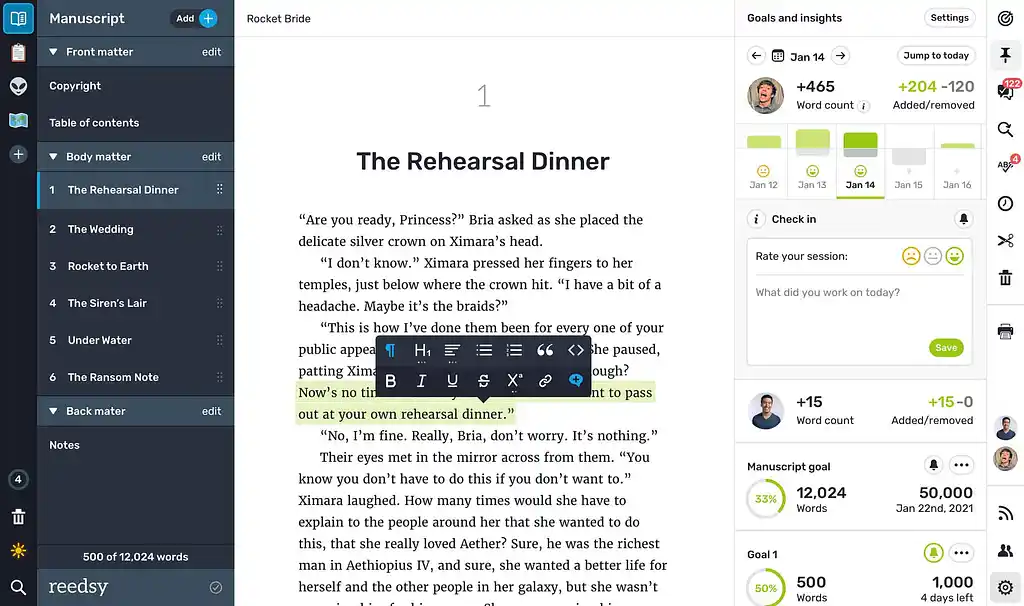
You can also share your book using a preview URL, which allows you to share a read-only version of your manuscript with early readers. Preview URLs allow you to choose which chapters you want to share, and add an expiration date to automatically revoke access after a set period.
Boards are one of Studio’s most convenient collaborative features, viewable on the left-hand side of the interface. These are separate spaces you can use to create supporting documents like character profiles, worldbuilding notes, and research notes. When a collaborator accepts your invitation, they gain access to the entire book, including any Boards you may have created. This means you can collaborate not only on the manuscript itself, but on all the planning and research that goes into it.
If you’d like to upgrade your Studio experience, you can do so with the optional Craft and Outlining add-ons, but every collaboration feature is available completely for free.
Ellipsus
Verdict: Ellipsus’ Draft system helps keep co-writing organized, and the chat feature is a fun addition that keeps discussion alongside the work itself. However, the lack of planning and organizational features means it's less suited to more research-heavy collaborations.
Price: Free
Reedsy Rating: ⭐️⭐️⭐️⭐️
First released in 2024, Ellipsus is a free, browser-based tool made specifically for collaborative writing. It's a newer option than most on this list, and updates land frequently.
Ellipsus centers on the Draft system, which allows each collaborator to work on their own copy of the manuscript while leaving the original untouched. You can compare drafts side-by-side and choose which changes you want to incorporate, which gives each collaborator the space to experiment without cluttering up the master manuscript.
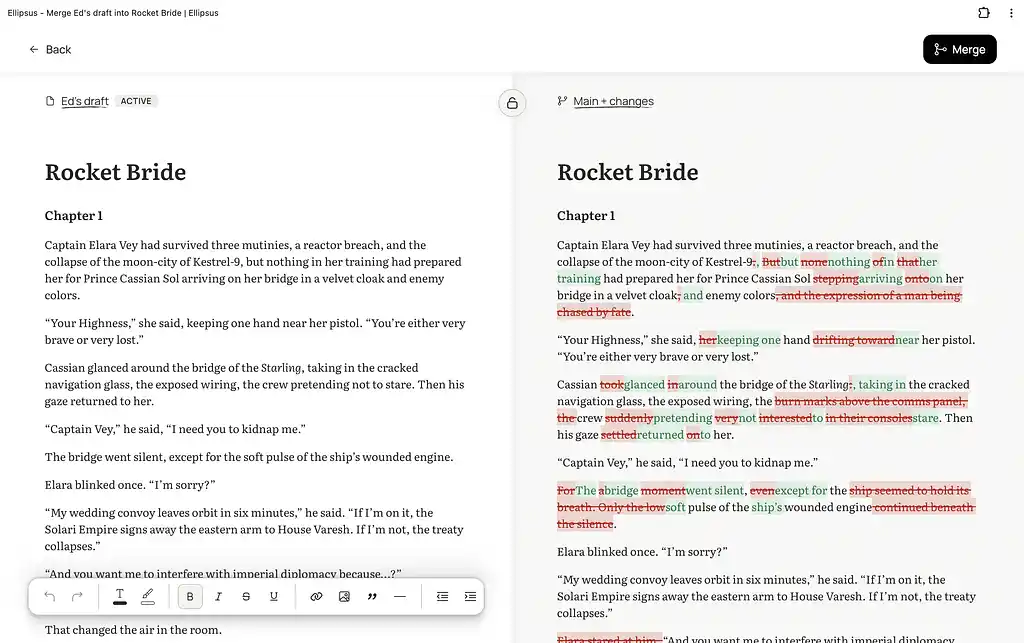
It also has a built-in chat feature, letting collaborators coordinate without leaving the app. Each draft keeps its own chat history, so conversations stay tied to the specific version they're about.
As of the time of writing, Ellipsus doesn't yet offer collaborative folders — each document has to be shared individually, which can be clunky on larger projects with multiple related files, like research notes or worldbuilding documents.
Google Docs
Verdict: Google Docs is a convenient tool for quick edits on shorter documents, but it wasn't built to handle book-length collaborative projects.
Price: Free
Reedsy rating: ⭐️⭐️⭐️
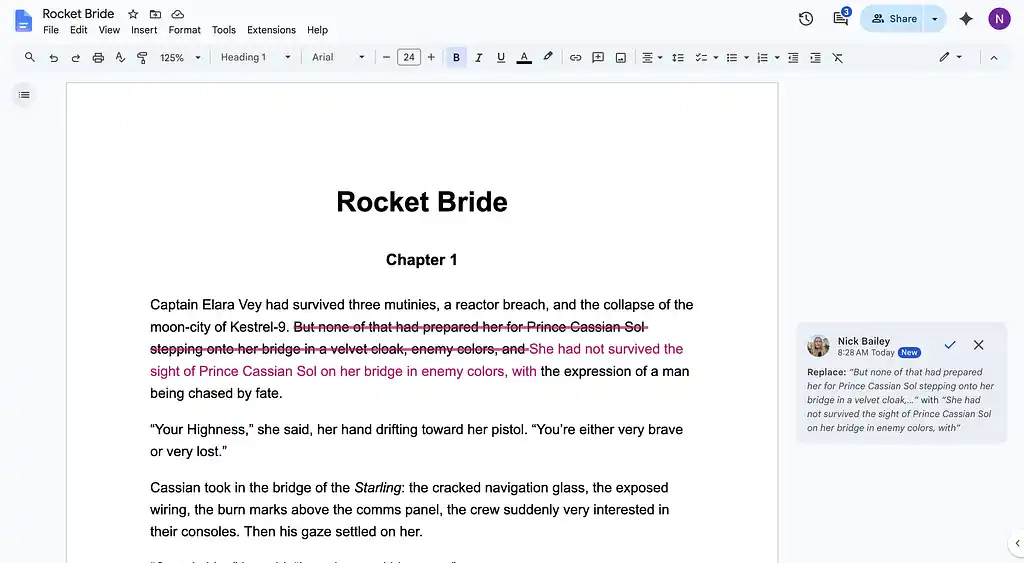
Likely the most widely used tool on our list, Google Docs is another free, browser-based tool that supports real-time editing with anyone who has a Google account. You can invite a collaborator using the “Share” button in the top right, either by generating a shareable link or adding their email to the access list. If a collaborator has editing permissions, they can toggle "Suggesting" mode to propose changes instead of editing directly. The owner can then review each suggestion and accept or reject it. What makes Docs so convenient is the low barrier to entry: almost anyone you'd want to share with already has a Google account, and there's nothing to install or learn.
For long, detailed writing projects, Google Docs falls short when compared to dedicated manuscript-writing software. Because Docs doesn’t offer dedicated chapter or scene divisions, real-time collaboration can feel awkward. If two editors are working in a document simultaneously, and one deletes a paragraph on page 1, the text on page 4 will shift upwards to fill the space, disrupting whoever's working below them.
There have also been reported cases of Docs blocking content from being shared if it violates Google’s terms of service. So if you’re collaborating on a spicy romance novel or graphic crime fiction, be aware that Google reserves the right to lock files mid-project.
Microsoft Word
Verdict: Word's most useful feature is its sharing controls — password-protected and expiring links let you decide who can access your work, and when. Its best tools are locked behind a paid subscription though, and with no native chapter or scene structure, it isn't suited for long-form manuscripts.
Price: Free (web); $6.99/month (desktop)
Reedsy Rating: ⭐️⭐️⭐️
Microsoft Word splits its collaboration features across two products: the paid desktop app, and the free Word for the Web. Basic functions like real-time co-writing, tracking changes, and link-based sharing are all available in the free web version, but the more powerful tools are locked to the desktop version, available for $6.99 a month.
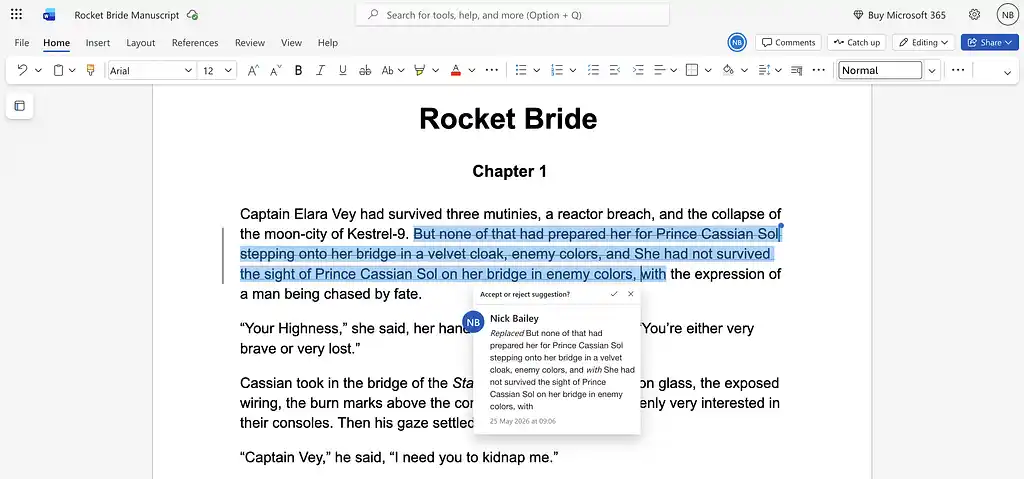
Word's collaboration tiers — Edit, Review, and View — function similarly to the Editor, Commenter, and Viewer roles in Google Docs. On desktop, shared links can be password-protected, or given an expiration date to automatically revoke access after a certain period.
So, what else does that $6.99 a month get you? The most notable desktop-exclusive is paragraph locking, which prevents two collaborators from editing the same paragraph simultaneously. You can also open two versions of a manuscript side by side with Compare and Merge Documents to merge them selectively, similar to Ellipsus’ Draft system. This is particularly convenient for cowriters who both want to work on a document offline — another feature that's only available to desktop users.
Word offers no native chapter or scene structure — a 90,000-word manuscript is one continuous scroll. The Navigation Pane lets you jump between headings, but there's no way to isolate the section you're working on. It’s also worth noting that a manuscript has to live on the Microsoft OneDrive to be collaborative — a .docx emailed as an attachment is an entirely different document.
Notion
Verdict: Despite the initial learning curve, Notion is a powerful tool if you’re planning a research-heavy project. However, the block system makes it less suited to drafting the manuscript itself.
Price: Free, with limitations
Reedsy Rating: ⭐️⭐️⭐️
Compared to the software we’ve covered so far, the collaborative writing tools available on Notion are somewhat lacking. This is to be expected — Notion positions itself as a “collaborative AI workspace” rather than a dedicated word processor, after all. But while Notion may not be the best choice for cowriting a full manuscript, it’s certainly worth considering as a collaborative planning tool.
Notion uses a unique database system that lets you store reference material like character bios, timelines, and research notes alongside your prose. Structured content can be placed in multiple places throughout a document, so if one entry is updated, every copy syncs automatically.
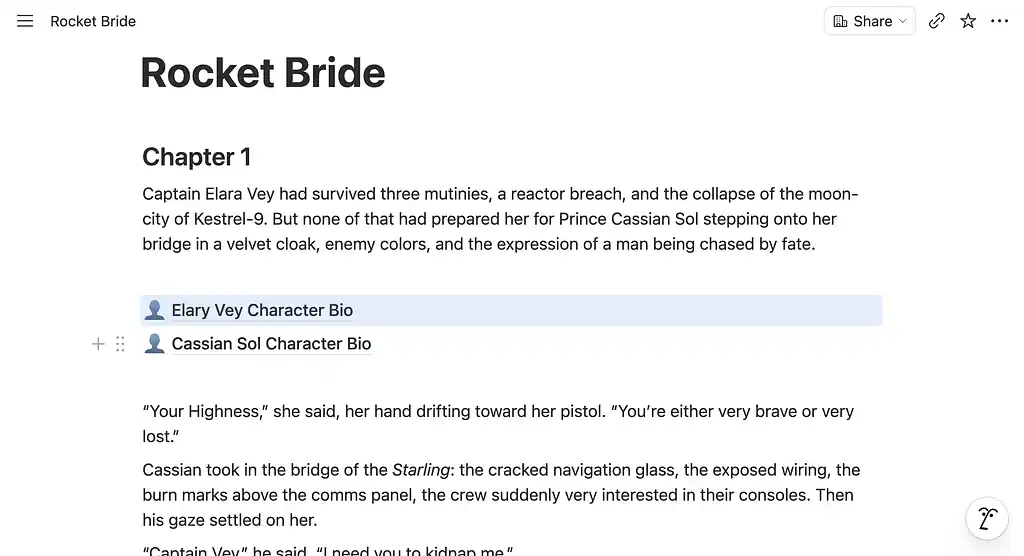
Like the other tools we’ve covered, Notion lets you invite collaborators via email or shareable link. Permissions can be set at the page or database level, so you can share specific sections with beta readers or editors while keeping your structured data private. The free tier is generally sufficient for most collaborative projects, but you can subscribe to Notion's Plus plan for $10 per month if you're concerned about hitting the free plan's block limit.
While Notion’s block-based system may be convenient for research and planning purposes, it can be awkward for long-form prose. Because every paragraph in Notion is a separate block, if you want to select text across paragraphs or rearrange a passage, you end up grabbing entire paragraphs instead of the text inside them. As a result, Notion’s interface can feel a little less intuitive than a traditional word processor, making it a tougher sell for collaborators who haven't used Notion before.
The best tool depends on what you need it to do — a quick round of edits and a fully co-written manuscript have very different needs. Work out which features matter most for your project, then make your selection from there.
All writing app listicles, reviews, and comparisons on Reedsy:
-
Book writing software (Listicle)
-
Writing tools (Listicle)
-
Scrivener alternatives (Listicle)
-
Grammarly alternatives (Listicle)
- Plagiarism checkers (Listicle)
-
Atticus (Review)
-
Campfire (Review)
-
Dabble (Review)
-
Grammarly (Review)
-
Hemingway (Review)
-
Novlr (Review)
-
Obsidian (Review)
-
Plottr (Review)
-
ProWritingAid (Review)
-
Scrivener (Review)
-
Squibler (Review)
-
Sudowrite (Review)
-
Vellum (Review)
- Ulysses (Review)
-
Dabble vs. Scrivener (Comparison)
-
Reedsy Studio vs. Atticus vs. Scrivener (Comparison)
-
Scrivener vs. Word (Comparison)