Posted on September 09, 2025 08:47
Reedsy Studio vs. Atticus vs. Scrivener: Which Should You Choose?
With so many book writing and formatting tools out there, picking the right one can feel overwhelming. The key is finding a software that matches your workflow, budget, and publishing goals. Three names that often come up are Reedsy Studio, Atticus, and Scrivener.
In this post, we’ll break down what each tool does best — and who they’re really designed for.
In a nutshell:
- Reedsy Studio is ideal for budget-conscious writers who want a solid editor, decent organizational tools, and polished, professional formatting.
- Atticus suits indie authors who write elsewhere but want high text customization and professional-looking exports.
- Scrivener is for writers who “live in their outlines” and need robust organizational features for complex projects.
|
Class |
Reedsy Studio |
Atticus |
Scrivener |
|
Pricing |
Free (Add-ons: $4.99/mo Craft, $7.99/mo Outlining) |
$147 one-time |
$59.99 one-time |
|
Platform Availability |
Web only |
Web + Desktop PWA (limited offline) |
Offline - Desktop and App (Mac/Win/iOS) |
|
User Interface & Learning Curve |
Beginner friendly |
Beginner friendly |
Steep learning curve, tutorial required |
|
Writing & Editing |
Clean editor with goals and revision history |
Basic editor with no spellcheck/focus mode |
Powerful editor with strong focus mode and split view |
|
Organization & Plotting |
Visual boards, templates |
None |
Digital binder, research folder, powerful corkboard |
|
Formatting & Export |
Professional, few templates |
Professional, highly customizable |
Professional, but complex |
|
Collaboration Features |
Real-time, free, easy to invite collaborators |
Limited, requires collaborators to own Atticus |
Minimal, Dropbox workaround required |
Let’s break down how well each tool does across various categories, starting with how welcoming each platform is to new users. Since most writers get started with MS Word or Google Docs before switching to a proper novel writing app, let’s test them by importing a .docx draft.
Interface & Learning Curve
- 🏆 Reedsy Studio (5/5): Easiest to start with, seamless import, ready in seconds.
- Atticus (3/5): Friendly UI but messy import.
- Scrivener (2/5): Powerful but overwhelming, requires a tutorial.
Reedsy Studio (5/5)
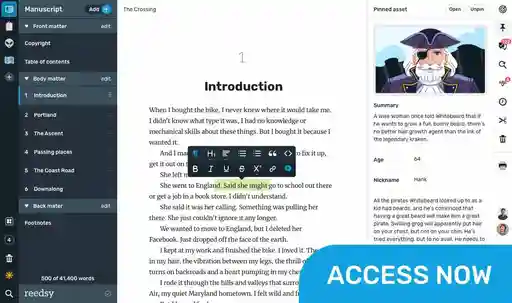
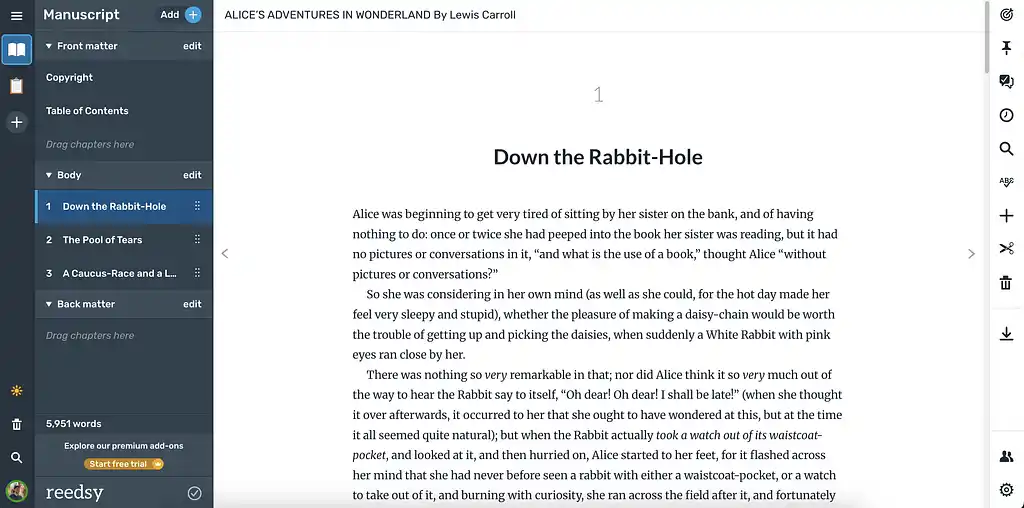
Reedsy Studio welcomes you into a clean, intuitive “bookshelf” where you can write or import as many projects as you like. The interface is straightforward enough that you can start writing within seconds of signing up.
When importing, Studio automatically separates chapters and preserves your original formatting. Not many tools match this quality and ease of import. The only drawback is that you can’t resize images inside the editor, so it’s best to adjust them beforehand. Otherwise, you can get writing in the editor in no time.
Atticus (3/5)
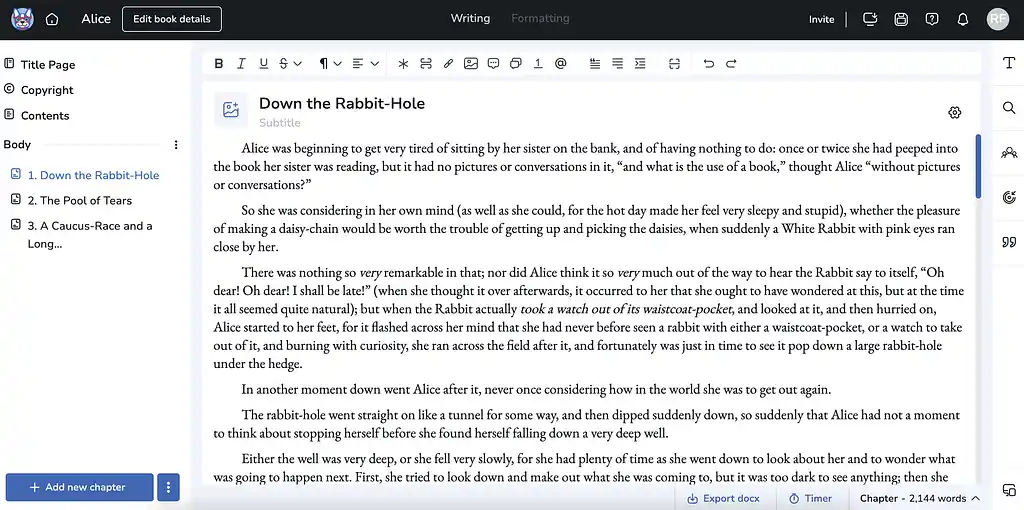
Atticus also offers a clean, intuitive interface with a bookshelf-style dashboard where you can start a new project or import one. Unlike Reedsy Studio, the importing process is a lot clunkier. Atticus struggles to detect chapter breaks and doesn’t handle pre-formatted or copy-pasted text well. This is especially annoying since, as we’ll see, its editor isn’t the best environment for writing a full book. It also doesn’t include a built-in proofreader — so you’ll likely need to do some copy-paste anyway. That said, the platform is practical and easy to use from the get-go.
Scrivener (2/5)
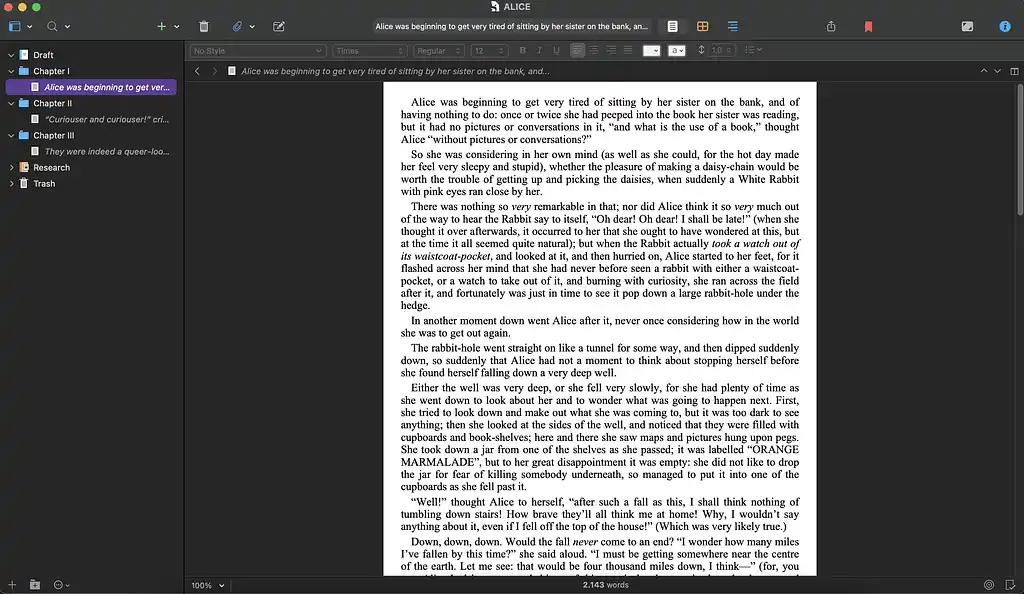
Scrivener is the most “sophisticated” and feature-rich of the three tools, but it also comes with the steepest learning curve. Instead of diving right in, you’ll need to complete its lengthy tutorial to grasp the basics — not just the advanced tools.
If you skip the tutorial, expect to spend a lot of time Googling solutions to roadblocks like “how to import a manuscript into Scrivener.” Even that isn’t straightforward: you need to insert a hash (#) before each chapter or scene in your word processor (e.g. Google Docs) for Scrivener to recognize them as separate documents. Once you get the gist of how it works, it becomes easier to use.
Let's now dive into the meat of the writing process — how each platform handles drafting, revising, and polishing your manuscript.
Writing & Editing
- Reedsy Studio (4/5): Clean, distraction-free editor with solid goals and history.
- Atticus (2/5): Weak editor — fine for tweaks, not full drafting.
- 🏆 Scrivener (5/5): Feature-rich editor built for serious writing sessions.
Reedsy Studio (4/5)
Reedsy Studio offers a great writing editor that prioritizes simplicity and a pleasant writing experience. Here are some of the main features:
- ✍️ Good editor: Clean writing space with auto-indentation, basic formatting, block quotes, image uploads, and footnotes/endnotes.
- 👁️ Focus mode: Option to hide side panels for full-screen writing.
- 🌙 Dark mode: Available with the premium plan.
- 📝 Spellcheck: To quickly correct mistakes.
- 🎯 Writing goals: Set word count and deadline targets. Choose your writing days to get automatic daily goals.
- 📜 Revision history: Timeline tracks every change so you can view and restore past versions.
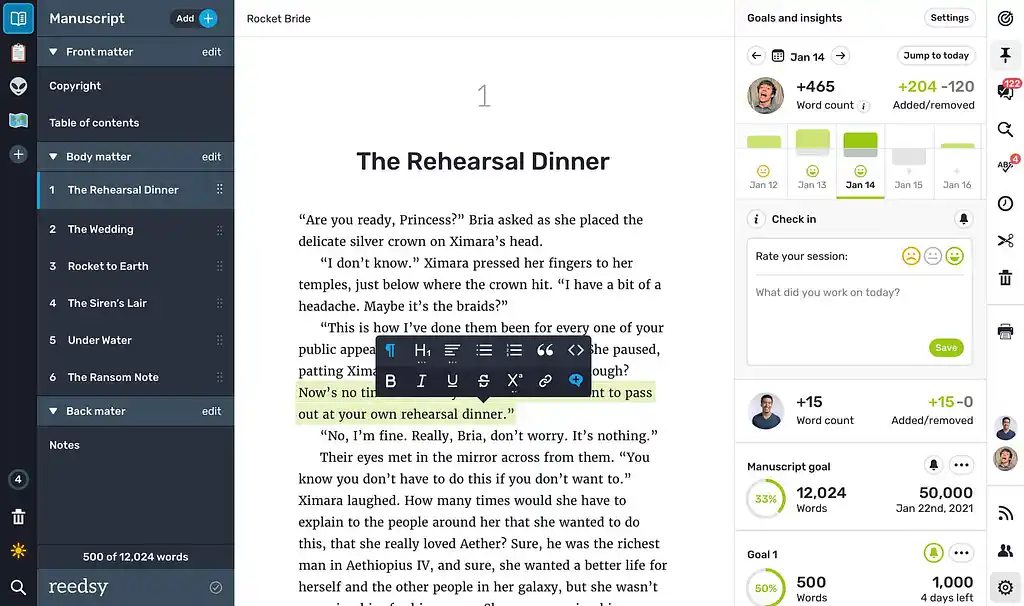
With the premium version, you get advanced writing stats (e.g. most used words and phrases), reading time estimates for chapters, daily writing check-ins, and email reminders to keep you on track.
The main limitation of Studio’s editor is that you can’t switch between different fonts or heavily customize the page layout, though you can still export your work in three different templates: Reedsy, Classic, and Romance.
Atticus (2/5)
Atticus’s bare-bones editor is probably its weakest feature. There’s not even a basic spellchecker, let alone a focus or dark mode. It’s not an inviting space to write in, so you’ll likely want to use Atticus mainly for formatting your book’s interior and exporting it.
That said, it does have some nice features:
- ✍️ Basic editor: Offers standard text formatting, scene and page breaks, images, footnotes, and hyperlinks. You also get four font options.
- ✨ Text customization: Add stylistic touches like callout boxes (great for nonfiction), decorative page breaks, and “text message” formatting — all with detailed customization controls.
- 🎯 Goals and tracking: Set project-based word count goals with deadlines, or track daily writing streaks to build consistency.
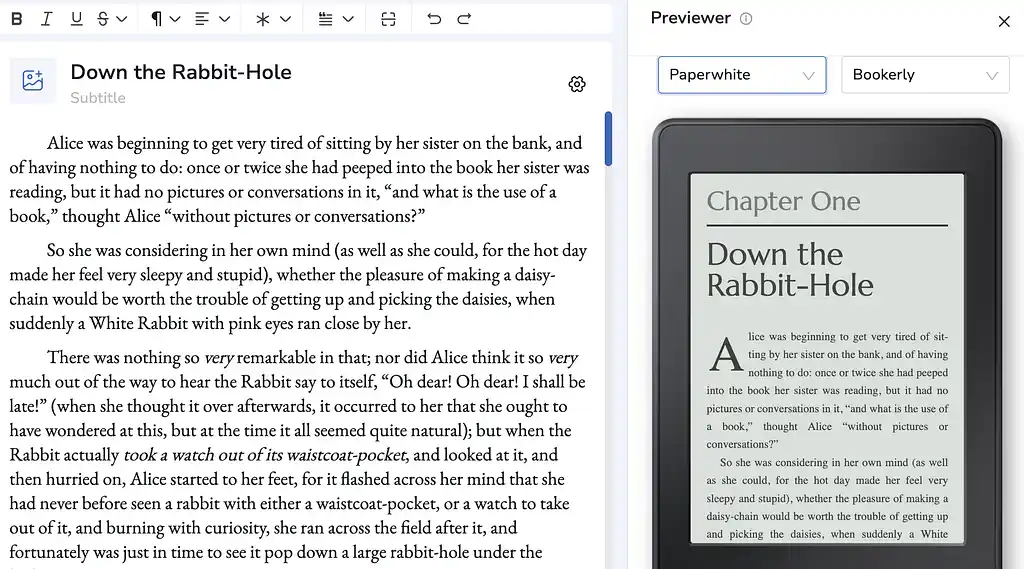
- 👀 Previewer: One of Atticus’s highlights. You can see how your book will look on different e-readers, with various fonts and sizes, in real time.
Scrivener (5/5)
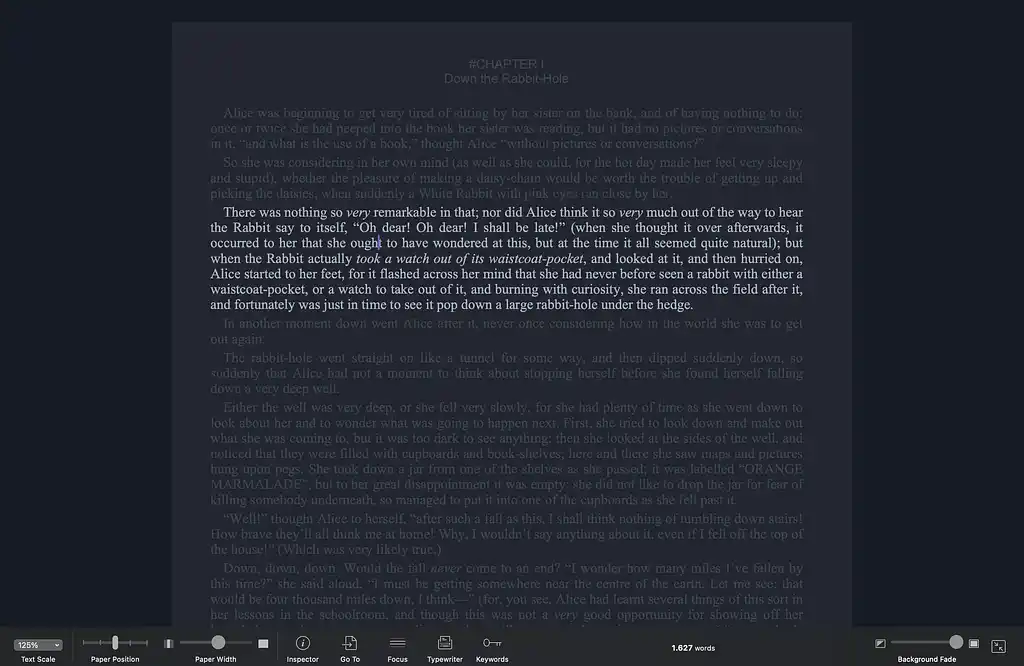
Scrivener features a powerful editor with a wide selection of fonts and formatting options. Its standout feature is focus mode, where you can simulate the experience of using a typewriter. With it, you can jump between chapters without breaking focus, highlight individual sentences or paragraphs (as you write them), and tailor the setup with plenty of customization.
Here are some other standout features:
- 🪞 Split screen: View and edit two chapters side-by-side for easy referencing.
- 📸 Snapshots: Save and restore earlier versions of your work at any time.
- 📊 Project targets: Track daily/session word counts and overall manuscript goals.
Now, how well does each platform handle working with co-writers, editors, and beta readers?
Collaboration Features
- 🏆 Reedsy Studio (5/5): Real-time sharing, seamless for co-writers and betas.
- Atticus (2/5): Requires collaborators to buy in — a big limitation.
- Scrivener (1/5): No real-time tools, Dropbox juggling required.
Reedsy Studio (5/5)
In Studio, you can invite anyone via email to co-write, edit, or proofread your book. Once they accept, they can make direct edits or suggestions (with “Track changes” enabled), which you can then review, accept, or comment on — making collaboration smooth and straightforward.
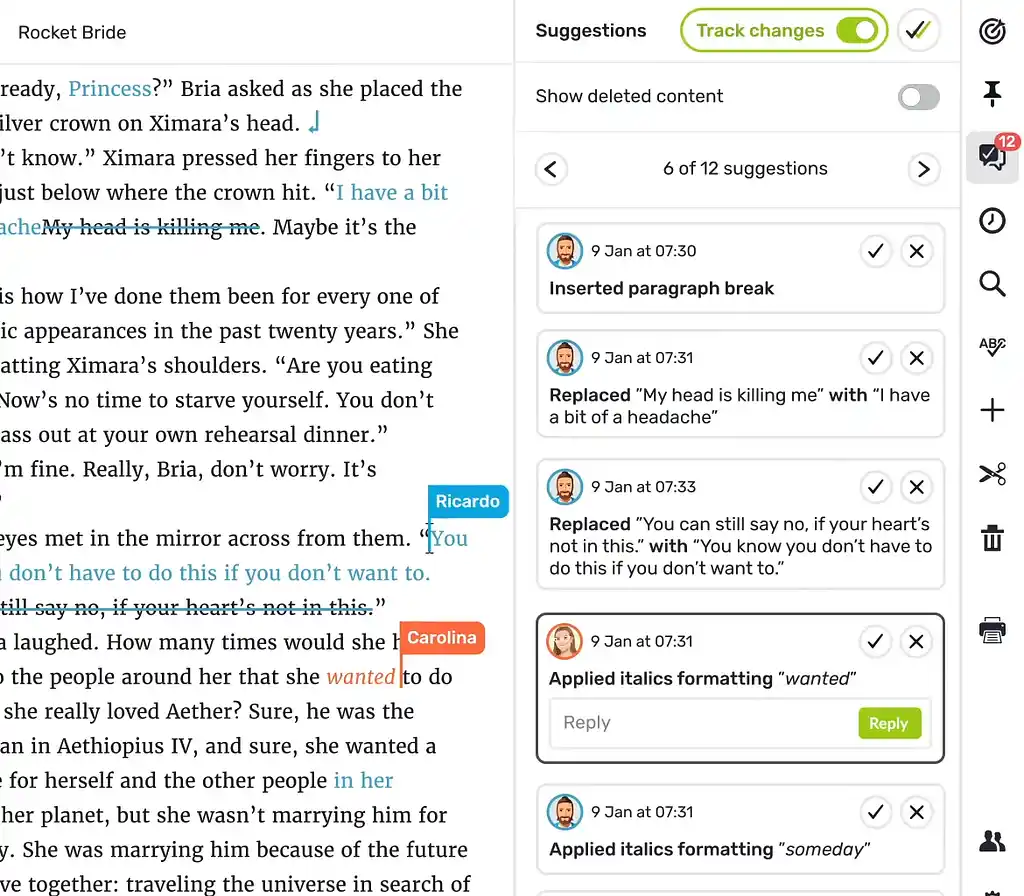
If you just want feedback, you can also generate a read-only link to share your draft. It works on any device, can be set to expire after a chosen date, and you can even limit access to specific chapters — ideal for beta readers.
Atticus (2/5)
Atticus also lets you invite co-authors, editors, or beta readers to collaborate, but only if their email is linked to an Atticus account (meaning they’ve also purchased it), which severely limits the usefulness of this feature. After all, not that many people have an Atticus account.
Scrivener (1/5)
Scrivener doesn’t support real-time collaboration. Sharing a project with co-writers or editors usually means setting up a shared Dropbox (or similar) folder and carefully coordinating who edits when. Only one person can safely open the project at a time, and they need to sync before and after each session. While this method works, it isn’t nearly as seamless as Reedsy Studio, or even Atticus.
For beta readers, there’s no built-in sharing option. The usual workaround is to compile and export your draft as a Word or PDF file, then collect feedback outside the app.
Next, let's explore how each tool helps you wrangle your story ideas, character notes, and research into something coherent.
Organization & Plotting
- Reedsy Studio (3/5): Visual boards with templates — good but limited.
- Atticus (0/5): No plotting tools.
- 🏆 Scrivener (5/5): Best-in-class Binder and Corkboard for complex projects.
Reedsy Studio (3/5)
Studio offers a visual planning system designed as a drag-and-drop cork board. You can create cards for scenes, characters, research notes, or story elements and organize them into folders. The system works well for both plotters and discovery writers — you might start with character cards and gradually expand scene outlines as your story develops.
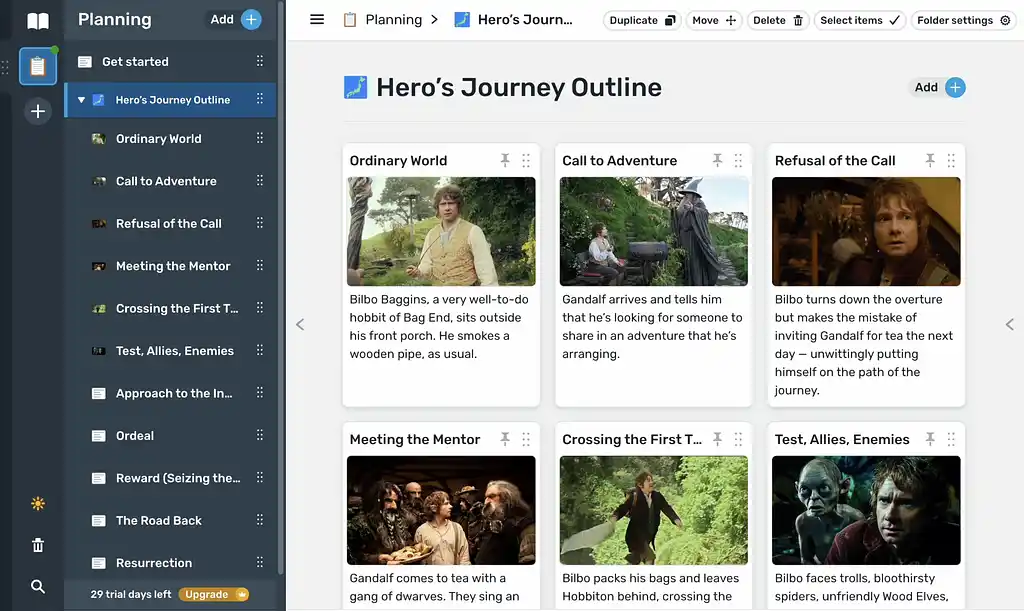
The platform comes with story structure templates, including the Hero's Journey, with more templates being added regularly. Cards can contain detailed information that you can rearrange easily if you want to experiment with plot structure.
With the premium version, you get enhanced planning features:
- Unlimited boards and notes,
- The ability to add attributes to cards (like character details, locations, dates),
- Card connections to map relationships,
- The option to pin notes to your writing window for reference while drafting.
The planning section feels integrated with the writing process. You can keep your outline open while writing and easily switch between planning and manuscript views.
Atticus (0/5)
Atticus offers virtually no organizational or plotting features. The platform focuses entirely on the formatting and presentation aspects of book creation.
Scrivener (5/5)
Organization is where Scrivener really shines. It has countless features, but these two stand out the most:
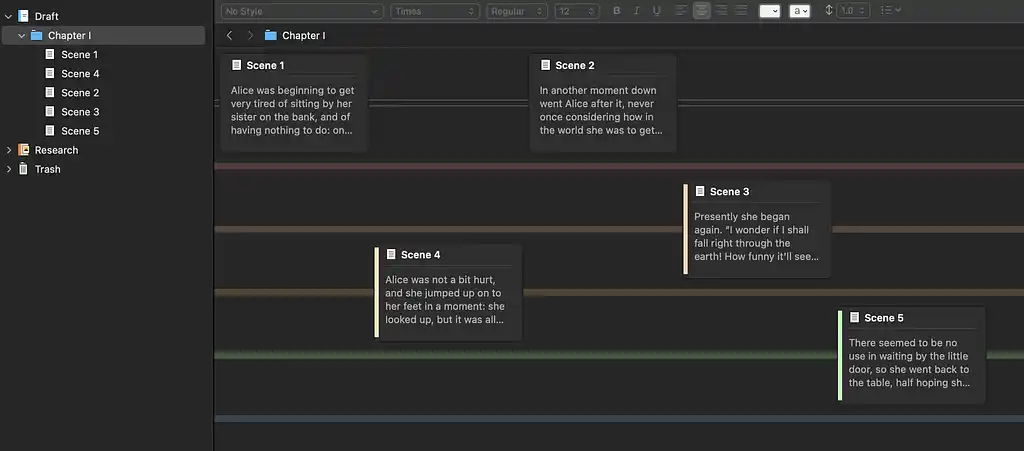
📒 The Binder: the heart of Scrivener, working like a digital ring-binder for your whole project. You can break your manuscript into smaller chunks — chapters, scenes, or even shorter sections — and rearrange them with simple drag-and-drop. It also includes a dedicated research folder where you can store images, websites, PDFs, notes, character sketches, and more, so your book’s “bible” is always within reach as you write.
🧑🏫 The Corkboard: a virtual corkboard with index cards, perfect for visual thinkers. You can shuffle these cards around to test different plot orders, rearrange scenes, and get a bird’s-eye view of your story. Every change syncs automatically with the Binder and manuscript. You can even color-code cards to track character arcs, subplots, or timelines, helping you juggle multiple narrative threads at once.
Next up, let’s see how each platform transforms your messy manuscript into a professional book file ready for readers.
Formatting & Export
- Reedsy Studio (4/5): Simple and polished, but only 3 themes available.
- 🏆 Atticus (5/5): Unmatched customization and pro-level exports.
- Scrivener (4/5): Functional, but dated and clunky to configure.
Reedsy Studio (4/5)
Studio's formatting capabilities are impressive, especially considering they're completely free. You can see how your book will look from the preview link that you use to share your work with beta readers. Studio currently only offers three preset themes, which you can’t customize (unlike Atticus). Still, the available options are clean and polished, ensuring a professional look for publication.
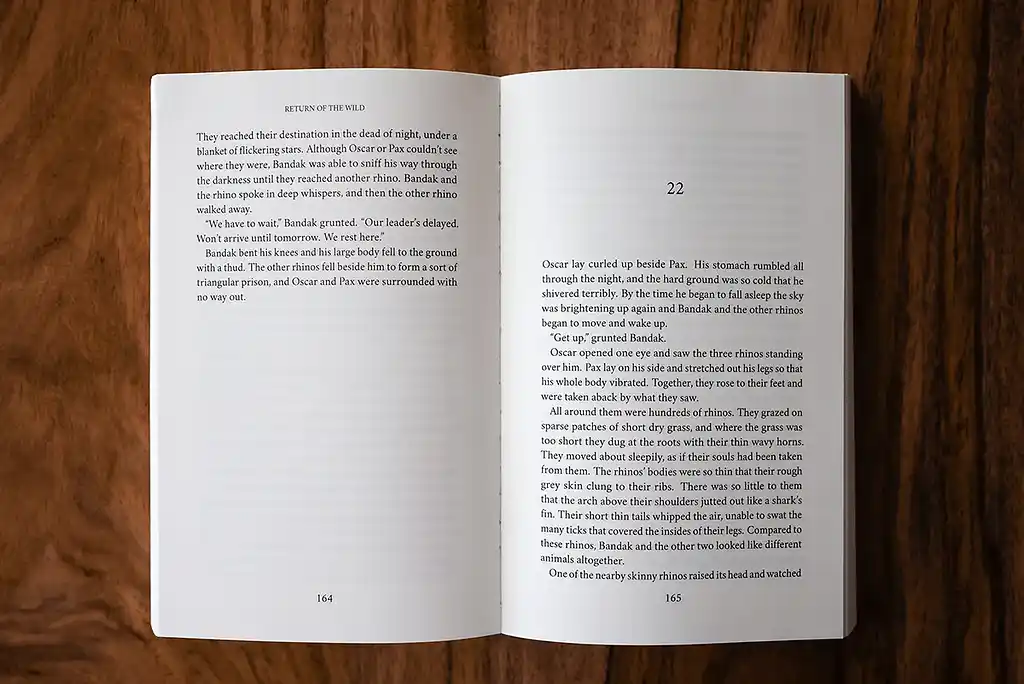
One of the best things about Studio formatting is how easy it is to set up the front and back matter. Copyright pages, table of contents, and other book elements can be configured with simple toggles.
The export process is streamlined: choose your cover image, select a theme, pick your trim size for print books, and export. You'll get professional-grade EPUB files for digital retailers and print-ready PDFs optimized for services like Amazon KDP and IngramSpark.
Atticus (5/5)
Atticus truly shines in the formatting department. The platform offers exceptional customization options with 17 built-in templates plus the ability to create completely custom themes. You can fine-tune fonts, sizes, spacing, and alignment for every element of your book.
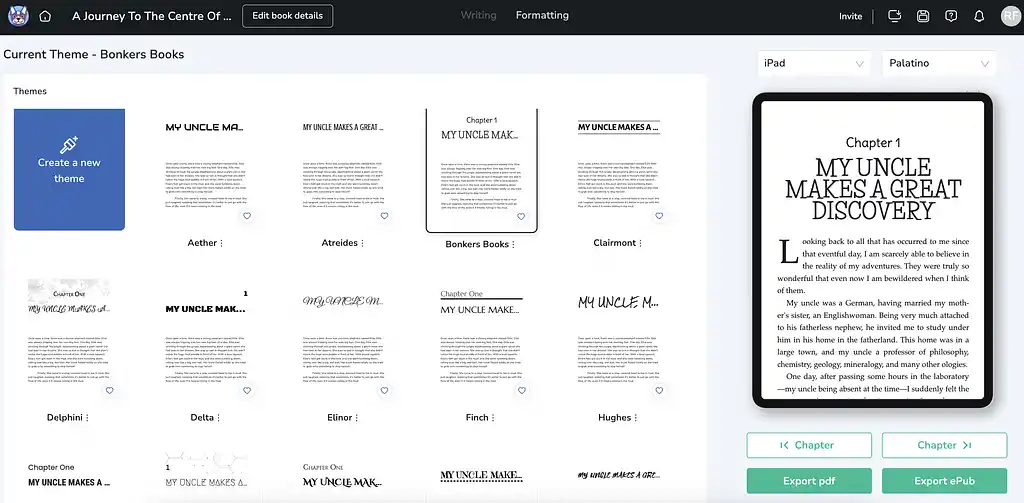
The real-time previewer is again a nice feature — you can see how your formatted book will look across different e-reader types, fonts, and sizes instantly.
The front and back matter selection is extensive, covering everything from copyright pages to forewords, prefaces, and bibliographies. Templates are available for both fiction and nonfiction, which simplifies setup.
For print books, Atticus shows which trim sizes work with major print-on-demand services, and the export process produces high-quality PDFs optimized for professional printing.
Scrivener (4/5)
Scrivener’s export system is handled through its Compile feature, which is powerful, but less intuitive than Studio or Atticus. You can generate EPUB and MOBI files for digital retailers, complete with metadata, cover images, and an auto-linked table of contents.
The Compile panel also lets you adjust fonts, section breaks, and titles for different document types, giving you granular control over how your manuscript comes together.
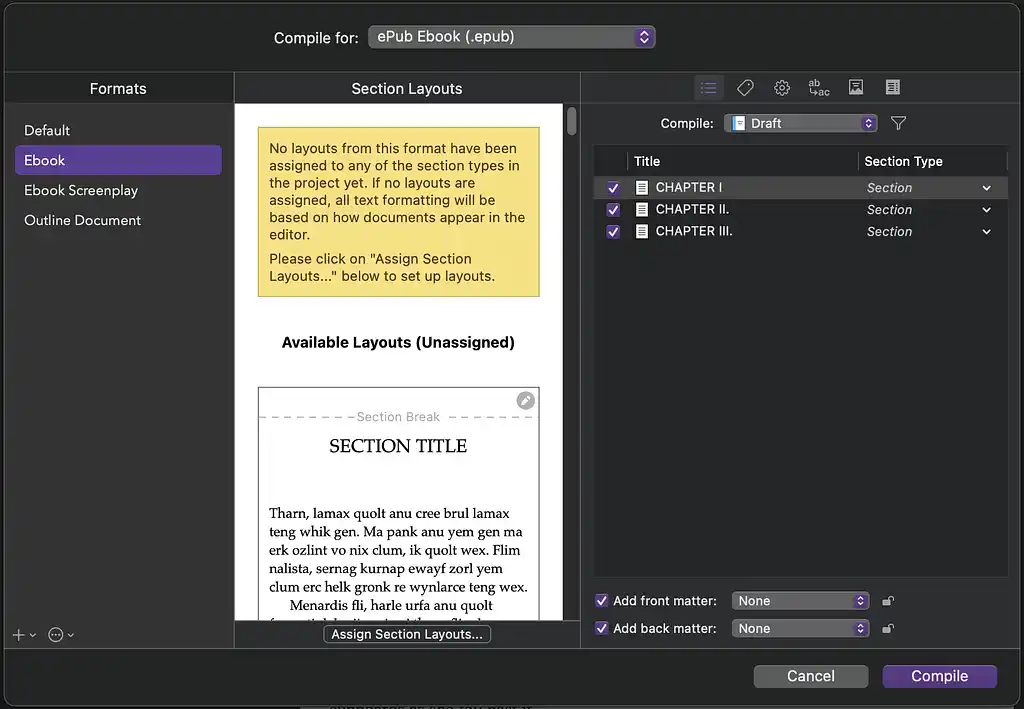
Overall, Scrivener is excellent for creating a functional, professional-grade EPUB or a solid draft PDF. But compared to Atticus’s templates or Studio’s streamlined process, it demands more setup and experimentation. It’s best suited for writers who like fine-tuning their output rather than relying on presets.
Finally, let’s consider how much you'll pay and where you can use each tool.
Pricing and Platform Availability
- 🏆 Reedsy Studio (5/5): Free core, cheap add-ons, but online-only.
- Atticus (2/5): One-time $147, flexible but limited offline.
- Scrivener (4/5): Affordable one-time fee, full offline, but no Android.
Reedsy Studio (5/5)
Reedsy Studio’s manuscript editor and formatter are free. With it, you gain access to one writing goal, a 30-day history, and a single planning Board — enough for most beginners.
For more, you can upgrade:
- Craft Add-On ($4.99/month): unlimited version history, advanced stats, customizable goals, daily check-ins, dark mode.
- Outlining Add-On ($7.99/month): unlimited Boards/Notes with Attributes, pinned notes, list view, dark mode.
Both come with a 30-day free trial (no credit card needed).
Studio is web-based only, so while your work is always backed up and accessible anywhere, it won’t suit those who want true offline access. Still, the free core feature and cheap add-ons make it one of the most compelling novel writing tools, especially for budding writers.
Atticus (2/5)
To get Atticus, you’ll need to make a $147 one-time purchase that covers lifetime access and updates.
The platform offers both browser-based access and a desktop Progressive Web App (PWA), which gives you some flexibility in how you work. However, the "offline" functionality is limited: you'll still need internet access for importing and exporting files, and you must open your project online first before working offline. It's a compromise that works for occasional offline sessions, but it may frustrate writers seeking true offline independence.
Atticus sweetens the deal with a 30-day money-back guarantee, making it essentially risk-free to try. For authors who want high formatting customization and who publish multiple books, $147 can be a good deal.
Scrivener (4/5)
At $59.99 for a one-time purchase, Scrivener is certainly an affordable option considering its extensive offerings.
Scrivener is a true desktop application available for Mac, Windows, and iOS (no Android option), which means your work saves locally to your device. This is perfect for writers who value complete offline access and control over their files, but it also means you're responsible for backing up your work — there's no automatic cloud sync (unless you set it up yourself through a service like Dropbox or iCloud).
Literature and Latte offers a generous 30-day trial, but here's the clever bit: it's 30 days of actual use. If you only write on weekends, that trial could last you 15 weeks, giving you plenty of time to determine if Scrivener's learning curve is worth climbing.
Conclusion: Which Tool Wins?
If we round up the scores, Reedsy Studio comes out on top (26/30). Scrivener is a close second (21/30), while Atticus trails behind (14/30).
- Choose Reedsy Studio if you want a free, beginner-friendly environment with seamless collaboration and professional-looking exports. It’s the most balanced choice overall.
- Choose Atticus if you write in another tool but need strong formatting customization. It’s less ideal as a writing app, but excellent for final polish.
- Choose Scrivener if you’re a planner who loves deep organization and doesn't mind a learning curve. Its offline reliability makes it great for distraction-free writers.
In short: Reedsy is the best all-rounder, Scrivener is the power user’s tool, and Atticus is a formatter first, writer second.
Other writing app listicles, reviews, and comparisons on Reedsy:
-
Book writing software (Listicle)
-
Writing tools (Listicle)
-
Collaborative writing tools (Listicle)
-
Scrivener alternatives (Listicle)
-
Grammarly alternatives (Listicle)
-
Plagiarism checkers (Listicle)
-
Proofreading software (Listicle)
-
AI writing tools (Listicle)
-
Grammar checkers (Listicle)
-
Atticus (Review)
-
Campfire (Review)
-
Dabble (Review)
-
Grammarly (Review)
-
Hemingway (Review)
-
Novlr (Review)
-
Obsidian (Review)
-
Plottr (Review)
-
ProWritingAid (Review)
-
Scrivener (Review)
-
Squibler (Review)
-
Sudowrite (Review)
-
Ulysses (Review)
-
Vellum (Review)
-
Dabble vs. Scrivener (Comparison)
-
Grammarly vs. Hemingway (Comparison)
-
Scrivener vs. Word (Comparison)
-
Ulysses vs. Scrivener (Comparison)