
Guides • Understanding Publishing
Last updated on Apr 15, 2026
How to Publish a Book on Amazon in 7 Simple Steps

Ricardo Fayet
Reedsy co-founder and Chief Marketing Officer, Ricardo Fayet has worked with hundreds of authors on their launches and marketing campaigns. He is the author of two bestselling guides on marketing for authors, and a regular presenter at the largest writers' conferences.
View profile →
Loretta Bushell
Loretta is a translator, proofreader, and writer with 4+ years of experience in the publishing industry. She helps freelancers and authors build sustainable careers.
View profile →As an expert book marketer and the author of two bestselling titles, I know how to publish a book on Amazon the right way.
You'll need to set up a free Kindle Direct Publishing (KDP) account, enter your book’s details, upload your files, and set your prices. However, to give your book the best chance of finding the right readers, you’ll need to put some thought into the process.
In this post, I’ll break every step down into simple instructions and share my top tips for publishing a book on Amazon.
Q: What are the crucial steps to successfully publishing a book on Amazon, from manuscript preparation to marketing?
Suggested answer

Publishing a book on Amazon comes down to two key components: a high-quality book and reaching the right readers. Think of it as creating a polished final product and ensuring the right audience sees it.
Your book cover is your first impression—it should clearly convey the genre and instantly appeal to your target readers. Next, your description should emotionally connect with potential buyers, drawing them into the story and making them want to hit "Buy." Adding credibility factors like Amazon reviews, editorial reviews, or awards can help reinforce their decision.
Pricing is another important step. It needs to align with what readers expect in your genre while leaving room to adjust as your book gains traction. Finally, traffic: you’ll need a plan to bring readers to your book’s page through advertising, promotions, or organic efforts like email lists.
Each of these elements works together to create the best possible experience for your readers and give your book its greatest chance at success. I work with my clients to ensure all these pieces are aligned and optimized, giving their books the boost they need to stand out on Amazon.
Jd is available to hire on Reedsy
1. Set up your Kindle Direct Publishing (KDP) account
The first step is to activate your KDP account — luckily, this is quick, free, and easy! Hop over to Kindle Direct Publishing, and either sign in with an existing Amazon account or click “Join KDP” to create a new one.
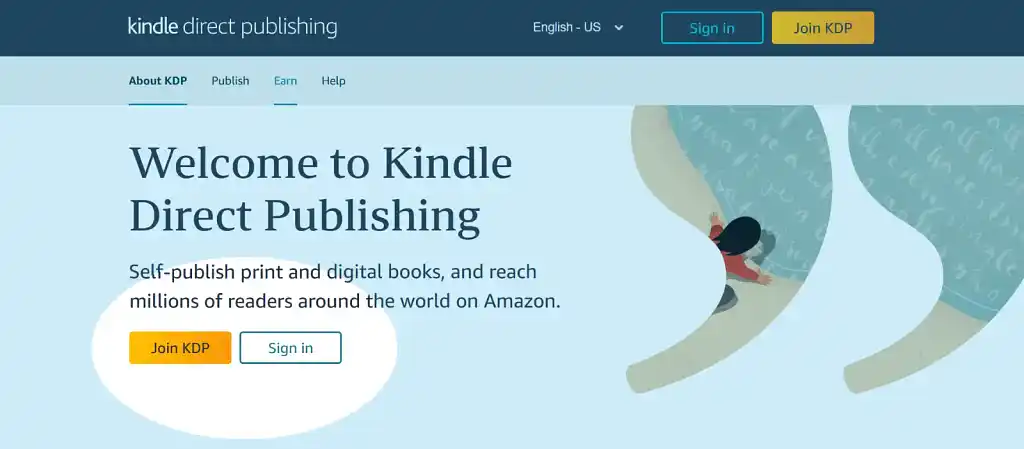
❗Don’t click “Join KDP” if you already have a regular Amazon account. Your login credentials will be the same across KDP and the marketplace, and authors are strictly forbidden from having more than one account.
Once you’re logged in, you’ll notice a message at the top of the page asking you to complete your account information — before you can upload your book, you’ll need to give Amazon your bank details and tax info. Click on “Your Account” to get started.

Here’s how to fill in each section.
-
Your Identity: Enter your name, address, and date of birth as they appear on your government-issued ID. Give your phone number with the country code.
-
Your Account > Account Details: Select your business type. Choose “Individual” if you’re publishing as an independent author and “Corporation” if you’re publishing on behalf of a company.
-
Your Account > Getting Paid: Add your bank details. For American accounts, you’ll need the account number and routing number 一 the first nine digits on the bottom of your checks. For British accounts, you’ll need the IBAN number and BIC code. You’ll also have to provide the account holder's name, date of birth, and address (or the company’s place and date of incorporation).
-
Tax Information: Click “Complete Tax Profile” and answer the questions to establish your tax identity. As an independent author, you’ll need your US Tax Identification Number (TIN) or an equivalent from your country — for example, your National Insurance Number or Unique Taxpayer Reference if you’re in the UK. If your country doesn’t issue a recognized TIN, you can apply for a US TIN on the IRS website.
You may also have to complete two-step verification to protect your account. Simply enter your mobile number or use an authenticator app to set up one-time passcodes.
Q: What do authors commonly misunderstand about Amazon KDP?
Suggested answer
A common misconception is that simply uploading a book to Amazon will lead to sales. Many authors believe readers will naturally discover their work, but the truth is, success on Amazon requires strategy. One of the biggest challenges is crafting a compelling book description. It’s not just a summary—it’s your pitch, designed to emotionally connect with potential readers and entice them to buy.
This can feel overwhelming, especially when condensing a 100,000-word story into just 160 words. Yet, studies show that your book description is one of the most critical factors in a reader's decision to purchase. Think of it as your best salesperson—if it’s not grabbing attention and building intrigue, your book may be overlooked. With the right approach, this small but mighty element can make all the difference.
Jd is available to hire on Reedsy
2. Create a new title and enter your book’s details
With your account information in order, you’re ready to start publishing your book! Click on “Bookshelf,” then “Create a new title or series.”
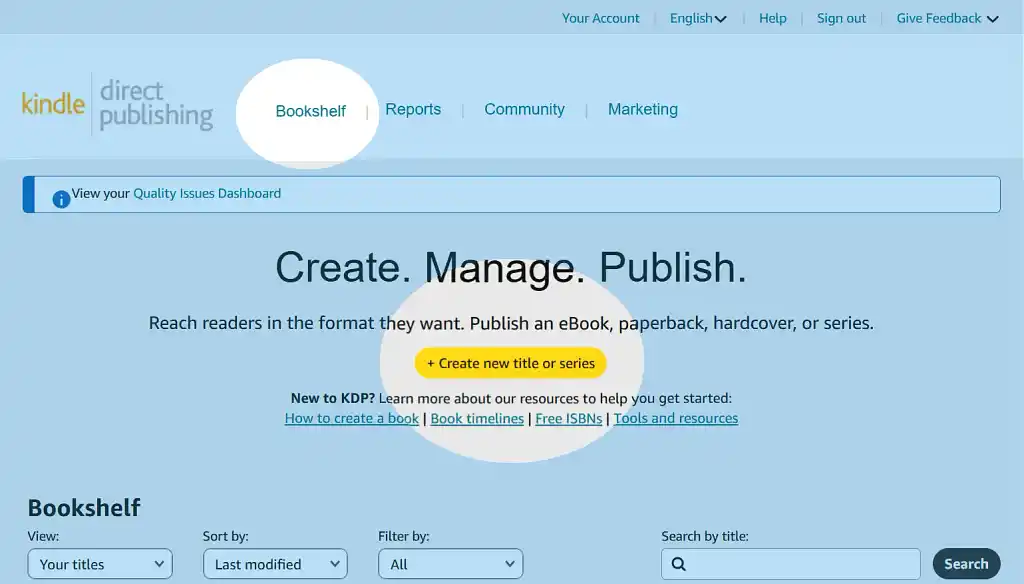
You’ll be asked whether you want to publish a Kindle ebook, paperback, hardcover, or series page. I’ll focus on how to publish an ebook for the majority of this post, but if you’re interested in paperbacks, I’ll cover that too at the end.
💡Believe it or not, hardcover printing was introduced to KDP as late as 2021. Find out all about it in our step-by-step guide.
Clicking “Kindle Ebook” will bring you to a dashboard with three sections: Details, Content, and Pricing. Let’s tackle them one by one, beginning with Details.
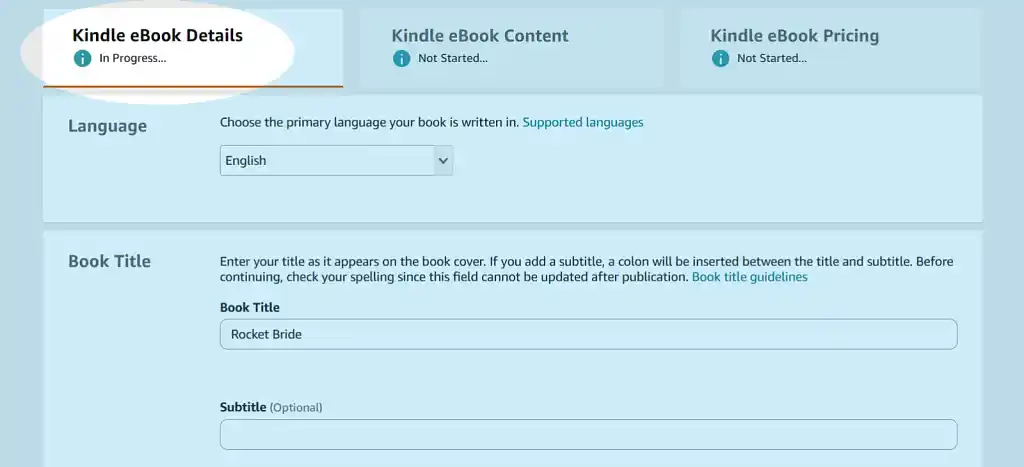
To start off, you’ll need to fill in:
-
The language of your book;
-
The title and/or subtitle (more on how to pick a good one here);
-
Whether it’s part of a series;
-
Whether it’s a new edition of an existing book (if not, leave this field blank);
-
Your author name (pen names welcome); and
-
The names of any other contributors (e.g. the illustrator, or the editor if it’s an anthology).
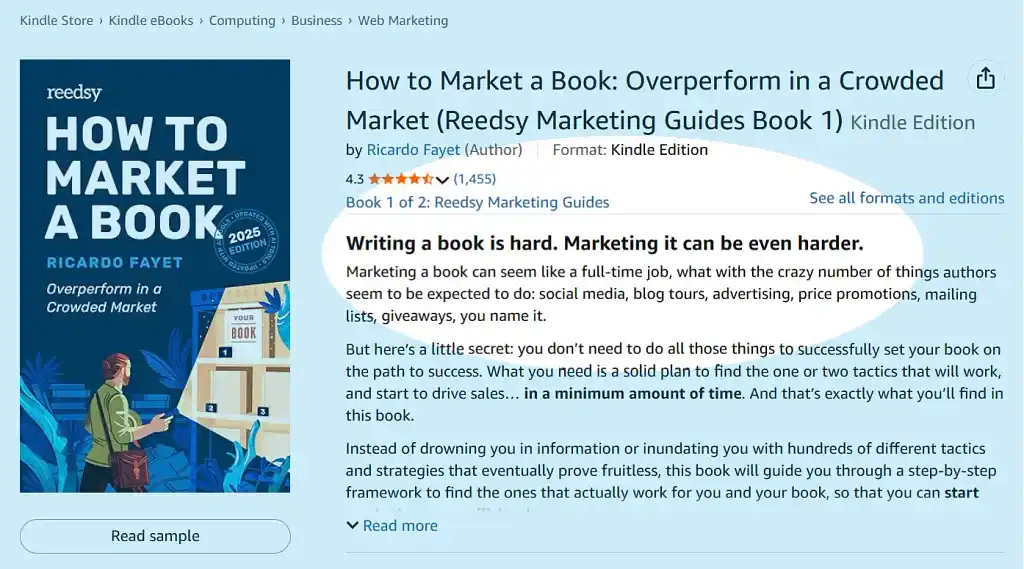
The next section is a little trickier. You’ll need to provide a book description, similar to a blurb. Make it as compelling as you can, and don’t forget to include relevant keywords. (To make sure you get it right, check out my detailed guide or download this free book description template.)
FREE RESOURCE
Book Description Template
Learn to write a book description that will make readers click “buy.”
My most important advice is to make your opening intriguing, since Amazon only shows a preview of your description and readers have to click “Read more” to expand it.
After the book description, there are some more formalities. You’ll need to declare:
-
That you own the copyright and hold the necessary publishing rights (or that the work is in the public domain);
-
Whether the book contains sexually explicit images or the title contains sexually explicit language; and
-
Which age group your book is suitable for, if it’s a children’s or YA book.
Now that your book’s details are finalized, it’s time to find the right shelf for your book in the maze of Amazon’s bookshop! First, select your primary marketplace, i.e., the location where you expect to make the most sales. (If you’re not sure, stick with Amazon.com.)
Next, we’ll turn to categories and keywords to give your book a more exact home.
Q: What are the key elements authors must get right when setting up their book pages on Amazon or other retail platforms?
Suggested answer

Book Cover
I'm aesthetically blind, but I still have a couple of valid criteria - readability and fitting a genre. On Amazon, your book cover is your business card. People need to get what it is about with just a single glance. Don't try to be smart, try to be clear.
In non-fiction, it usually means a huge title that can be read in a thumbnail size. In fiction, it is a big image that screams the right genre (think dragons for fantasy, starships for SF).
Book Title (and subtitle)
In case of fiction, the title may be catchy and cryptic, but it needs to be short. Often, it is just an article and a single word.
In case of non-fiction, you'd better spell out in capital letters what your book is about.
For all books, subtitles are a great place to stuff in some keywords ("a medieval historical novel").
Book Description
Your book description is your sales page on Amazon.
It is not a synopsis, God forbid!
For fiction, think Hollywood movie trailers - something that reveals hints of the movie, but its main objective is to get the attention.
For nonfiction, spell out the features and benefits, but in a way that pique curiosity (“The undervalued habit that everyone can practice and tune into their self-talk (would you believe it can create new brain cells?!)”.
Emphasize your credentials in book's subject matter.
Format your description properly. Have a clear headline - the first short line (think: blog posts titles) that is separated from the rest of the blurb's text. And don't scare a reader with "the big wall of text." This is Internet! Nobody reads huge paragraphs anymore.
Keywords
On Amazon, you have seven fields with 50 characters.
Use five of those to brim. Why? Because the interface doesn't reflect the mechanics of Amazon keyword system. Those "seven fields" are actually a one huge tag cloud. Any word from one field can be connected to any word from another field.
Use one field to give the clear 'elevator pitch' for a book ("military space marines book”).
Use the word 'book' in this field. It will connect with all the other words in your keyword tag cloud.
Use the last field trying to indicate the category your book fits best.
Categories
12 years ago, it was a good idea to hit some niche category, so you could easily claim the bestseller status. Not anymore. Relevancy is the key. If your book is fiction, don't put it in obscure non-fiction categories (and vice versa).
The more specific you can get, the better for your positioning and algorithm's understanding of your book, e.g. Romance ->Historical Romance ->Scottish.
Bonus: Pricing
Don't price your 100-page novella eBook at $9.99.
If you have a fiction series, price the volume #1 lower. It is your lead magnet, if readers like it, they will buy next volumes at higher prices.
Michal is available to hire on Reedsy
Your book cover is the first thing readers notice, and it has to grab their attention right away. But here’s the thing: your cover gets them to click, but it’s your description that actually convinces them to buy.
A great book description needs to spark curiosity, set clear expectations, and connect with readers emotionally. If it doesn’t make them feel like they need to read your book, they’ll move on to something else.
Other details, like editorial reviews, awards, or even strong reader reviews, can help seal the deal, but the description is where it all happens. Think of your cover as the invitation—it gets readers to the party. Your description? That’s the host that keeps them there and makes sure they have a great time.
Jd is available to hire on Reedsy

I find that the most overlooked component of an Amazon book page is consistently the author bio. Of course the cover design and descriptive text are essential, but so too is the About The Author section. Particularly for non-fiction where the prospective reader is seeking confirmation of why you are credible to write on your subject matter. Readers are looking for subject matter experts, and your thought leadership status is what will sell your book. Beyond that, in the age of AI, you need to show that you are a real person. Over an author's career, it is the author that is the brand, not any one book. Show us that your credentials are legitimate, and that you are a worthy authority on whatever you are writing about.
Chris is available to hire on Reedsy
3. Select your Amazon categories and keywords
Now, this task shouldn’t be taken lightly (although you can make changes at a future date if things don’t work out). Categories and keywords tell Amazon's algorithm where to shelve your book, and who to show it to. You get three categories and up to seven keywords in KDP, and I'd recommend choosing them carefully, because they directly affect your book's discoverability.
You’ll want to find subcategories that are relevant to your book, popular, and not oversaturated or competitive. To do this, start analyzing existing books’ Amazon Best Sellers Ranks. (To find out how, read my detailed guide to choosing Amazon categories.)
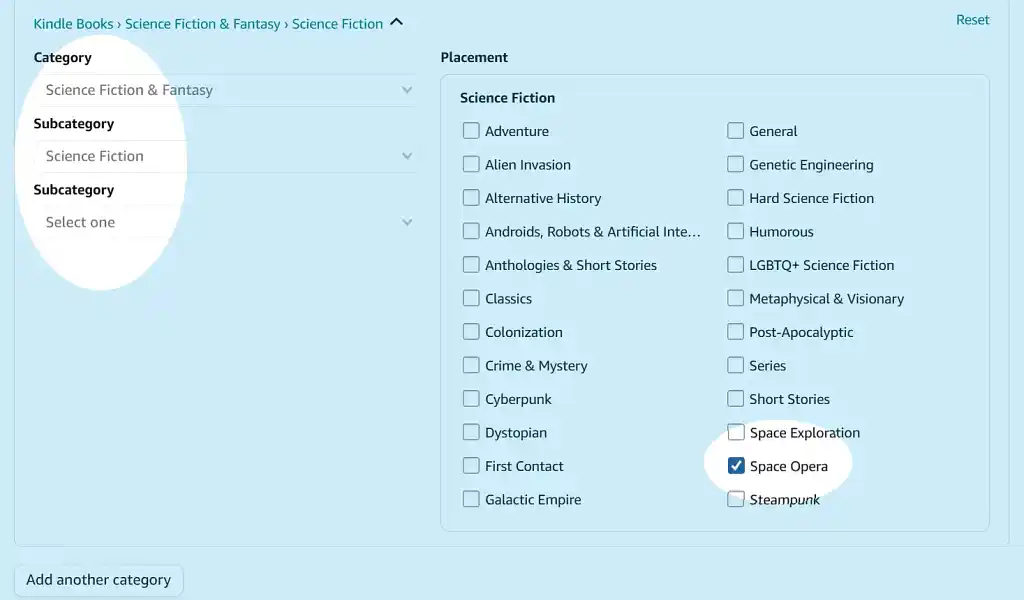
Likewise, choose keywords with a decent search volume but manageable competition. Try exploring longtail keywords that are partial matches for multiple terms, like “space opera romance with strong female protagonist.”
Want to learn more? I also have a post on optimizing Amazon keywords, or you can sign up to my free email course on Amazon algorithms.
FREE COURSE
Amazon Algorithms for Authors
Learn to optimize your book description, pick categories, and sell more books.
Q: How do book marketers identify an author’s audience and market positioning?
Suggested answer
A marketer helps an author find the market positioning for their book through a combination of industry knowledge and research.
There are two types of comparables I look for when doing a market positioning report. The first is popular titles in the traditionally published world that has an audience profile, genre, and style similar to my client's. The second is successful self-published authors with a decent readership.
The first is useful for figuring out how to communicate with the audience. The second is very useful for seeing what strategies are working. Often there are many unknown factors (such as the author's personal network or success in other series) but there's much you can learn by researching the strategies of a true comparable title in the indie publishing space.
Once the good competitors are identified, I look at their sales ranking, web presence, and do a little snooping to see how and where they advertise. This is also useful for pricing strategies. I can also identify additional competitors by looking at who those indies compare themselves to.
Robin is available to hire on Reedsy
I'm dealing with marketing, but I'm not a marketer. I'm an advertiser.
Market positioning? I don't even know what that means. It connotes with building a brand.
Amazon ads may be used for this, but it is a costly endeavor. Basically, you target the books you want your book to be connoted with and pay absurd bids for your ads to be displayed on this book's page.
The more popular is such a book, the bigger budget you need for it to work. And even the biggest budget is not a guarantee of success. The ad has to convert at a decent rate, otherwise Amazon will make you pay even more, or simply disregard your bidding because they will deem your book irrelevant.
Author’s audience
Hmm, author's audience... For me it is "People who, eventually, may read the book."
The intimate knowledge of the book is a key to success here. Nowadays, AI helps with it. I upload a manuscript to NotebookLM and ask it: What the book is about and what are similar popular books on the market?
Well, if an author themselves provides answers to this questions, it's even better.
Understanding the book, I explore a few angles on Amazon:
Category bestsellers - a list of bestselling books in a few relevant categories
"Others Who Bought" from similar books - the ones pointed out by AI or an author
Keywords - phrases used by readers to find books, e.g. 'space marine SF books' or ' romanfantasy about dwarves'
Exactly how?
For extraction of bestselling titles and 'Others Who Bought' section I use Also Boughts Downloader plugin for Chrome by Kindletrends.
I also reverse-engineer a few similar books using Publisher Rocket's reverse-ASIN functionality. It provides both other similar books and list of keywords for which those books are ranking well.
I also play with Publisher Rocket's 'Keyword Search' functionality to harvest some iterations of the most fitting search phrases. You can do the same playing with the Amazon's search bar manually, but Rocket saves me tons of time for the same output.
Michal is available to hire on Reedsy
Last thing before moving on to the next section — you’ll be asked if your book is ready for sale or if you wish to make it available for pre-order. I recommend the latter: by setting a launch date in the future, you can generate pre-launch hype and get crucial early sales and reviews.
Once you’ve set a release date, click “Save and Continue” to navigate to the next tab.
4. Upload your book files and enter your ISBN
Get out your manuscript, because we’re going to upload it now. You can do so any time until the deadline of 72 hours before your launch, though I personally suggest doing it as soon as you have the files ready — you can always re-upload them if you need to make changes.
Upload your manuscript as an EPUB
To upload your manuscript, simply click the yellow “Upload manuscript” button and select your final file. Amazon will accept a range of file formats, but they strongly recommend having your file formatted as an EPUB, which will also give you better control over what it looks like on Kindle. Slapping a Word document in and trusting Amazon to do the rest rarely works out well.
❗ Make sure your formatting is up to standard. Readers can tell who’s professionally formatted their book, and who hasn’t — and cutting corners will come back to bite you. Hiring a typesetter will definitely pay for itself over time, but if you’re on a tight budget, you can use Reedsy Studio to format and export a beautiful ebook for free.
Once you’ve selected your file, don’t refresh or click off of the page! Amazon can take a few minutes to upload your book and verify it.
Eventually, you’ll see a little green message saying that your manuscript has been uploaded successfully. Take a moment to celebrate, but don’t get too distracted — there are still a few very important steps to go.
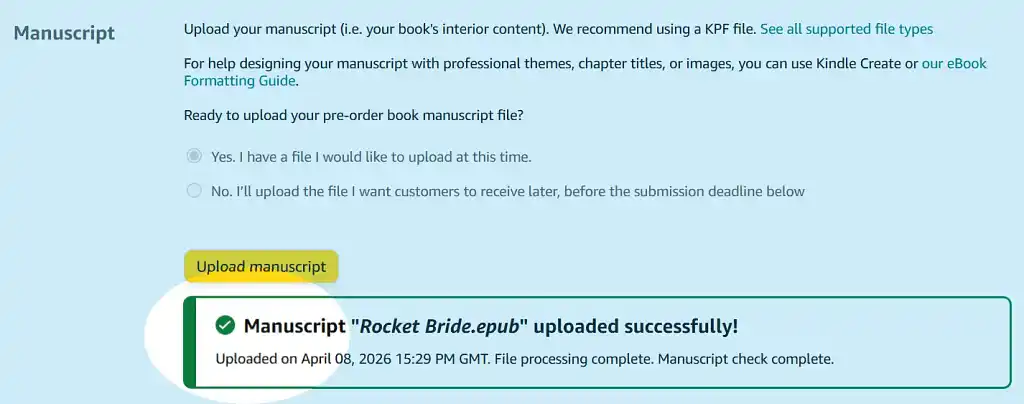
But before we get to them, there’s a little checkbox asking whether you would like to apply Digital Rights Management (DRM) to your files. If you say yes, customers won’t be able to download or share your book — which theoretically combats piracy, but in practice isn't very effective and also makes it harder for readers to send your book to their preferred device. I generally advise authors to tick “No.”
Upload an enticing book cover
Now for another very important step: uploading an attractive and genre-appropriate cover file. Your cover designer should have provided you with a JPG or TIFF version of your front cover, sized to Kindle’s suggested resolution of 2,560 x 1,600 px. To add it, simply select the option to use a pre-existing cover, and click “Upload your cover file.”
Q: How do you ensure a book cover is effective as a thumbnail for online stores like Amazon?
Suggested answer

Thumbnail performance is something I think about from the very first sketch. Covers go through so many formats — retailer pages, social media, email newsletters — that a design which only works at full size simply isn't finished.
The most reliable test I use is brutal: shrink the cover down to roughly 80/120px and ask yourself whether the title is still readable and whether the image creates any emotional response at all. If the answer to either is no, something needs to change — usually the type weight, the contrast, or how much is competing for attention.
One thing I'd add that hasn't been said: genre legibility matters as much as technical legibility. At thumbnail size, a reader should be able to feel in a split second whether a book is a thriller, a literary novel, or a romance — not just read the title. That's achieved through colour temperature, font personality, and the mood of the central image working together as a single, fast signal.
Cloe is available to hire on Reedsy

Making a book cover effective as a thumbnail is really the cornerstone to a quality illustration. There are a few very important keys to unlocking a great thumbnail. The absolute root of a good thumbnail is legibility. The goal is to guide someone's eye right to your cover and the best way to do that is to make something that is comprehensible in a small scale, and interesting to look at.
First, the design needs to have a hierarchy of shape language to preserve legibility and a solid composition to make the focal point read well. There needs to be a priority of legibility. If you have too many similar shapes, or objects that feel out of balance, the thumbnail will just look noisy. Some of the best covers end up be big, bold, dynamic shape designs because of this. My goal is to usually pick one focal point and have other details support that.
Adding onto the strong foundation, the values of the cover can greatly influence its readability. I'm referring to the dark and light areas of the cover. If you take a good image, and turn it black and white, it should still be completely organized and readable. Grouping values within the focal point so that certain areas are emphasized or minimized will allow the image to read at a distance. Other techniques like saving your brightest and darkest values for the focal point will help it stand out.
Lastly, color can play a crucial role in the initial read of a cover. With the shapes and values locked in, color can be the cherry on top. There are lots of ways to make an image stand out, but one of the strongest is balancing cold and warm colors. Imagine a cool blue image with a small bright pop of orange and yellow where you want the viewer to look. Color harmony can really drive the eye.
So, all of these things together can make a very strong illustration, and when used correctly, they can create a cover that stands out and looks amazing at a small or large scale. Organizing the chaos of an illustration can be the best way to stand out.
Matt is available to hire on Reedsy

While I wouldn’t recommend prioritising tiny, low-resolution thumbnails in an online store, it’s crucial that book covers are easily and quickly recognisable to potential buyers.
This can be achieved in several ways, but a good strategy is to
Simplify the design and prioritise key elements
Avoid overly complex visuals or intricate details that may become indistinguishable when scaled down. Focus on bold, clear imagery and use minimal design principles if possible. Highlight the most important details, such as the title and a central design element, while minimising unnecessary clutter. Choose a striking focal image or graphic that remains recognisable when reduced to thumbnail size.
Use readable typography and keep contrast high
Use large, legible fonts for the title and author name. Choose clean typefaces that remain clear even at small sizes. Incorporate strong contrast between text and background colours to make the cover stand out and ensure readability.
Jonathan is available to hire on Reedsy
As when you upload the book, this process can take a minute. When it’s done, you’ll get another green notification.
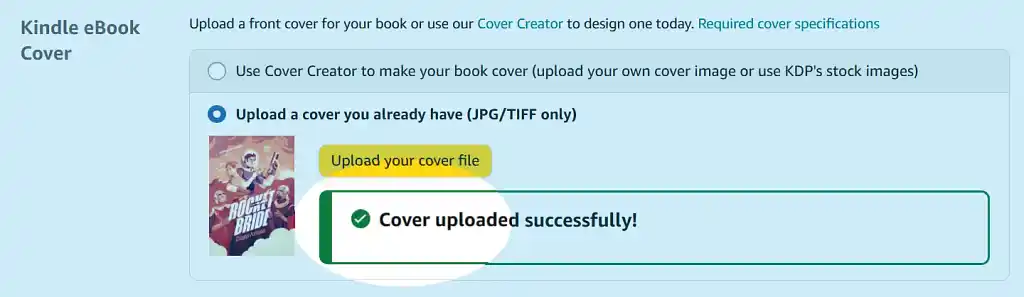
After you’ve uploaded the content and cover, you’ll have to declare whether AI was used to produce text, images, or translations in your book. Then, use the “Ebook Preview” tool to see how it will look page by page.
Take a minute to ensure that everything is correct: that the whole cover shows up, that the interior looks the way it does on your computer, etc. If anything is wrong, double-check your files, then upload again.
Enter your ISBN number
Once you’re happy with the preview, move on to the optional ISBN number and publisher. Amazon will assign an ISBN number to your book for free if you don’t have one, but I recommend buying your own if you can afford it, since you can register your name as the publisher and retain ownership in case you want to “go wide” and publish to other retailers in the future.
The last question in this section is about accessibility features, specifically whether your images include alt text and/or extended descriptions. Try to follow Amazon’s accessibility best practices if you can, but don’t worry about it too much if you only have decorative images in your text.
Instead, turn your attention to a much more important decision: whether to join KDP Select!
Hire an Amazon marketing expert
Tara L.
I am a children's, middle-grade, and YA book marketing expert with 25 years of experience at top publishers. *BEWARE OF SCAMMERS*
Request a quote
Mamie S.
Customer-focused and strategy-driven digital marketer with 10 years of experience at Abrams Books and Simon and Schuster.
Request a quote
Kate L.
12 yrs marketing experience in consulting, launching, and promoting books. Specialized in sci-fi, fantasy, gamelit/litrpg, spec fic, LGBTQ+
Request a quote5. Decide whether you’ll join KDP Select
Click “Save and Continue” to find this crucial question at the top of the third tab.

KDP Select gives Amazon exclusive rights to your ebook for a renewable 90-day period. In exchange for not selling your ebook elsewhere, you’ll be able to enroll your book in Kindle Unlimited (a “Netflix for books” that attracts a large audience of readers) and access various promotional tools.
Whether to join KDP Select is a very personal decision. It depends on your genre, audience, location, and long-term career goals. Read up on it carefully before you commit one way or the other! We have a post on its pros and cons here, or you can take our 30-second quiz to find out whether KDP Select might be right for you.
✅
Wondering whether you should give all your ebook distribution rights to Amazon?
Answer these 5 questions to find out!
Whatever your choice, you’ll need to select the territories for which you hold distribution rights. If your work is original and has never been published before, you will have worldwide rights and can select “All territories.”
Q: What types of books or authors would NOT particularly benefit from KDP Select?
Suggested answer
Non-fiction authors. Because the main perk of KDP Select are pages read from borrows (because the Kindle Unlimited [KU] program is attached to the KDP Select). But people don't read non-fiction books. They feel like they solved their problem by making a purchase, I guess.
So, with non-fiction it goes like this: people borrow, instead of buying (so you are not getting paid for a sale), they read just several pages and get distracted/ discouraged. You are paid a few cents.
Yes, they are rare exceptions, for example a memoir, which reads like fiction, so people are actually reading it from cover to cover.
But I advertised hundreds of non-fiction books, and only about 5% of them found some success with the KU program.
Also, all the books with not many pages, for example children’s books will not benefit from KDP Select. I've heard that their count of pages read (KENPs) is different, but I never confirmed that rumor.
If your fiction book is short, you won't make much money with KU, too. In this program you make about 40-50 cents for 100 pages read. You need to have 500 pages to match royalties from a sale of $2.99 book. And that's under the condition that a reader will read the full book and don't stop in the middle.
Oh, and if you are not going to utilize KDP Select benefits - free days or countdown deals AND your book is thin, then KDP Select makes zero sense for you.
Both of those options are price-based, so if you are not going to offer your Kindle book cheaper, you simply cannot benefit from the program.
TLDR: the shorter your book the less sense KDP Select (and KU attached to it) makes for you.
Michal is available to hire on Reedsy
Honestly, not really—I’m a big fan of KDP Select, especially for new authors. One of its best perks is access to Kindle Unlimited (KU), which lets readers try your book without committing to a full purchase. Those page reads can add up fast, giving your book more visibility and earning potential.
For most authors, this is a great way to remove barriers for readers and get your story into more hands. Once you’ve built a strong following, it’s easier to branch out to other platforms, like selling direct or expanding to retailers like Barnes & Noble. But when you’re starting out, keeping things simple and focusing on Amazon’s massive audience is usually the smartest move.
In my experience, KDP Select provides a solid foundation for authors to build their readership and grow their career. I often help clients decide when it’s time to expand and how to do it strategically, but for most, starting with KDP Select is the best first step.
Jd is available to hire on Reedsy
6. Set a price between $2.99 and $12.99
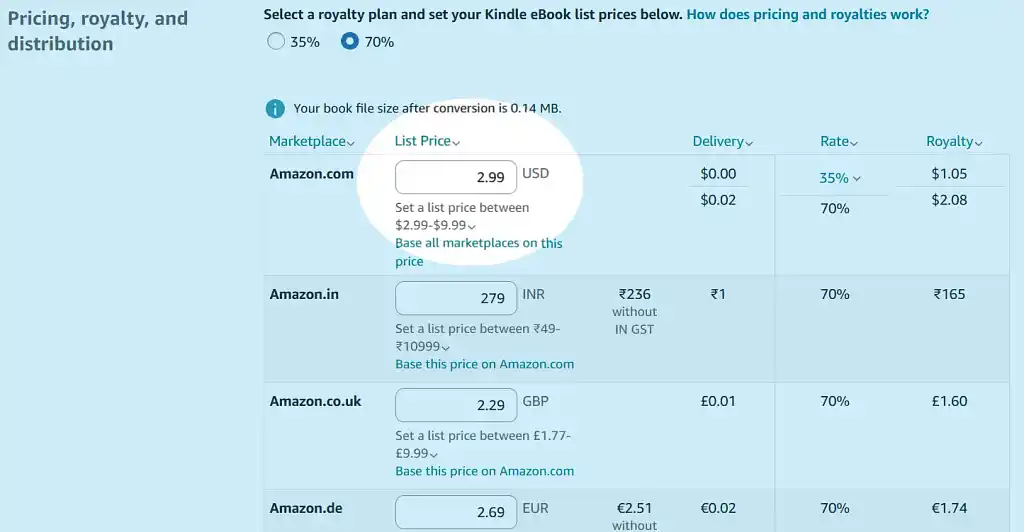
Finally, it’s time to price your book! Now, the most important thing to know is that Amazon offers a 70% royalty rate on ebooks priced between $2.99 and $12.99, and 35% on anything outside that range. KDP will ask you to pick a plan — usually the 70% plan, but there will be times when you want to sell a book outside this price range. For example, perhaps you will sell the first in a series at a lower price to drive sales for the rest of the books.
As you set your price, Amazon calculates your estimated royalties. It deducts a small “delivery fee” based on the file size of your book and then shows you how much money you’ll make per sale.
Q: What are the most common mistakes authors make when pricing their self-published books, and how can they avoid them?
Suggested answer
A big mistake I see authors make is not thinking through how their pricing affects readers. If you price your book too high, you risk scaring people off. If it’s priced too low, readers might assume it’s not worth their time. Finding the right balance—what I like to call the “sweet spot”—is so important.
The best place to start is by looking at other books in your genre. What are they priced at? This gives you a good idea of what readers are willing to pay. Temporary promotions, like dropping your price to $0.99, can help boost visibility, but I don’t recommend staying there. It’s easy to get caught in a “race to the bottom,” where constant discounts make your book feel less valuable.
As your book gains credibility—through reviews, awards, or just word of mouth—you can raise your price to reflect that value. Pricing isn’t just about numbers; it’s about showing readers that your book is worth their time and money.
Jd is available to hire on Reedsy
The most common mistake authors make when pricing their self-publishing books is not pricing it so that they are covering all of their outlaid costs. Some authors only look at comparative titles in the marketplace and how they are priced. Indeed, this is an important step in figuring out what to price a book, but if you are not making a return on investment to at least to recoup your spend, not to mention a profit, then your list price is failing you.
Tara is available to hire on Reedsy
My answer, as usual, is based solely on Amazon, where 80-100% of sales happen for most authors.
1. Missing KDP's thresholds for Kindle
Amazon pays you 70% of the retail Kindle price - if the price is in the range $2.99 - $9.99.
If the price is lower than $2.99 or $10 and higher - you will receive only 35% in royalties.
Kindle book which is more expensive than $10 and below $29 has no economic justification from the self-publishing point of view.
2. The same price for the paperback and Kindle
Those are two distinct products. Kindle should be cheaper than paperback. There are no production or distribution costs involved for an eBook.
Plus, Amazon customers are trained to expect cheap and discounted stuff, especially for such a flagship category like Kindle books.
3. Pricing too low
This happens more with hard copies. In 2025, Amazon introduced new royalty structure: 50% royalties for books cheaper than $9.99, and 60% for $9.99+ books.
The trick is in fine print, as usual. Those percentages are counted after deducting the printing (and distribution) fee. So, when the same book costs $8 or $12, your royalties will be dramatically different. Let's say the printing cost is $3: in the $8 scenario you will get half of the five dollars; in the $12 scenario, you will receive 60% of nine dollars ($2.5 vs. $6).
Avoid the less-than-$9.99 price range, unless you have particularly good reason to price your book so low.
With Kindle there is a dramatic difference between $2.99 book and $2.49 book because of the thresholds mentioned in point #1 (about $2 vs. 87 cents).
Personally, I find only one price point below $2.99 worth trying: 99 cents. It is good for entry point of a series or for promotional purposes.
4. Pricing too high
It applies especially to Kindle format. First, because the royalties’ thresholds penalize higher prices. Second, because Kindle readers are cheap.
First-time authors think: "It's just $5, a price of the coffee, surely people will be willing to buy my book." They forget that they don't sell coffee, but eBooks. Amazon customers have millions of other titles free or priced incredibly low to choose from.
In case of paperbacks, it is more about the subject matter and length of the book. If you try to sell your 70-page novella for $20, good luck. Non-fiction books solving specific problems are more "justified" to cost more.
In the fiction genres the competition is fiercer. Readers have plenty of alternatives, so if you overdo your price, they may skip your book and pick your competitor’s book.
5. Pricing out of market
If you aren't a household name, you'd better accommodate to market's expectations. Don't price your debut novel, or poetry book, or children book $50 - it is just too expensive.
Don't price your business manual $0.99 - people will think it's so cheap because it's trash.
Michal is available to hire on Reedsy
Amazon will automatically convert your list price into other currencies. However, I recommend you adjust the prices for other marketplaces manually, if only to make the prices “nicer” numbers. Selling internationally can really help boost your sales, so keep an eye on your international sales trends and nurture those that develop. Reedsy’s free course can tell you all you need to know about international pricing. Just sign up here!
Once you’ve set all your prices, get your champagne ready: the time to publish has come.
7. Publish your book
This is the moment you’ve been waiting for! Before rushing in, take a minute to click back through the previous tabs and ensure everything is set up exactly the way you want it 一 you can do that by clicking “Back to Content” on the left. And although you can correct a mistake after you’ve published, it’s better to ensure the information is right before you hit that button.

If you’re not quite ready, a “Save as Draft” button will allow you to come back and finish later.
But if everything looks good, there’s nothing left to do but hit “Submit for Pre-order” — or “Publish Your Kindle ebook” if you haven’t enabled pre-orders.
Congratulations! As you see, publishing a book on Amazon isn’t nearly as scary as it seems. Your book will appear on Amazon bookshelves soon, but expect it to take up to 72 hours for Amazon.com and up to five days for country-specific Amazon sites.
Now you can focus all your energy on publicity and marketing — or release your book in paperback format, for which I also have instructions below.
Creating a paperback
To create a paperback version of your ebook, navigate to your bookshelf and click “Create paperback.”
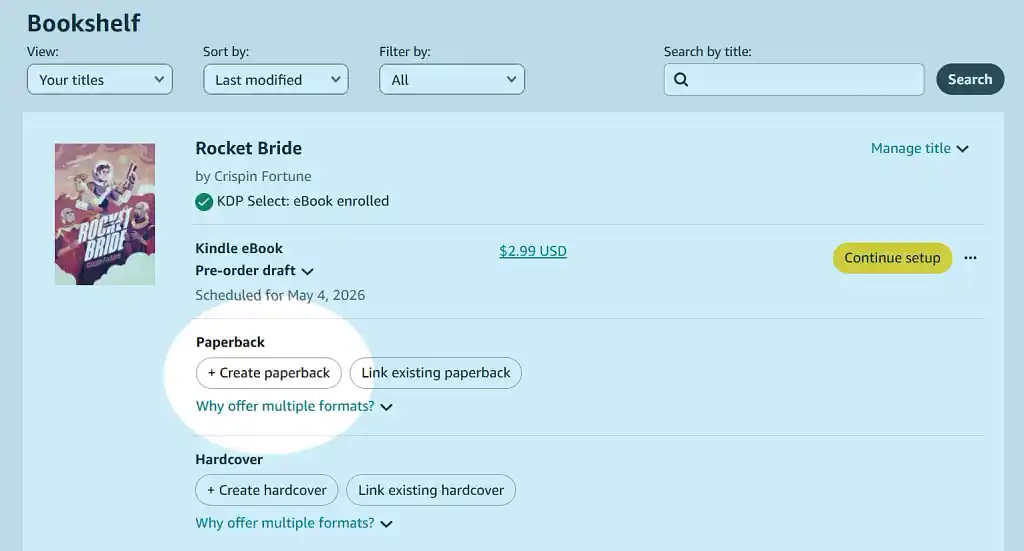
Many of the fields will already be filled out for you. In the first tab, all you’ll need to do is re-select your book’s Amazon categories (the choice and competition are different, so take the time to do your research again) and specify whether your book is low-content or large-print.
In the second tab, you’ll need to add your ISBN (which must be different from your ebook’s ISBN) and choose your ink and paper type, trim size, bleed, and cover finish. You can use Amazon’s Printing Cost & Royalty Calculator to help you choose settings that align with your desired pricing and royalties.
You’ll need to re-upload your manuscript, this time as a PDF or docx, and you’ll need to upload your front cover, spine, and back cover as a single PDF file. Your illustrator should provide you with this; if not, you can use an appropriate Amazon template to ensure your dimensions are correct for your book. Remember to tick “Yes, my cover has a barcode” if applicable.
The pricing tab works much the same as for ebooks, except there’s only one royalty plan. You can opt in to expanded distribution if you like (though I personally don’t recommend it for going wide). You can also request a proof copy of your book before sending it live to check for any errors.
Q: How can self-publishing authors succeed without selling on Amazon?
Suggested answer

The trick is to drive traffic to a highly converting landing page for your book, complete with all the social proof (i.e., reader reviews), awards, and a frictionless checkout system that keeps readers moving through the purchase process. You'll need attractive ads (Meta, Google, social media) to drive traffic to your site, so there will be an upfront investment and a steep learning curve. It is possible, but you will want to do this with off-set printed books, and not print-on-demand products for better profit margins.
Lisa is available to hire on Reedsy
It’s possible, but it’s a much tougher road. Amazon is where most readers are, and it has tools like Kindle Unlimited and massive visibility to help get your book noticed. For new authors, that kind of reach is hard to beat.
If you’ve already built a big email list or have a loyal fanbase, then selling directly or exploring other platforms can work. But for most authors—especially if you’re just starting out—Amazon should be your first stop. It’s the easiest way to connect with readers and build momentum.
That doesn’t mean you’re locked in forever. Once you’ve built some traction, branching out to direct sales or other retailers can be a smart way to expand your reach and diversify your income. Starting with Amazon lays a strong foundation—and having a plan for when and how to grow can make all the difference.
Jd is available to hire on Reedsy
Congratulations again! You’ve now doubled your available book formats and tapped into a new audience. If you want to go deeper into KDP best practices, check out the rest of this guide — next up, we’ll be looking at Amazon’s algorithms.

10 responses
Joni says:
19/10/2019 – 01:52
Do I need to get a ISBN number if I choose to e-publish?
↪️ Martin Cavannagh replied:
23/10/2019 – 09:46
Most times, the distributor (Amazon, et al) will assign you with their own unique codes. So in short, not really.
Jeff says:
12/04/2020 – 23:44
This is helpful, Thank you for this resource.
Stephen James says:
27/05/2020 – 11:22
Is it still possible, likely, or practical to sign with a traditional publisher, through pursuing agents with query letters, after self-publishing with Kindle on Amazon?
↪️ Martin Cavannagh replied:
03/06/2020 – 10:20
For future books, very practical. For the book you've already self-published: incredibly difficult unless it's been a MASSIVE hit already.
Stephen James says:
27/05/2020 – 11:24
Assuming I would buy my own ISBN from Bowker, at what point would I insert it into the copyright page?
Bert de Korte says:
30/06/2020 – 14:09
Hi I already self published 2 books in holland trough Bruna. I want to publish them in ebook format at amazon. Is that possible? Already have isbn numbers.thx Albert
Sandra Bailey says:
14/07/2020 – 13:13
If my book is already published and is a Kindle book, how can I update the book with a new section directly through Amazon and republish the book?
↪️ Martin Cavannagh replied:
28/07/2020 – 10:43
You can do! Here's the relevant help page from KDP: https://kdp.amazon.com/en_US/help/topic/G202176900
Lorie Eubank says:
18/08/2020 – 23:47
If I self published a book several years ago primarily for print purposes for personal use and distribution, can I republish using the KDP format? I have all rights to the book. And I know from the publisher that I would just need to get a new ISBN number