Posted on Oct 01, 2026
The 5 Best Amazon Keyword Research Tools for Authors

Dario Villirilli
Dario Villirilli is a senior content marketer, editor, and SEO strategist with many years of experience in publishing. He is Managing Editor of the Reedsy Blog and has also written for IngramSpark, ProWritingAid, Written Word Media, and PublishDrive.
View profile →Publishing your book on Amazon is one thing; helping readers find it is another. Amazon gives you seven keyword slots to describe your book and connect it with relevant searches. But how do you know which keywords will give your book the most visibility?
Amazon doesn't share its internal search data, so keyword research tools fill the gap with estimates drawn from autocomplete suggestions, product rankings, Google search volume, and other data sources. These estimates can help you save time and make better choices.
In this post, we’ll share the best tools and options available to authors for estimating search volume and choosing the right keywords for their book.
TL;DR: start with the free options — find real search terms in Amazon’s search bar, then compare their popularity in Google Keyword Planner. If you want more detailed data, consider Publisher Rocket or BookBeam.
Here’s a quick overview:
|
Tool |
Price |
Best for |
|
Amazon’s search bar |
Free |
Anyone starting out, to find the exact phrases readers search on Amazon |
|
Google Keyword Planner |
Free (needs a Google Ads account) |
Anyone comparing which keywords get the most searches online |
|
Publisher Rocket |
$199 one-time |
Authors who want keyword ideas and ready-made Amazon Ads keyword lists |
|
BookBeam |
From $47/month |
Authors and entrepreneurs hunting for profitable niches to publish in |
|
Helium 10 |
From $129/month |
Entrepreneurs who, aside from books, also sell physical products and want competitor keyword data |
Free keyword tools anyone can use
The first two options are free. They require more manual work, but both rely on real search data from Amazon and Google.
1) Amazon’s search bar
💸 Price: Free
💻 Access: Any browser, on the Amazon store where you sell
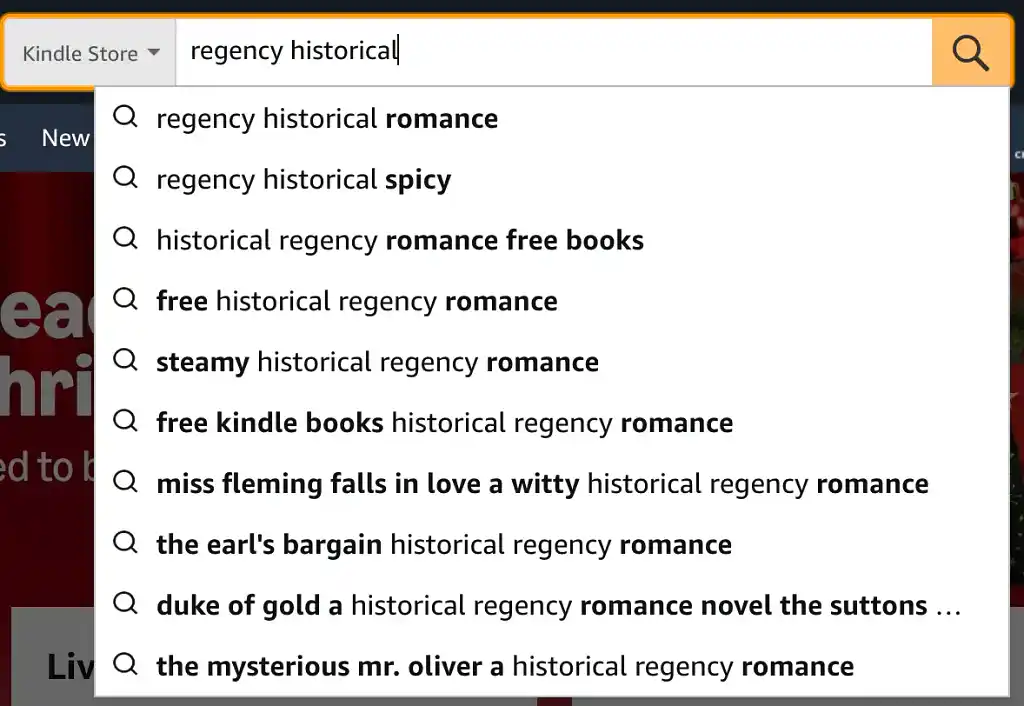
The most reliable keyword data on Amazon costs nothing (except time). Set the search department to Kindle Store or Books, start typing a phrase that describes your book (e.g., “small town romance” or “scottish crime thrillers”), and the suggestions in the dropdown are searches real readers are making. Many paid tools use this same data as their starting point.
To get the most out of it, use a private or logged-out browser window so your own history doesn’t change the suggestions. Start with a broad phrase like “cozy mystery”, then add a letter after it (“cozy mystery a”, “cozy mystery b”) to bring up longer, more specific phrases.
For each phrase worth keeping, look at the books on the first page. Thousands of reviews mean a new book will struggle. A few books with modest review counts mean your book has a realistic chance.
The limitation is that autocomplete tells you which phrases people search, not how many people search them. It’s also slow if you’re researching many books at once. Our guide to Amazon keywords walks through the full manual method.
The phrases readers type also show you the wording you may want to use on your Amazon page, like in your subtitle and book description, to help it rank. Remember that, while keywords and categories help, they usually matter far less than a well-edited book, a professional cover, and a strong description. If you’re publishing for the first time, it’s worth getting those right before paying for a tool.
Verdict: The best place for every author to start, and a useful check on any paid tool’s suggestions.
👍 Pros:
- Completely free.
- Based on real Amazon searches, not estimates.
- Shows the exact wording readers use.
👎 Cons:
- No search volume numbers.
- Slow for large amounts of research.
- No sales or competition data unless you check it by hand.
Q: What are the key elements authors must get right when setting up their book pages on Amazon or other retail platforms?
Suggested answer

Book Cover
I'm aesthetically blind, but I still have a couple of valid criteria - readability and fitting a genre. On Amazon, your book cover is your business card. People need to get what it is about with just a single glance. Don't try to be smart, try to be clear.
In non-fiction, it usually means a huge title that can be read in a thumbnail size. In fiction, it is a big image that screams the right genre (think dragons for fantasy, starships for SF).
Book Title (and subtitle)
In case of fiction, the title may be catchy and cryptic, but it needs to be short. Often, it is just an article and a single word.
In case of non-fiction, you'd better spell out in capital letters what your book is about.
For all books, subtitles are a great place to stuff in some keywords ("a medieval historical novel").
Book Description
Your book description is your sales page on Amazon.
It is not a synopsis, God forbid!
For fiction, think Hollywood movie trailers - something that reveals hints of the movie, but its main objective is to get the attention.
For nonfiction, spell out the features and benefits, but in a way that pique curiosity (“The undervalued habit that everyone can practice and tune into their self-talk (would you believe it can create new brain cells?!)”.
Emphasize your credentials in book's subject matter.
Format your description properly. Have a clear headline - the first short line (think: blog posts titles) that is separated from the rest of the blurb's text. And don't scare a reader with "the big wall of text." This is Internet! Nobody reads huge paragraphs anymore.
Keywords
On Amazon, you have seven fields with 50 characters.
Use five of those to brim. Why? Because the interface doesn't reflect the mechanics of Amazon keyword system. Those "seven fields" are actually a one huge tag cloud. Any word from one field can be connected to any word from another field.
Use one field to give the clear 'elevator pitch' for a book ("military space marines book”).
Use the word 'book' in this field. It will connect with all the other words in your keyword tag cloud.
Use the last field trying to indicate the category your book fits best.
Categories
12 years ago, it was a good idea to hit some niche category, so you could easily claim the bestseller status. Not anymore. Relevancy is the key. If your book is fiction, don't put it in obscure non-fiction categories (and vice versa).
The more specific you can get, the better for your positioning and algorithm's understanding of your book, e.g. Romance ->Historical Romance ->Scottish.
Bonus: Pricing
Don't price your 100-page novella eBook at $9.99.
If you have a fiction series, price the volume #1 lower. It is your lead magnet, if readers like it, they will buy next volumes at higher prices.
Michal is available to hire on Reedsy

Your book cover is the first thing readers notice, and it has to grab their attention right away. But here’s the thing: your cover gets them to click, but it’s your description that actually convinces them to buy.
A great book description needs to spark curiosity, set clear expectations, and connect with readers emotionally. If it doesn’t make them feel like they need to read your book, they’ll move on to something else.
Other details, like editorial reviews, awards, or even strong reader reviews, can help seal the deal, but the description is where it all happens. Think of your cover as the invitation—it gets readers to the party. Your description? That’s the host that keeps them there and makes sure they have a great time.
Jd is available to hire on Reedsy

I find that the most overlooked component of an Amazon book page is consistently the author bio. Of course the cover design and descriptive text are essential, but so too is the About The Author section. Particularly for non-fiction where the prospective reader is seeking confirmation of why you are credible to write on your subject matter. Readers are looking for subject matter experts, and your thought leadership status is what will sell your book. Beyond that, in the age of AI, you need to show that you are a real person. Over an author's career, it is the author that is the brand, not any one book. Show us that your credentials are legitimate, and that you are a worthy authority on whatever you are writing about.
Chris is available to hire on Reedsy
2) Google Keyword Planner
💸 Price: Free with a Google Ads account
💻 Access: Web app, inside Google Ads
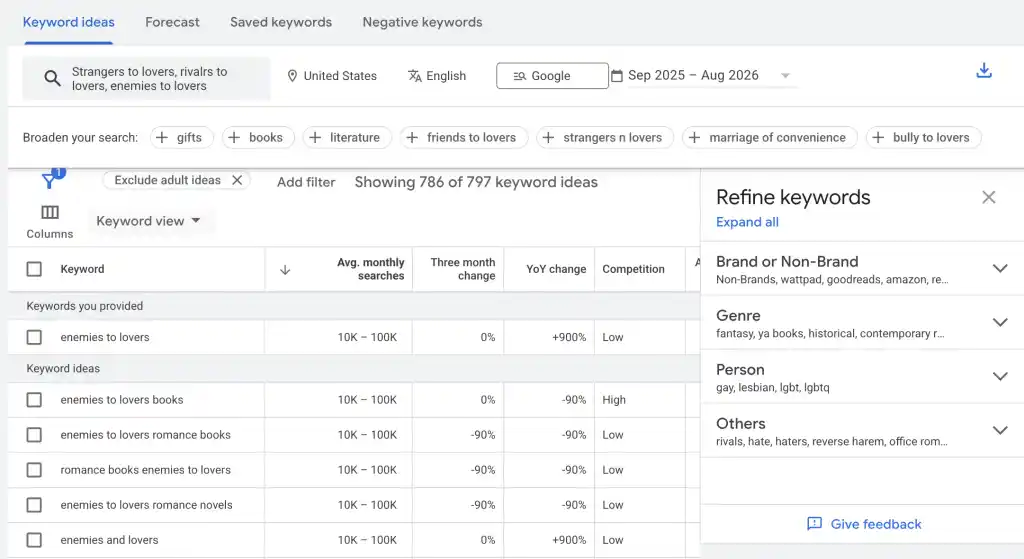
Google Keyword Planner is Google’s tool for advertisers, and it shows roughly how many people search for a phrase on Google each month 一 for free. It also suggests related phrases you might not have thought of.
Google searches aren’t Amazon searches, but the numbers are a reasonable stand-in. If “enemies to lovers romance” gets far more Google searches than “rivals to lovers romance”, the same is very likely true on Amazon.
To use Keyword Planner, start by creating a Google Ads account with your billing information. Don’t worry — you won’t need to run or pay for any ads. During setup, look for the option to switch to Expert Mode and create an account without a campaign.
If you don’t spend money on ads, you’ll only see broad ranges like "1K–10K" instead of exact numbers. But these figures will still help you distinguish between phrases with hundreds of searches from those with tens of thousands.
Keyword Planner is best used alongside Amazon’s search bar. Start by finding real phrases with autocomplete, then use Keyword Planner to determine which ones have the most demand.
Verdict: The only free source of real search volume data, and a good way to compare phrases you’ve already found on Amazon.
👍 Pros:
-
Free, with real Google search data rather than estimates.
-
Suggests related phrases.
-
Good for comparing the popularity of different wordings.
👎 Cons:
-
Measures Google searches, not Amazon searches.
-
Shows broad ranges unless you’re running ads.
Keyword tools built for authors
If you’d rather pay for a dedicated tool, there are some apps built specifically for authors that track key metrics behind book sales.
3) Publisher Rocket
💸 Price: $199 one-time (plus VAT where applicable), with free updates and a 30-day money-back guarantee
💻 Access: Desktop app for Mac and Windows; covers 8 Amazon stores (including the US, UK, Australia, and Canada)
⭐️ Reviews: 4.4 out of 5 on Trustpilot from 64 reviews
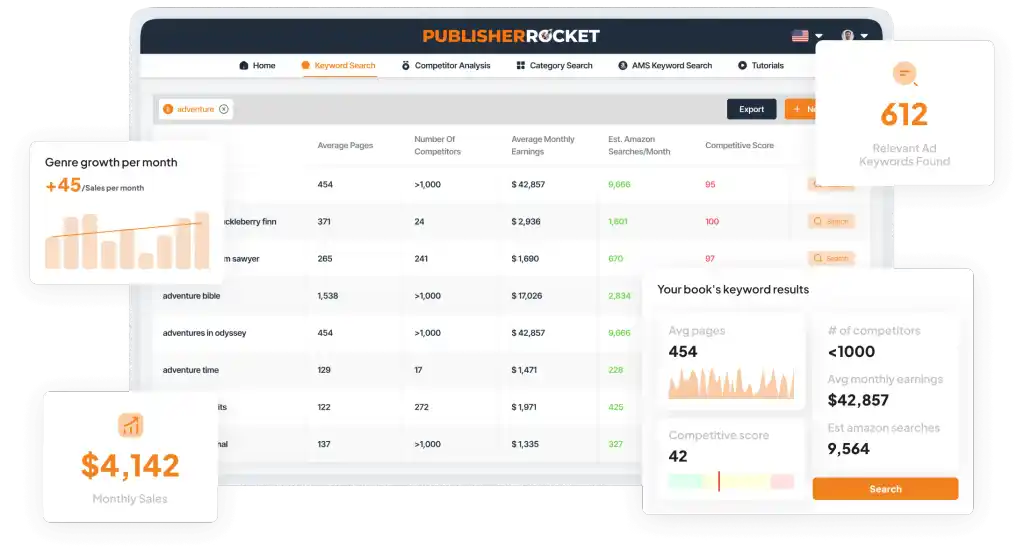
Publisher Rocket is a popular market research tool for self-published authors looking to optimize their visibility on Amazon. Type a seed phrase like “unicorn coloring book”, and the dashboard will show you a Competitive Score (0-100), estimated monthly Amazon searches, average list prices, and average monthly earnings for top books. This helps you quickly spot high-demand keywords with manageable competition.
Beyond basic keyword discovery, the software features a comprehensive Competition Analyzer to track rival sales ranks and metadata, alongside a Category Search tool that maps out over 19,000 categories to show exactly how many daily sales are required to secure a #1 bestseller badge.
Authors will also find its AMS Keyword Generator useful. It quickly creates targeted Amazon Ads keyword lists based on your book’s topic, saving you hours of manual work and helping reduce ad costs.
Verdict: A book-specific, time-saving tool for market validation. Especially powerful if you run Amazon Ads or want to break into competitive KDP categories.
👍 Pros:
-
One-time payment with free updates.
-
Built specifically for books, with category and competitor research included.
-
The AMS Keyword Generator saves hours of building Amazon Ads keyword lists.
👎 Cons:
-
Search volumes are estimates.
-
No daily keyword rank tracking over time.
Hire a professional marketer

Lesley S.
Facebook Ads specialist who works with multiple authors across genres offering training and done-for-you ads services to get them results.
Request a quote
Maria H.
Metadata marketing specialist helping books find their readers. Beware of scammers: Reedsy contractors never contact authors unsolicited.
Request a quote
Jaime W.
I'm a publicist with over 17 years of experience managing debuts and high-profile authors at some of the biggest publishing houses in the UK
Request a quote4) BookBeam
💸 Price: Starts at $47/month. No free trial, but a 7-day money-back guarantee.
💻 Access: Web app and Chrome extension; 7 Amazon stores plus Audible data
⭐️ Reviews: 4.9 out of 5 on Trustpilot from 280 reviews
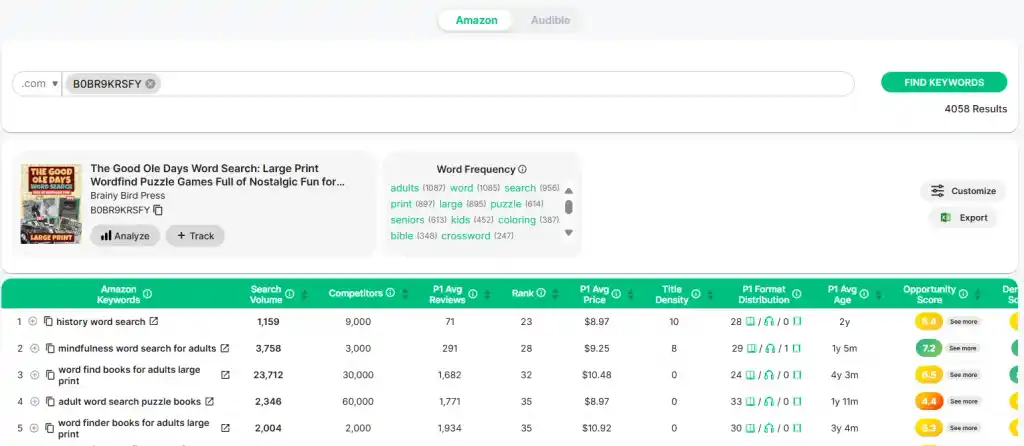
BookBeam is for authors who want more than keyword ideas. Its Niche Finder lets you filter a database of over 200 million books using criteria such as review count and sales volume to help you identify less competitive niches for your book.
For example, you can filter books with a Best Sellers Rank under 30,000 (a strong rank, since lower numbers mean more sales) but fewer than 40 reviews. That will give you topics where readers are buying, but there are only a few established books available.
BookBeam’s Keyword Research Tool suggests related phrases to target based on your main keyword, while the Reverse Keyword Tool shows which keywords a close competitor's book ranks for.
Finally, the Chrome extension will add charts and data to Amazon product pages showing estimated daily sales, royalties, and price history charts. This information can help authors identify if a book is trending, if it’s seasonal, which month it sells best, and more.
The downsides are its high price and its search-volume figures, which are still estimates. If you only need a few keywords for one novel, the $47 monthly plan is probably more than enough.
Verdict: A feature-rich tool for prolific authors, but its high cost makes it best suited to those who publish multiple books each year.
👍 Pros:
-
Intuitive and clean interface.
-
Great tools to uncover low-competition sub-genres and spy on rival keywords.
-
Chrome extension that adds real-time sales estimates, royalties, and price history directly to Amazon product pages.
👎 Cons:
-
Search volumes are still estimates.
-
The ongoing monthly subscription can add up quickly over time.
Keyword tools built for product sellers
There are also non-book-specific tools that provide Amazon data, which often appear in searches for Amazon keyword research tools. They can be powerful and feature-rich, though often more complex than most authors need.
5) Helium 10
💸 Price: Paid plans from $129/month.
💻 Access: Web app and Chrome extension
⭐️ Reviews: 2.1 out of 5 on Trustpilot from 713 reviews
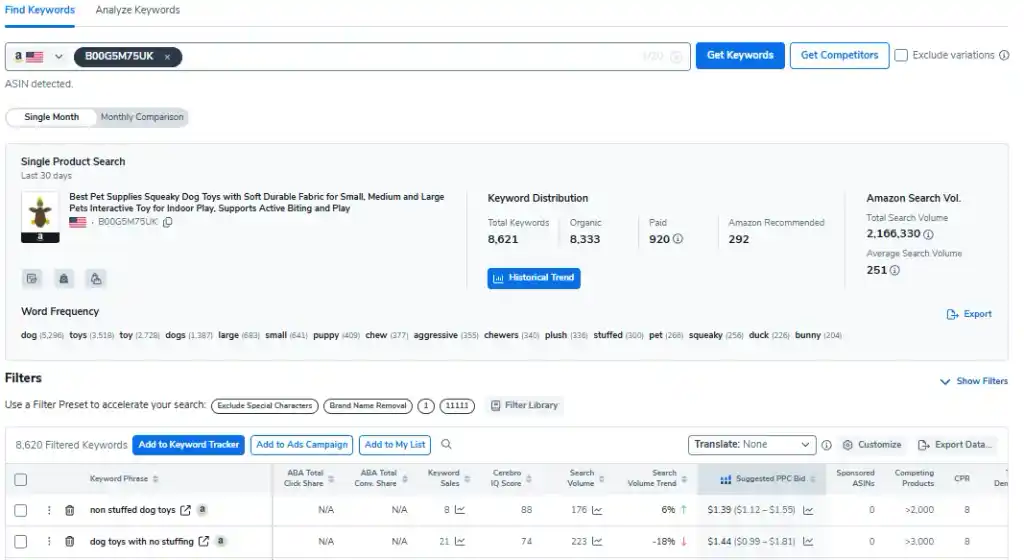
Helium 10 is one of the best-known Amazon keyword tools on the market. As an author, you would mainly use two features: Cerebro (Plus Magnet), and the X-Ray Chrome extension.
Cerebro shows the keywords a competing book ranks for, including those it targets with ads. Magnet generates keyword ideas from a starting phrase, helping you fill your seven keyword slots. The X-Ray extension adds data such as Best Sellers Rank, estimated monthly revenue, and review counts to Amazon pages, making it easier to assess a niche.
While Helium 10 may sound appealing, in practice, it’s rarely worth the cost for authors — its plans are aimed at brands with up to $100K in yearly sales and beyond. It’s also worth flagging its poor Trustpilot rating, with many customers complaining that the company removed core features and pushed long-term users towards costly upgrades. If you want to pay for a tool, you're better off starting with Publisher Rocket or BookBeam.
Verdict: A powerful tool mostly aimed at e-commerce entrepreneurs who also happen to sell books.
👍 Pros:
-
Cerebro shows the keywords rival books rank for, including ad keywords.
-
X-Ray adds rank, revenue estimates, and reviews to Amazon pages.
👎 Cons:
-
Plans start at $129/month, well above author-focused tools.
-
Built for product sellers, so most features go unused by authors.
Q: What aspects of book marketing should authors focus on learning and handling themselves to save money while promoting their work?
Suggested answer

Social media activity can be a key part of most marketing plans, but many authors struggle to find time for it, or worry that they aren't handling it correctly. It can be really tempting to outsource this. However, if you are working with a book marketer who has experience in the publishing industry, creating both content and social media strategies for author accounts, then for authors early in their career the cost of this service could outweigh the benefits of long-term content creation. Instead, I'd suggest learning a little more about social media strategies for authors, perhaps from those very marketers who you were considering to run the accounts for you.
Although social media can take up a lot of time, it doesn't have to: even spending 30 minutes one day a week to pre-plan your content can give you plenty of posts, and there are free scheduling tools available so that you don't need to come back to the platforms later in the week to post.
Once you've had a go at using social media in your marketing by yourself for a little while, I'd suggest having another check in with a professional to get an audit of your channels, where they can then recommend ways for you to improve in future, to keep you on the right track and keep increasing your sales.
Ailsa is available to hire on Reedsy

Marketing a children’s book doesn’t have to require a huge budget. Being selective with where you are focusing your efforts, time, and budget will help maximize your return on investment. This can be getting testimonials from an author's own network, mazimizing your discoverability on Amazon through precise categories and keywords, and targeting special interest group for endorsements or bulk buys. For instance, if a picture book is about aviation, contacting aviation museums, organizations, and stores would be a great start. For kids books, reaching educators and librarians is important for word of mouth and for in-person event opportunities. Positive feedback from a teacher or librarians gives a book credibility and validation and lets families know this book is vetted, so to speak, and worth purchasing.
Tara is available to hire on Reedsy
All of it. If you execute a proper runway to launch program you don't need to spend any money on marketing. The key is to start early. Include people in the creation of the book. Everyone in an author's circles of friends/family/followers should know the book is coming. Once a book has been published, the promotional activities come across as selling. Before a book comes out, all of your promotion is "sharing", and your audience will be far more receptive to that.
Chris is available to hire on Reedsy
Choose your keywords carefully, but don’t lose sleep over them. The algorithms are always changing and perhaps soon, with AI-powered search, books will be discovered through intent more than exact keyword match.
To fill your seven magic slots, start with the free options: find real phrases in Amazon’s search bar, then compare their popularity in Google Keyword Planner. If you want to go deeper, pick one of the paid tools above.
Whichever you select, use keywords that describe your book accurately — a phrase that brings in the wrong readers won’t convert to sales. Then spend your energy on what sells books once readers find them: a polished book cover, professional reviews, and targeted Amazon Ads.
You can also get a free copy of Reedsy’s co-founder, Ricardo Fayet, How to Market a Book: Overperform in a Crowded Market. It’s a practical guide to marketing that works, from building a mailing list to running profitable ads. For a quick overview first, read his seven-step guide to marketing a book on the blog.