Blog • Understanding Publishing
Posted on Dec 15, 2025
Speechify Review: Is It Worth It For Authors?

Linnea Gradin
The editor-in-chief of the Reedsy Freelancer blog, Linnea is a writer and marketer with a degree from the University of Cambridge. Her focus is to provide aspiring editors and book designers with the resources to further their careers.
View profile →Speechify is a popular text-to-speech (TTS) app with a large library of AI voices that can help read a variety of file formats. Originally developed to help people with dyslexia and visual impairments access text more easily, Speechify offers a number of other features that enterprising authors might find helpful as well.
In this review, we’ll be looking at Speechify from a writer’s perspective, assessing whether it can meaningfully replace a professional audiobook narrator and how you might use it for better productivity.
Before diving into the details, here’s a quick overview:
-
🎂 Origin: Officially launched in 2017.
-
💸 Price: Free basic version available; Premium costs $29/month or $139/year.
-
💻 Compatibility: Works with most major operating systems and devices, including Windows, macOS, iOS, Android, and Chrome OS.
-
🌐 Access: Web-app, browser extension, or mobile app.
-
👌 Best for: Authors with dyslexia or visual impairment; authors who edit by ear; research-forward authors.
-
Reedsy rating (for authors): 3/5 ⭐
|
✅Pros |
❌Cons |
|
Supports auditory learners and readers/writers with dyslexia, ADHD, and visual impairments. |
Premium voices (and other helpful features) are locked behind a subscription. |
|
Helpful tool when editing; listening helps catch pacing issues, awkward phrasing, repetition, and typos. |
AI narration lacks emotional tone and character performance — not suitable for professional audiobook publishing. |
|
Works across most devices and multiple file formats (PDFs, Google Docs, web browser, mobile). |
Pronunciation errors require manual correction (especially for fantasy names, jargon, or made-up terms). |
|
Speeds up research by converting long articles or sources to audio. |
Reads chapter headers, footnotes, or page numbers unnaturally unless cleaned (locked behind premium). |
|
A low-cost way to “produce” a simple audiobook. |
Some platforms have restrictions in place for AI-narrated audiobooks. |
Read on for an in-depth analysis of Speechify for authors.
User interface 3/5
Speechify has two main interfaces that are relevant for authors: its original text-to-speech tool and Speechify Studio, where you can create voice-overs, do voice cloning, or even create rudimentary audiobooks. Let’s take a quick look at both.
Speechify
Speechify’s main interface is built for quick listening and ease of use, which is both a strength and weakness.

On the plus side, both the web and mobile apps are clean and easy to navigate.You can choose between importing files, inputting text directly into the app, or importing text via URL. Speechify can also read text on images or screen grabs and there’s a discrete browser extension to help you read any web-based text.
Most core features (e.g. voice selection, speed adjustment, screen grabbing, and dictation) are accessible with just a few taps. However, it’s not always intuitive where to find other functions, like downloading MP3-files or accessing the more advanced features available in Speechify Studio (more on this below).
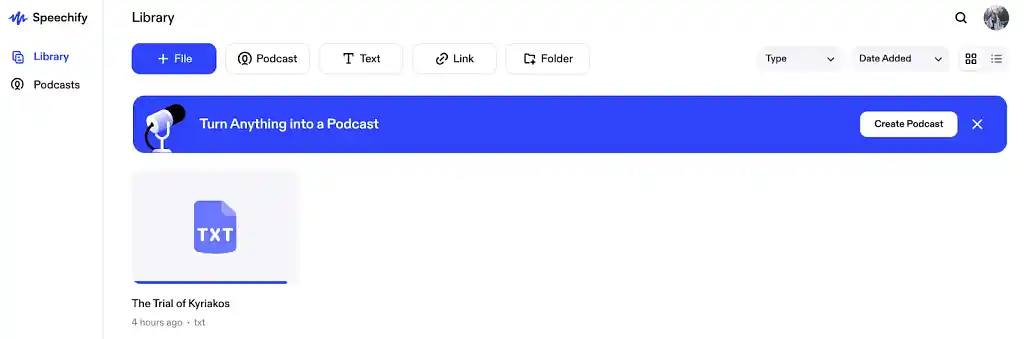
There’s also a bit of friction when importing larger files, and the web app can lag when moving between your library and saved files. Additionally, when you import long manuscripts or use URLs to import text, it sometimes struggles to transfer the formatting correctly, so you may have to manually clean the document for the best user experience.
Speechify Studio
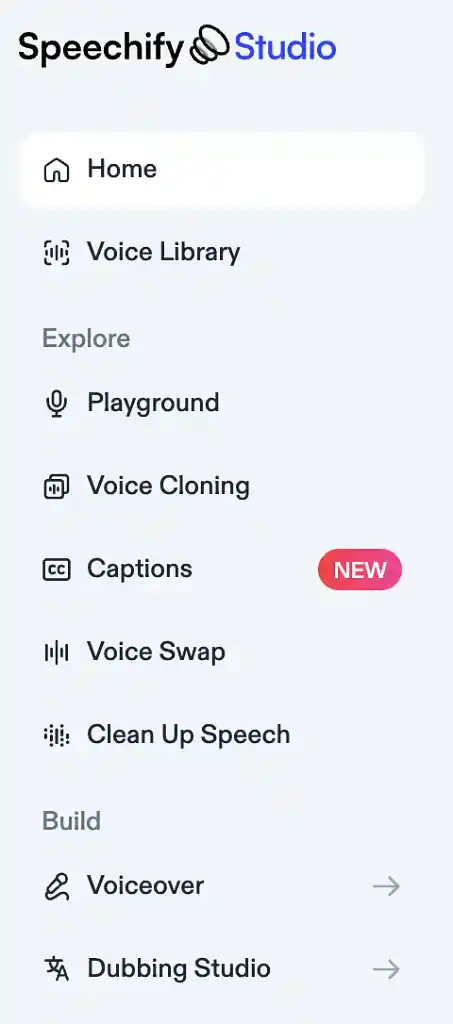
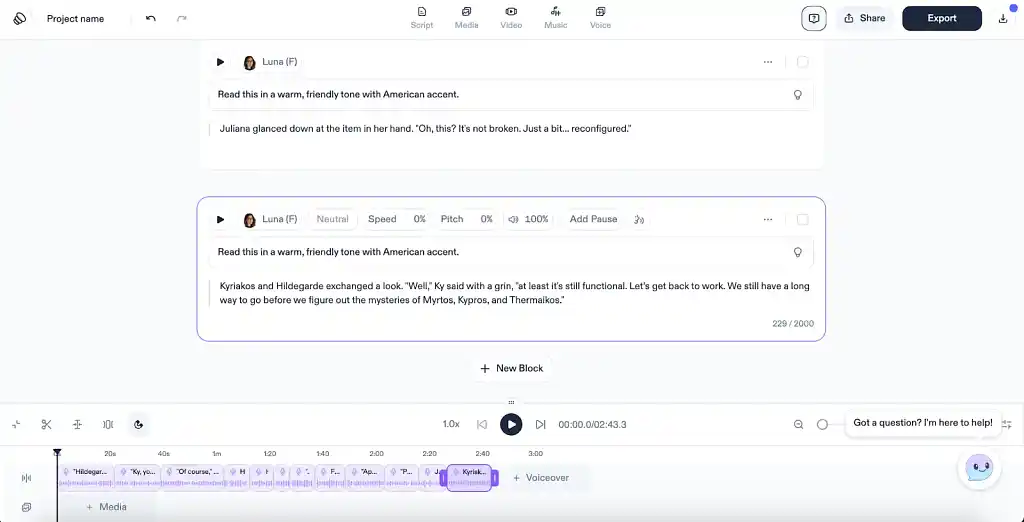
Speechify Studio is where Speechify shifts from a listening tool to a content creation platform. Its interface includes a simple timeline editor and you can use it for voice overs, voice cloning, transcripts, video captions, and even audiobook production (more on this below).
The tool makes it easy to paste or upload a script and assign different AI voices to sections of text. Basic adjustments like pacing, pitch, pauses, and tone are accessible from the menu at the top and can be adjusted with AI prompting for each separate block.
However, while exporting MP3s or WAVs is possible, the settings are fairly basic, the timeline editor feels too lightweight for advanced audio production, and the learning curve is steeper than the text-to-speech reader. Additionally, like the TTS app, Studio has a tendency to lag when processing large amounts of text at once.
Audiobook production 2/5
Speechify doesn’t just market itself as a listening tool — it also presents the Studio app as a tool to produce full audiobooks. Let’s see if it lives up to that claim.
AI voice quality
Speechify’s voices range from very basic synthetic to surprisingly natural premium options, and your experience will vary dramatically depending on which subscription tier you’re on.
Free voices
The free voices are clear enough for proofreading, catching typos, and listening to research materials. For writers who revise by ear, they absolutely do the job, but they sound noticeably robotic.
They’re a step up from the built-in narration you get in programs like Microsoft Word and they can be useful for editing — but not nearly convincing enough to mimic human speech.
Premium voices
If you opt for the premium subscription, not only can you pick fun narrators like Snoop Dogg or Gwyneth Paltrow to read your text (which may require extra licensing for commercial use), but the voices actually sound surprisingly natural. They offer smoother pacing, more tonal variation, and a broader selection of accents and languages. Though far from perfect, they are also better at capturing emphasis and emotion.
However, unless specifically prompted in Studio, they can’t deliver character differentiation, emotional storytelling, comedic timing, or narrative tension the way a professional narrator can.
Audio editing & production tools
Speechify Studio gives authors the basic tools to fine-tune pacing, pitch, tone, and pronunciation. You can also insert music and other media where suitable. However, adjustments must be made manually and individually, which can become tedious over the length of an entire book. More importantly, even with edits and AI prompting, you’ll be limited in your ability to direct emotional nuance or character performance.
Export options
Speechify makes exporting audio fairly easy: you can quickly download your book or chapters as .MP3 files (and in some cases, .WAV). This makes it simple to share sample clips with beta readers or listen offline.
However, the export settings are basic, offering little control over bitrate or mastering. There are no tools for leveling, noise reduction, or post-production polish, so you’d have to purchase other programs if this is something you want to do. The files are perfectly adequate for personal use or early drafts, but they’re not necessarily ready for the standards required in commercial audiobook publishing.
Export limitations
With the free plan, users are given 600 credits per month that can be used to download sound files. AI-generated audio will cost 1 credit per second, while voice dubbing will set you back 3 credits per second. That means you’re limited to a maximum of 10 minutes of audio per month, which won’t get you very far.
The premium plan, on the other hand, allows you to download up to 50 hours of audio per year as part of the subscription, which should be enough for at least a couple of full-length books.
Compatibility with distribution platforms
Even if you record and export a full audiobook in Speechify Studio, distribution is not guaranteed. AI-narrated audiobooks are still a grey area and acceptance varies widely in the industry. We recommend checking the guidelines and requirements for the different distribution options you’re considering and think carefully about your readership before proceeding with an AI-narrated audiobook.
FREE COURSE
Audiobook 101
Learn to create a professional audiobook and stand out in a growing market.
Productivity tools 3/5
Even though Speechify might not be our first choice for audiobook production, it does let you consume or revise text without staring at your screen. This can become especially valuable in two areas of the writing process: researchinng and editing by ear.
Research
For research-heavy writing — whether you’re working on historical fiction, academic nonfiction, or worldbuilding — Speechify can dramatically speed up how you absorb information. It can read websites, PDFs, articles, and even scanned material, and adjustable playback speeds mean you can get through dense material quickly, or slow down when nuance matters.
Editing by ear
Many authors read their work aloud as part of their revision process, and for good reason: hearing your text can help you notice any weaknesses that you might otherwise miss, such as awkward rhythm, repeated phrases, clunky dialogue, or missing words. This makes it a great tool if you like to edit by ear.
Note, however, that Speechify’s browser extension can interfere with your cursor in e.g. Google Docs when you want to quickly navigate within your text, making it somewhat frustrating to use the TTS function while actively editing or writing.

MEET EDITORS
Polish your book with expert help
Sign up, meet 1500+ experienced editors, and find your perfect match.
Pricing 4/5
As we’ve already hinted at, Speechify offers two main subscription tiers: a free version, and a premium version. The free version offers the basic TTS functions you’d need for accessibility reasons or light editing, but most authors will only get real value out of the premium tier.
Here’s a summary of the main features in each one:
|
Feature |
Basic plan — free |
Premium plan — $29/month or $139/year |
|
Voices |
10 Robotic-sounding voices |
200+ high-quality, natural-sounding AI voices, including Snoop Dogg, Gwyneth Paltrow, and Mr Beast. |
|
Skip Headers, Footers, etc. |
❌ Not available |
✅ Available |
|
High-Quality Audio |
❌ Not supported |
✅ Supported |
|
Offline MP3 Download |
❌ Not available |
✅ Yes — MP3 downloads |
|
AI Summaries & Chats |
❌ Not included |
✅ Included |
|
Storage for Library Files |
5-file limit |
Unlimited storage |
|
Support |
Basic email support |
24/7 priority support |
Let’s take a closer look.
Free plan
The free version gives you a handful of basic, synthetic voices and simple text-to-speech functionality. As previously noted, it’s perfectly fine for quick proofreading, short articles, or for testing whether you enjoy editing by ear. But the voices are noticeably robotic, the reading speed is limited, and export options are too limited for any kind of meaningful use. Not to mention that many mobile devices and apps have built-in, native TTS features that often do the trick just as well.
Premium plan
Speechify could be genuinely helpful once you unlock the Premium tier. Billed annually, it runs at around $139/year (or about $11.50/month), with the option to pay monthly if you’re only using it temporarily.
This gives you access to more voices and better quality across the board. The voices sound remarkably natural, and you can play around with different narrators for different parts of your text. You get better control over pacing and tone, support for full-length documents and PDFs, and the ability to export 50 hours of audio files per year. For anyone who revises by ear, does heavy research, or wants to experiment with early audiobook drafts, this might be a worthwhile investment.
However, while Speechify Premium does offer competitive quality and pricing compared to other AI narration tools — such as ElevenLabs — and is more affordable than hiring a human narrator and producer, it’s hard to compare it to the value that a human narrator brings to the table.
Verdict: is Speechify worth it for authors?
Speechify can be a helpful tool, especially for writers who edit by ear, juggle a lot of research, or benefit from text-to-speech for accessibility reasons. Its premium voices are high quality, and they come at a competitive pricing point. Speechify Studio also offers many helpful tools for voice over and rudimentary audiobook production. It may be worth it if you’re on a tight budget, but if you want to produce a professional-grade audiobook, ultimately nothing beats human narrators.
Reedsy Rating: 3/5
Hire an expert

Marie O.
Available to hire
Award-winning UK author/editor with over twenty years' experience , working with many of the top names in the SF/F/H/crime genres.

Josiah D.
Available to hire
Epic Fantasy/LitRPG-focused editor with 9 years' experience and 500 novels under my belt. Do you want to grow? Let's talk.

Helen L.
Available to hire
Literary Agent and Developmental Editor. I represent incredible authors at Ki Agency. My editorial focus is on Fantasy, Sci Fi and Romance.