If you’ve ever heard the term “Netflix for books,” you’re already familiar with the book subscription model. Book subscription services allow readers to “borrow” books from vast reserves of reading material — sort of like a virtual library.
And if you’re a serious book lover, chances are you’ve at least thought about subscribing to one of them! Which means you’ve probably heard of Kindle+ (formerly known as Kindle Unlimited), one of the most prominent book subscription services on the market today.
However, the inner workings of Kindle+ remain a mystery to many readers. You probably have tons of questions like: What is Kindle+? How does it compare to Amazon Prime? And is Kindle+ really worth the $11.99/month price tag? We’ll answer all these questions and more in this comprehensive guide to Amazon Kindle+.
If you're feeling overwhelmed by the number of great books out there, you can also take our 30-second quiz below to narrow it down quickly and get a personalized book recommendation 😉
📚
Which book should you read next?
Discover the perfect book for you. Takes 30 seconds!
What is Kindle+?
Kindle+, or K+, is Amazon’s subscription service for books, audiobooks, and magazines. Prior to October 2026, it was called Kindle Unlimited (or KU). Subscribers have access to a pool of over a million titles, plus a selection of accompanying audiobooks. Users can borrow up to 10 items at once and return them at any time.
You can subscribe to Kindle+ right now from the link above! And you can use it on any device you want — not just a Kindle — through the Kindle app or on the Kindle Cloud Reader.
Of course, you’ll also need an Amazon account, but that’s easy enough to sign up for (if you’ve somehow managed to go this long without one).
How much does Kindle+ cost?
A Kindle+ subscription costs $11.99 per month, or $143.88 per year. There’s also a free 30-day trial so you can test it out beforehand.
If you’re in for the long haul, keep in mind that Amazon sometimes runs price promotions on Kindle+, such as deals on three-month and one-year subscriptions:

Look out for these promotions if you’re hoping to get a deal on K+. Pending eligibility, they should appear on your digital subscription page. You can get there from any page on Amazon by selecting “Accounts and Lists” (in the upper righthand corner) → “Your Kindle+” → “Click here to join.”
Is Kindle+ free for Prime members?
Amazon Kindle+ is not included in Amazon Prime, which is Amazon’s premium subscription service for all products. K+ is a completely separate service that focuses on written content. However, Prime members do get access to Prime Reading, which is comparable to Kindle+ (and which we'll cover in greater detail below).
How does Kindle+ work?
Kindle+ lets you borrow up to 10 books, audiobooks, and magazines at a time, and then return them whenever you’re done! Again, you can read K+ titles on any device — not just a Kindle — so long as you have an Amazon account.
Featured items to borrow will appear your Kindle+ dashboard, which tailors its suggestions based on your browsing history. On Amazon, you can access this dashboard by clicking on the “Shop by Category” icon (which looks like three horizontal lines in the upper left corner), then “Kindle E-readers & Books” → “Kindle+.”
From there, you can also check out the full Kindle+ catalog, under “Browse the catalog” on the right side of the dash.
To borrow a book from your dashboard, simply hover over it and click on the green button that says “Read now.” If you want to save it for later, click “Add to Library.”
To borrow a book from the K+ catalog, click on its product page and then on the yellow button on the right that says “Read for Free.” This same button will appear if you’re browsing as usual and stumble upon a Kindle+ title, so you’ll never accidentally pay for a book that you can get through K+.
You can also find Kindle+ audiobooks by selecting “Show results for: eBooks with Audible narration” on the left side of the catalog. This should filter results to only show books that also have audiobooks on K+. When an audiobook is available, the yellow button on the product page will say “Read and Listen for Free.”
Finally, to view which books you’ve borrowed and return them when you’re ready, go to Your Borrowed Items page. You'll find it under “Accounts & Lists” → “Your Kindle+,” underneath info about your membership.

Click the yellow “Return” button in order to return a book. But feel free to keep each book as long as you like — unlike a brick-and-mortar library, it’s not like you’re preventing someone else from reading it! The Borrowed Items page also keeps track of which books you’ve read in the past, so you can take pride in your literary prowess. 💪
What kinds of books are on Kindle+?
The reading material on Kindle+ isn’t quite unlimited. Yes, there are plenty of Amazon Kindle books to choose from, but you can’t just read anything you want.
The vast majority of the K+ library is self-published books, in part because every author who enrolls in KDP Select automatically has their book added to it. This is great for readers seeking up-and-coming titles that haven’t entered the mainstream yet, and even better for the authors who want to gain more exposure.
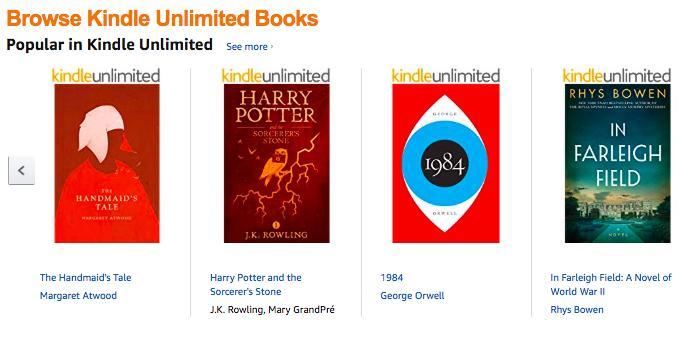
However, it’s not ideal for people hoping to read lots of contemporary bestsellers. While K+ excels in the indie department, it’s rather lacking in mainstream books. There are a few recent-ish bestsellers available, such as the Hunger Games books and the Harry Potter series (which K+ strives to promote, as you can see below). But these are few and far between compared to the number of self-published titles on K+.

But that doesn’t mean that the quality of books available on Kindle+ is any lower than, say, an actual library. Indeed, thousands of K+ titles have a 4-star rating or higher! You might have to sift through them to find something up your alley, but you shouldn’t discount K+ on literary caliber alone, because there are some amazing self-published books out there.
Is Kindle+ worth it?
So, are the benefits of Kindle+ worth its $11.99 monthly ($143.88 yearly) price, or would you be better off investing in something else?
As we touched on in the “kinds of books” section above, the deciding factor for most people considering K+ will be what they like to read. If you already read tons of self-published and indie books on Amazon, Kindle+ could be a great way forward! But if you gravitate toward Big 5 titles, you’re probably going to be frustrated by K+’s less-than-mainstream selections.
The other main factor to think about here is how many books you read per month. As some K+ skeptics have pointed out, the regular prices of many self-published books on Amazon are very low — often $5.00 or less. This means you’d have to read at two or three Kindle+ books per month for your subscription to be worth the money… money that you could otherwise spend on mainstream books in the Kindle store.
Kindle+ vs. Prime Reading
Readers may also be curious how Kindle+ stacks up against Amazon Prime. Again, K+ isn't included in Prime — it's an entirely separate service. But Prime does provide a similar option to K+ in the form of Prime Reading.
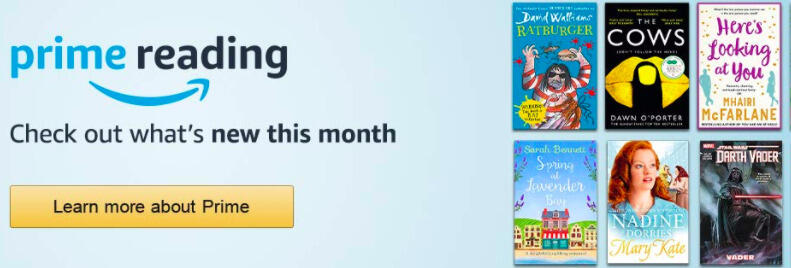
Prime Reading allows subscribers to borrow from a library of over 1,000 books, magazines, comics, and other works. As with Kindle+, readers can take out 10 books at a time and return them at their leisure. There's also a higher ratio of mainstream titles to indie titles on Prime Reading, which will appeal to those in the zeitgeist.
However, readers looking for a truly extensive library may be disappointed by Prime Reading. Yes, 1,000+ titles sounds like a lot — but compared to the 1,000,000+ Kindle+ books, the Prime Reading library is actually pretty puny. Then again, you still might find its small mainstream pool preferable to K+'s vast ocean of indie books.
In terms of how you can enjoy these books, Kindle+ and Prime Reading basically offer the same reading options. On the plus side, neither requires you to own a Kindle device; you can access both K+ and Prime Reading materials through the Kindle app or the Kindle Cloud Reader. Also like K+, Prime Reading offers accompanying audiobooks for some works, though certainly not for all.
Now let's tackle the million-dollar question (no pun intended): how do they compare on pricing? As mentioned above, Kindle+ costs $11.99/month or $143.88 per year. An Amazon Prime subscription, which includes Prime Reading, costs $14.99/month or $139/year (when an annual subscription is purchased).
Math whizzes will see that Prime subscribers get a $40 discount with that annual payment option, which makes these prices a bit hard to compare — not to mention the fact that Amazon Prime includes way more than just Prime Reading. And obviously, if you're seeking a full lifestyle update with expedited shipping on all products, Prime Video, Prime Music, and so on, the full Prime membership is the way to go.
But if you don't want any of that and only care about the reading...
The bottom line
If you’re a voracious, indie-book-loving reader, Kindle+ could be perfect for you. If you’d like to read more indie books (or if you just want to binge-read the whole Harry Potter series) you can always give the 30-day trial a shot!
But if you’re only going to be reading one or two books a month, and you’d prefer those books be bestsellers, you should skip the Kindle+ membership. For those inclined toward more mainstream reads, Prime Reading is a better option — as long as you don't mind shelling out for Amazon Prime. (And if you already have Prime and haven't taken advantage of Prime Reading, go do it right now!)
If you've already subscribed to Kindle+ and want to cancel, follow the instructions below. Or if you think a non-Amazon subscription might be a better fit, check out our list of K+ alternatives at the end of this article!
How to cancel Kindle+
It’s easy to cancel your Kindle+ membership if you're not using it (or if you want to opt out before the 30-day trial ends). You can click here to do it right now, or navigate to the page yourself on Amazon: “Accounts & Lists” → “Your Kindle+” → “Cancel Kindle+ Membership” (on the left).
You’ll have to confirm the cancellation again on the next page, but other than that you should be set! Once you’ve canceled, your card will no longer be charged, but your K+ subscription will last until the next day of the billing cycle so you don’t lose what you’ve already purchased.
Alternately, if you’ve paid for a long-term subscription and cancel before it has run its course (e.g. cancelling six months into a year-long subscription), you’ll be refunded for the remaining months. However, keep in mind that if you do this, you cannot restart your subscription later — so be 100% sure about your decision before you cancel your Kindle+ membership.

Alternatives to Kindle+
1. Scribd
Scribd boasts over 80 million subscribers and access to more than a million published titles. Since its humble beginnings as a document-sharing platform, Scribd has grown to include works from a wide variety of authors… and, perhaps most importantly for users, titles from Big 5 and other major publishers! The price is $11.99 a month after a 30-day free trial.
Those let down by K+’s lack of mainstream titles will be much more satisfied by Scribd. But of course, it’s not without a catch: despite familiar claims about their library being totally “unlimited,” Scribd still has to cap users at either three ebooks OR two audiobooks/month in order to maintain profitability. After you’ve hit this limit, your reading options get reduced to a much smaller pool of books.
Considering how much this kind of mainstream content would normally cost, Scribd is still a pretty sweet deal — but if you were thinking that unlimited bestsellers sounds too good to be true, you’re right on target.
2. Bookmate
Closer to K+ in terms of scope and subscriber count (just a few million) is Bookmate, which has a library of about 500,000 books. Distribution deals with HarperCollins and Bloomsbury give it a mainstream edge, though no other service can really compare to Scribd on that front.
What makes Bookmate unique is its social element: users can create custom profiles and follow friends to see what they’ve been reading, as well as what’s on their TBR “bookshelves.” Think of it as K+ meets Goodreads — if you love to share and talk about books with other people, you’d probably enjoy Bookmate. You can try it for free for 7 days, after which point it costs $12.99/month.
3. 24symbols
There’s also 24symbols, a subscription service whose biggest advantage is its pricing: only $8.99/month, or $90/year. Like K+, 24symbols provides access to over a million books that are mostly lesser-known or independently published, with just a handful of mainstream titles on offer such as The Alchemist and Rupi Kaur’s Milk and Honey. You can read online, or simply download books to your preferred device using the 24symbols app.
Overall, whether or not you should subscribe to K+ depends entirely on you as a reader. What kinds of books do you enjoy, where can you find them, and how many would you like to read each month? Your decision will hinge on your answers to these questions — consider them carefully, and they’ll steer you in the right direction.
***
If you're an avid reader, sign up to Reedsy Discovery to access the freshest new reads — or become a reviewer to share your hot takes!